8 ~2F250A-2831_E.fm Pagc4 Tucsday.Ja"uaryll.2005 12:20PM ~ .
-t (Before Operating This Set ) ~
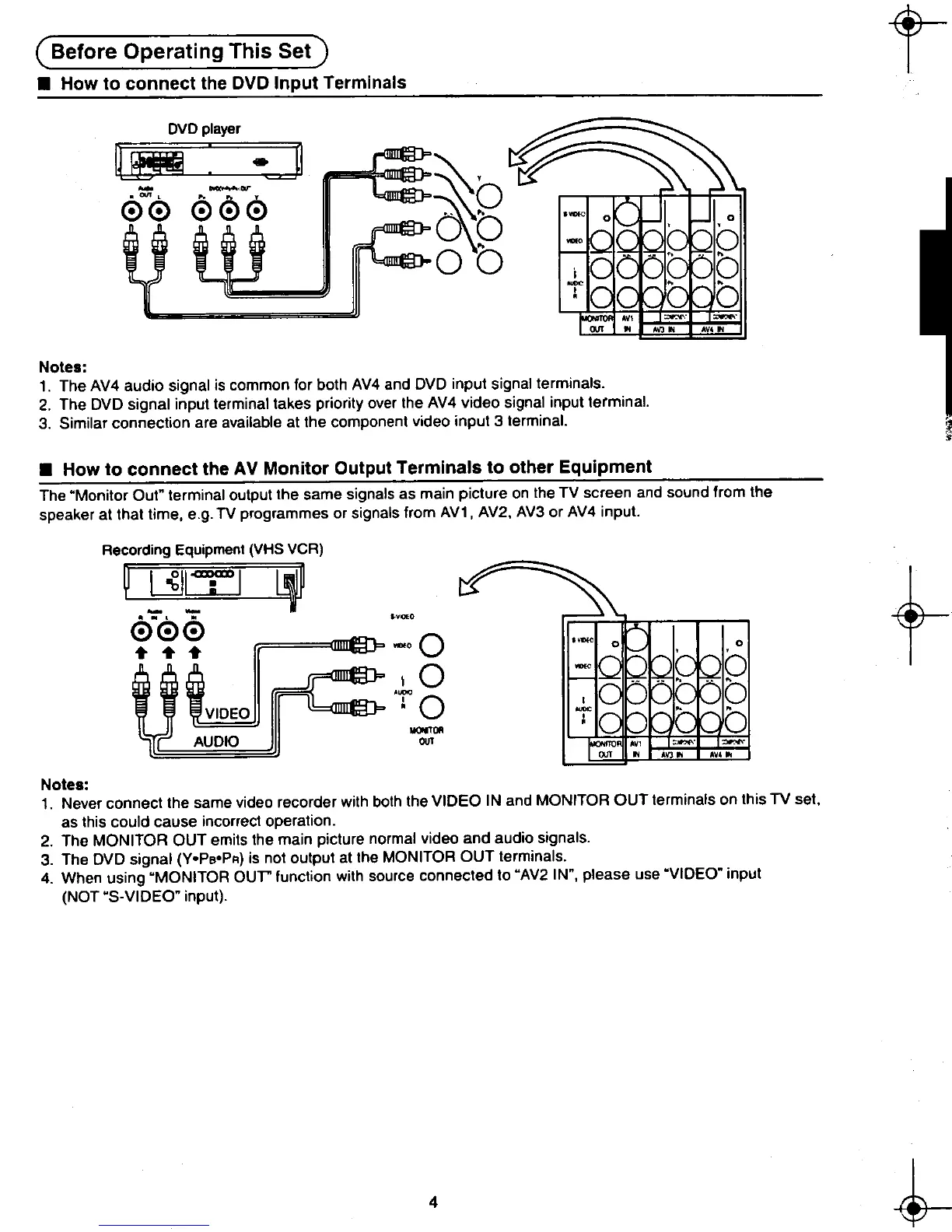
.How to connect the DVD Input Terminals
DVD player
r~ ;~-~!l ~
o'
0~0 000 ~6
tt~:g~~~J-{= 0 0 ~ -
..AV'"
Notes:
1. The AV4 audio signal is common for both AV4 and DVD input signal terminals.
2. The DVD signal input terminal takes priority over the AV4 video signal input terminal.
3. Similar connection are available at the component video input 3 terminal.
.How to connect the AV Monitor Output Terminals to other Equipment
The "Monitor Out" terminal output the same signals as main picture on the TV screen and sound from the
speaker at that time, ego TV programmes or signals from AV1 , AV2, AV3 or AV4 input.
Recording Equipment (VHS VCR)
~~~~?:I~~~~~ .-
t000
..
t~J~::C:-O ,0 0
I 0 ., "
..,. 0
ij ~~J~~::::IDEO : 0 " ..
-""' 0
AUDIO OUT '-' """
"'.. AV'"
Notes:
1. Never connect the same video recorder with both the VIDEO IN and MONITOR OUT terminals on this TV set,
as this could cause incorrect operation.
2. The MONITOR OUT emits the main picture normal video and audio signals.
3. The DVD signal (Y.PeOPR) is not output at the MONITOR OUT terminals.
4. When using "MONITOR our function with source connected to "AV2 IN", please use "VIDEO" input
(NOT oS-VIDEO" input).
~ 4 ~
8~ ~ ~8
"..-"











 To Next Page