I1-
8 ~2F250A-2831_E.fm Pagc25 Tucsday.Januaryll.2005 12:20PM ~ 8
1 r
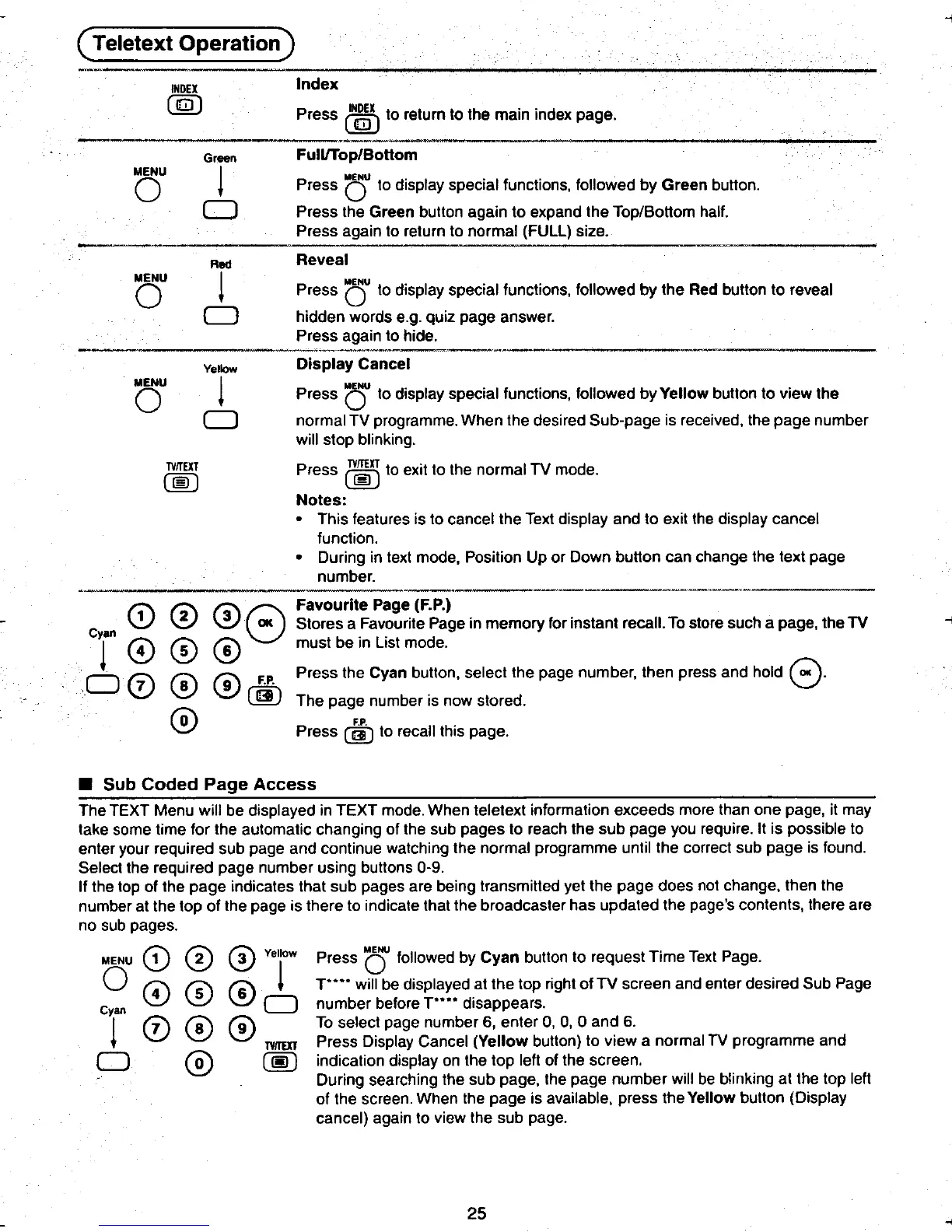
INDEX Index
@ Press @ to return to the main index page.
-, ". ..
Gr.een Full/Top/Botiom
MENU I MENU
0 * Press 0 to display special functions, followed by Green button.
0 Press the Green button again to expand the Top/Bottom half.
Press again to return to normal (FULL) size.
~-_C' , ,
Rod Reveal
MENU I MENU
0 * Press 0 to display special functions, followed by the Red button to reveal
0 hidden words e.g. quiz page answer.
Press again to hide.
~--- "-'..-
Yelklw Display Cancel
MENU I MENU
0 * Press 0 to display special functions, followed by Yellow button to view the
0 normal TV programme. When the desired Sub-page is received, the page number
will stop blinking.
tiS Press ~ to exit to the normal TV mode.
Notes:
.This features is to cancel the Text display and to exit the display cancel
function.
.During in text mode, Position Up or Down button can change the text page
~ u,o.~-~ ,
tFavourite Page (F.P.) Cyan 0 0 08 Stores a .FaV?urite Page in memory for instant recall. To store such a page, the TV
! 0 0 @ must be In list mode.
00 0 0 F.P. Press the Cyan button, select the page number, then press and hold G.
00 The page number is now stored.
fO\ FP
II h. \V Press @ to reca t IS page.
.Sub Coded Page Access
The TEXT Menu will be displayed in TEXT mode. When teletext information exceeds more than one page, it may
take some time for the automatic changing of the sub pages to reach the sub page you require. It is possible to
enter your required sub page and continue watching the normal programme until the correct sub page is found.
Select the required page number using buttons 0-9.
If the top of the page indicates that sub pages are being transmitted yet the page does not change, then the
number at the top of the page is there to indicate that the broadcaster has updated the page's contents, there are
no sub pages.
MENU CD 0 0 Yellow Press "0 followed by Cyan button to request Time Text Page.
0 f4' f"5'I f6" ! T"" will be displayed at the top right of TV screen and enter desired Sub Page
Cyan ~ ~ \V 0 number before T"" disappears.
I 1'7'" 0 0 To select page number 6, enter 0, 0, 0 and 6.
* \U TY/IEXT Press Display Cancel (Yellow button) to view a normal TV programme and
0 0 ~ indication display on the top left of the screen.
During searching the sub page, the page number will be blinking at the top left
of the screen. When the page is available, press the Yellow button (Display
cancel) again to view the sub page.
~ 25 h
.~ ~ ~.











 To Next Page