.""'2F250A-28:1I_E.fm Pagc 14 Tucsday. January 11.2005 12:20 PM --$ 8
-t (Setup menu ) ~
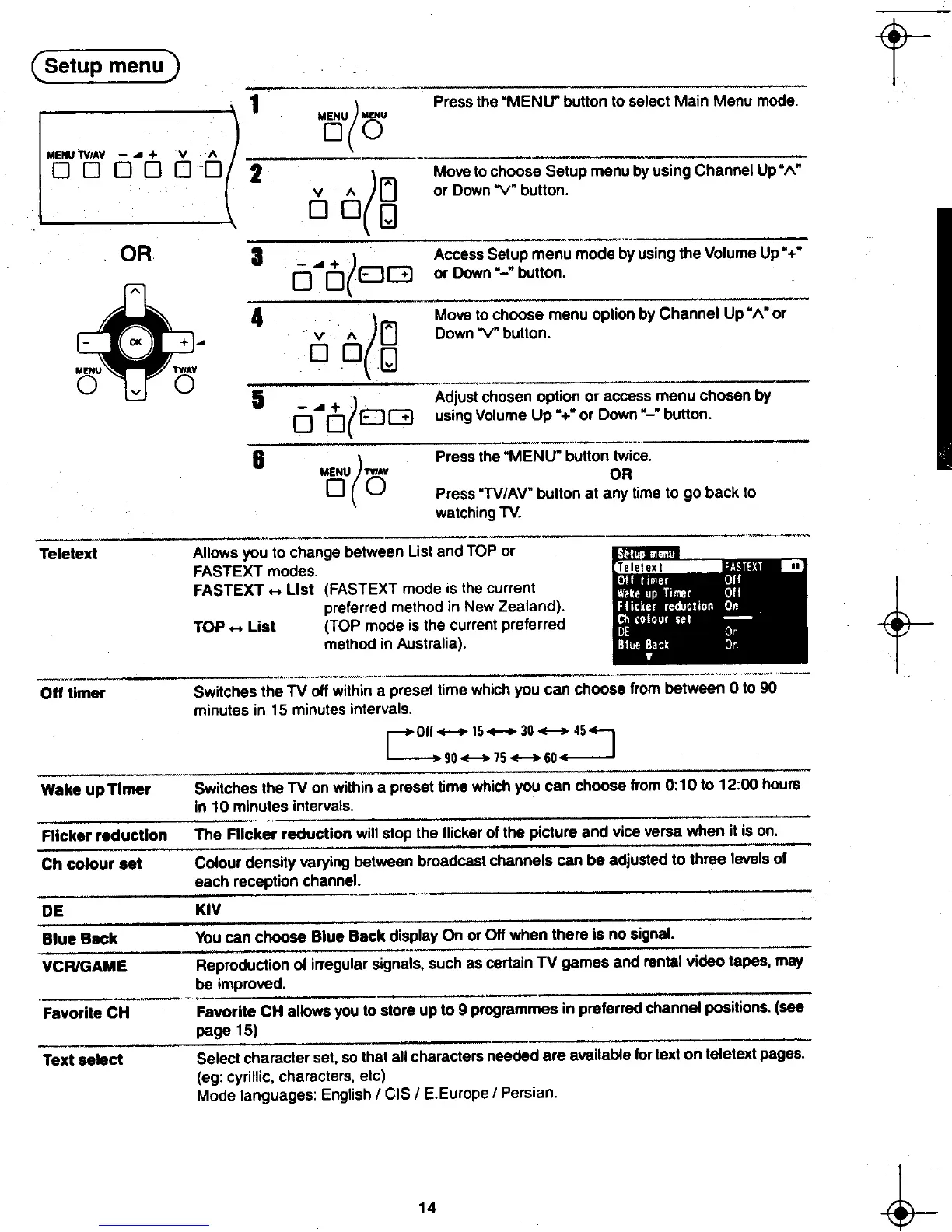
) Press the "MENU" button to select Main Menu mode.
MOU( au
2
([j -~~;-s;"u"j;~y~si~g'Ch~nn;1 UP";.: V" or Down "\I" button.
DOg
3 -..+ ) Access Setup menu mode by using the Volume Up" +"
A 0 o(EJG or D~~~~" button.
~ 4 (A Move to ~hoose menu option by Channel Up" A" or
-0 + ~ V ,,~ Down"\l button.
DOn
MENU TVIAY W
0 V 0
0 O(EJG using Volume Up "+" or Down"-" button.
6-~
( Press the "MENU" button t';;;ce.-~
MENU TVIAY DR
0 0 Press "TV/AV" button at any time to go back to
watching TV.
---~-- Teletext Allows you to change between List and TOP or
FASTEXT modes.
FASTEXT H List (FASTEXT mode is the current
tpreferred method in New Zealand). TOP -List (TOP mode is the current preferred
method in Australia).
Off timer Switches the TV off within a preset time which you can choose from between 0 to 90
minutes in 15 minutes intervals.
rOff-15-30_45...
l--. 90 +-+ 75 -60 ~
"-
Wake up Timer Switches the TV on within a preset time which you can choose from 0: 1 0 to 12:00 hours
in 10 minutes intervals.
-
Flicker reduction The Flicker reduction will stop the flicker of the picture and vice versa when it is on.
.
Ch colour set Colour density varying between broadcast channels can be adjusted to three levels of
each reception channel.
,
DE KIV
Blue Back You can choose Blue Back display On or Off when there is no signal.
VCR/GAME Reproduction of irregular signals, such as certain TV games and rental video tapes, may
be improved.
."'
Favorite CH Favorite CH allows you to store up to 9 programmes in preferred channel positions. (see
page 15)
,
Text select Select character set, so that all characters needed are available for text on teletext pages.
(eg: cyrillic, characters, etc)
Mode languages: English / CIS / E.Europe / Persian.
~ 14 h
8-t- -t.
, ,. ",~",j,,'











 To Next Page