8 ~2F2.~OA-283t_E.fm Page 18 Tucsday.January 11.2005 '2:20PM ~ .
-T C Tuning menu) r
.Channel Selection
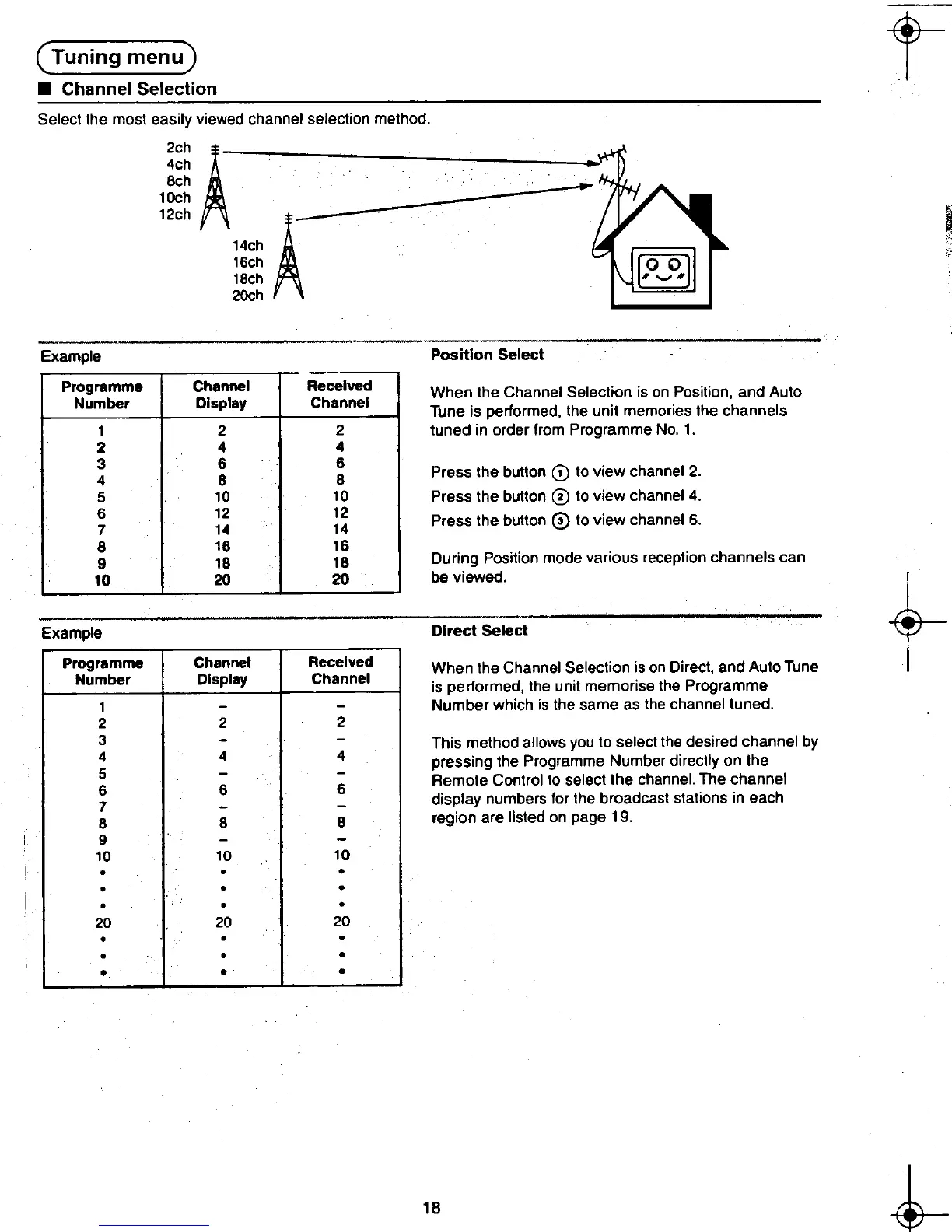
Select the most easily viewed channel selection method.
~~~
A-~8ch - 1Och
12ch i~~ A
Example Position Select
Programme Channel Received When the Channel Selection is on Position, and Auto
Number Display Channel Tune is performed. the unit memories the channels
1 2 2 tuned in order from Programme No.1.
2 4 4
: : : Press the butlon G) to view channel 2.
5 10 10 Press the butlon 0 to view channel 4.
~ ~~ ~~ Press the butlon 0 to view channel 6.
8 16 16
D .
P .. d t. h Ig 18 18 urlng osilion mo e various recep Ion c anne scan
10 20 20 be viewed.
t-..-,
Example Direct Select
Programme Channel Received When the Channel Selection is on Direct, and Auto Tune
Number Display Channal is performed, the unit memorise the Programme
--Number which is the same as the channel tuned.
2 2
-This method allows you to select the desired channel by
4 pressing the Programme Number directly on the
~ Remote Control to select the channel. The channel
-display numbers for the broadcast stations In each
8 region are listed on page 19.
.
~ 18 ~
.~ --to
.,












 To Next Page