[
~ ~.TX32F250A-2831_E.fm Pagc 17 Tucsday, January 11.2005 12:20 PM 8
~ C Tuning menu) r
" :
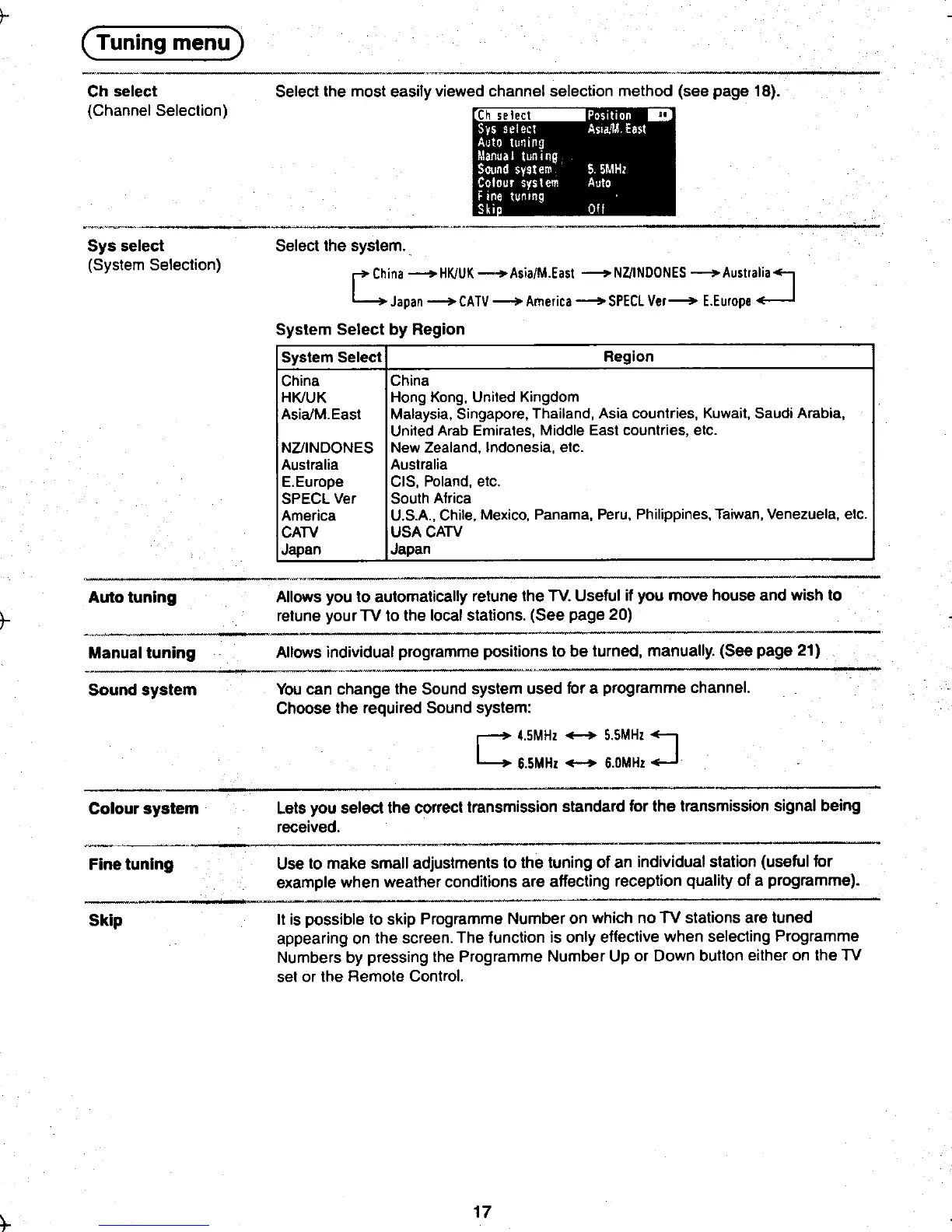
Ch select Select the most easily viewed channel selection method (see page 18).
(Channel Selection) Ch selecl
.~'".."-- ,"" "",".."" ._,""".." ~-._~ ~-
Sys select Select the system.
(System Selection) r+China ~HK/UK_Asia/M.East -NZ/INDDNES _Australia~
4 Japan --+-CATV -America -SPECl Ver--+- E.Europe ~
System Select by Region
System Select Region
China China
HK/UK Hong Kong, United Kingdom
Asia/M.East Malaysia, Singapore, Thailand, Asia countries, Kuwait, Saudi Arabia,
United Arab Emirates, Middle East countries, etc.
NZ/INDONES New Zealand, Indonesia, etc.
IAustralia Australia
E.Europe CIS, Poland, etc.
SPECL Ver South Africa
America U.S.A.., Chile, Mexico, Panama, Peru, Philippines, Taiwan, Venezuela, etc.
CATV USA CATV
Japan Japan
~ .',-'.-'-'-""'- tAuto tuning Allows you to automatically retune the TV, Useful if you move house and wish to
retune your TV to the local stations. (See page 20)
Sound system You can change the Sound system used for a programme channel,
Choose the required Sound system:
C 4..5MHz +-+ 5..5MHz
J6.5MHz +-+ 6.0MHz
, --.
Colour system Lets you select the correct transmission standard for the transmission signal being
received.
~---"--'" nw,- --
Fine tuning Use to make small adjustments to the tuning of an individual station (useful for
example when weather conditions are affecting reception quality of a programme).
--, ",_.~
Skip It is possible to skip Programme Number on which no TV stations are tuned
appearing on the screen. The function is only effective when selecting Programme
Numbers by pressing the Programme Number Up or Down button either on the TV
set or the Remote Control.
~ 17 ~
. ~o~ ~.'
, ,













 To Next Page