:
.~2F250A-283"_E.fn1 Pagcl3 Tucsdoy. Januory 11.2005 12:20 PM ~ 8
~ ( Sound menu) ~
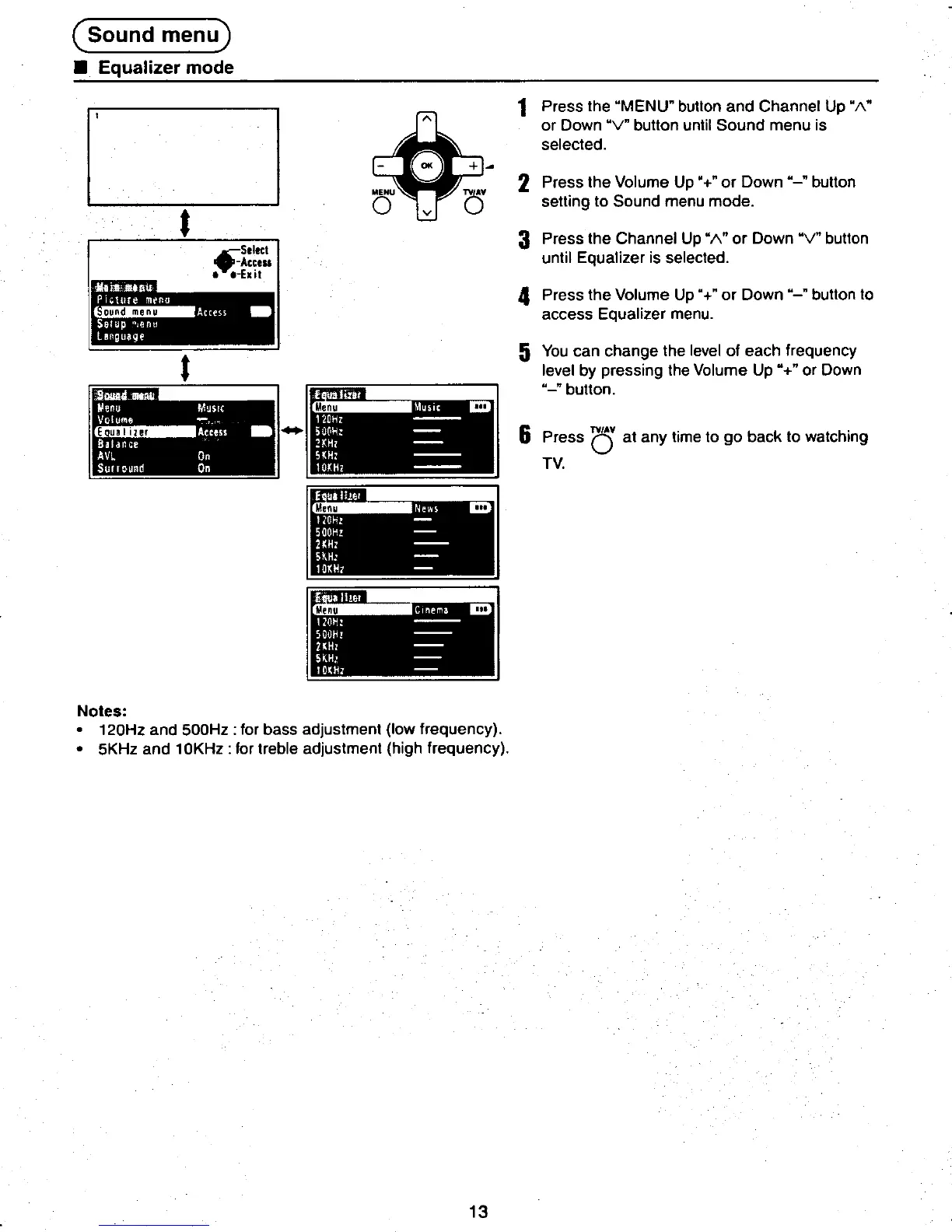
.Equalizer mode
D ~1 Press the "MENU" button and Channel Up "1\"
" or Down "V" button until Sound menu is
selected.
-00( +~
MENU TVAV 2 Press the Volume Up "+" or Down "-" button
0 v () setting to Sound menu mode.
.3 Press the Channel Up "1\" or Down "V" button
.~~:','~ until Equalizer is selected.
..-Exit
~~... -.4 Press the Volume Up "+ " or Down "-" button to
:ii::~.~'~ ., access Equalizer menu.
t 5 You can change the level of each frequency
.level by pressing the Volume Up "+" or Down
liilll' "-" button.
Menu ...
-' 6 Press 0' at any time to go back to watching
, TV.
liilll
.~ ~iiil!1 t.
Notes:
.120Hz and 500Hz: for bass adjustment (low frequency).
.5KHz and 10KHz: for treble adjustment (high frequency). I
~ ~13 -
.~ ~ ~.












 To Next Page