..+ro2F250A-2831_E.rm Page 26 Tucsday. January 11.2005 12:20 PM ~ 8
.
-t C Troubleshooting) "t-
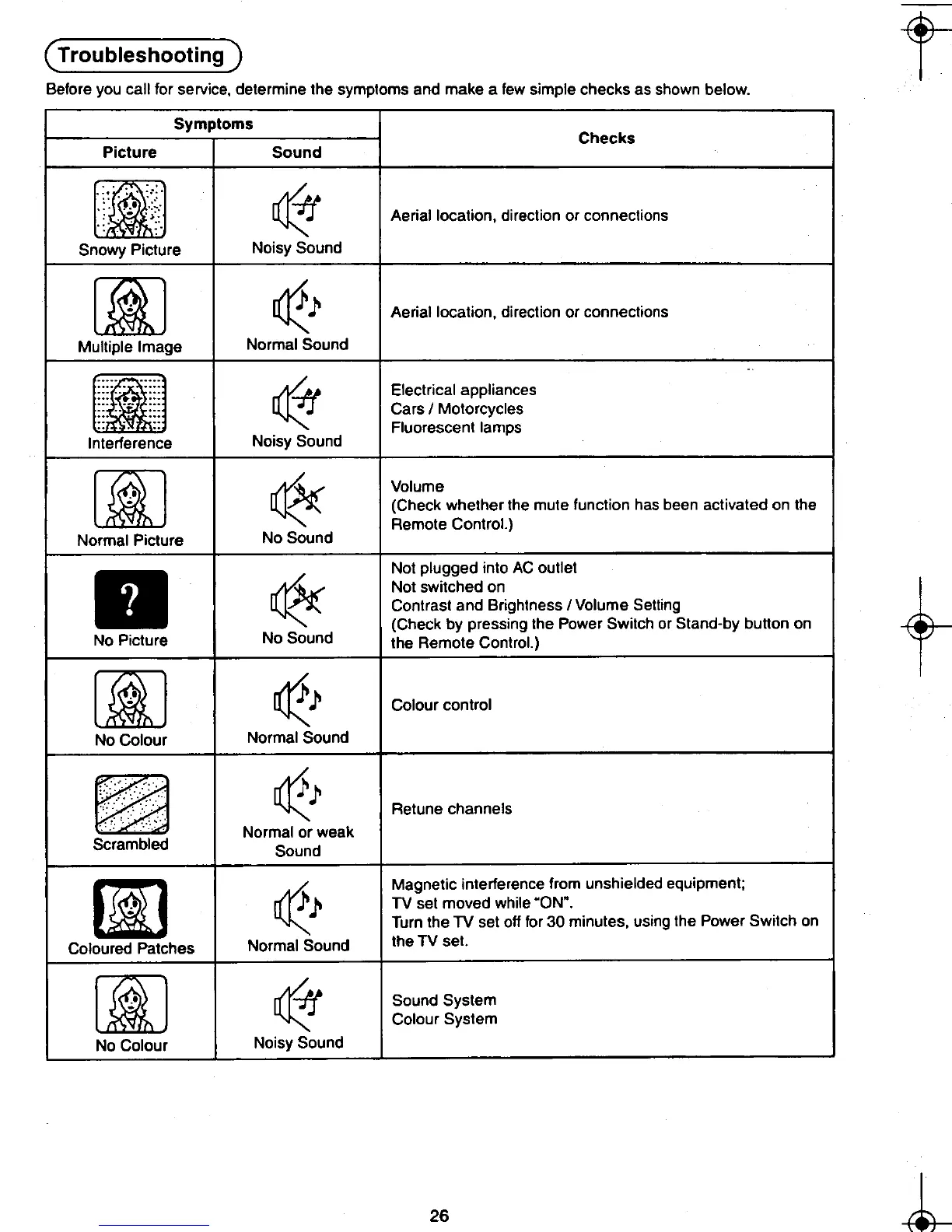
Before you call for service, determine the symptoms and make a few simple checks as shown below.
Symptoms
Checks
Picture Sound
~ Aerial location. direction or connections
Snowy Picture Noisy Sound
[iJ ~ l' Aerial location. direction or connections
Multiple Image Normal Sound
rIff Electrical appliances .oJ Cars / Motorcycles
Fluorescent lamps
In e erence Noisy Sound
[]iJ ~ Volume " ~ (Check whether the mute function has been activated on the
Remote Control.)
Normal Picture No Sound
Not plugged into AC outlet
-+ . ~ Not switched on
t~ Contrast and Brightness / Volume Setting
(Check by pressing the Power Switch or Stand-by bunon on
No Picture No Sound the Remote Control.)
[]iJ ~ l' Colour control
No Colour Normal Sound
~ l' Retune channels
Normal or weak
cram Sound
[i] oR Magnetic interference from unshielded equipment;
,,' :1' l' TV set moved while .ON".
Turn the TV set off for 30 minutes. using the Power Switch on
Coloured Patches Normal Sound the TV set.
r-~l rI4J Sound System
L~ ~ Colour System
No Colour Noisy Sound
~ 26 h
.~ ~ -1'-
".~., ,.. I iI~'











 To Next Page