0 ~2F250A.2831_E.fm Pagc 16 Tucsday. January 11.2005 12:20 PM ~ 8
-r C Tuning menu) ---t
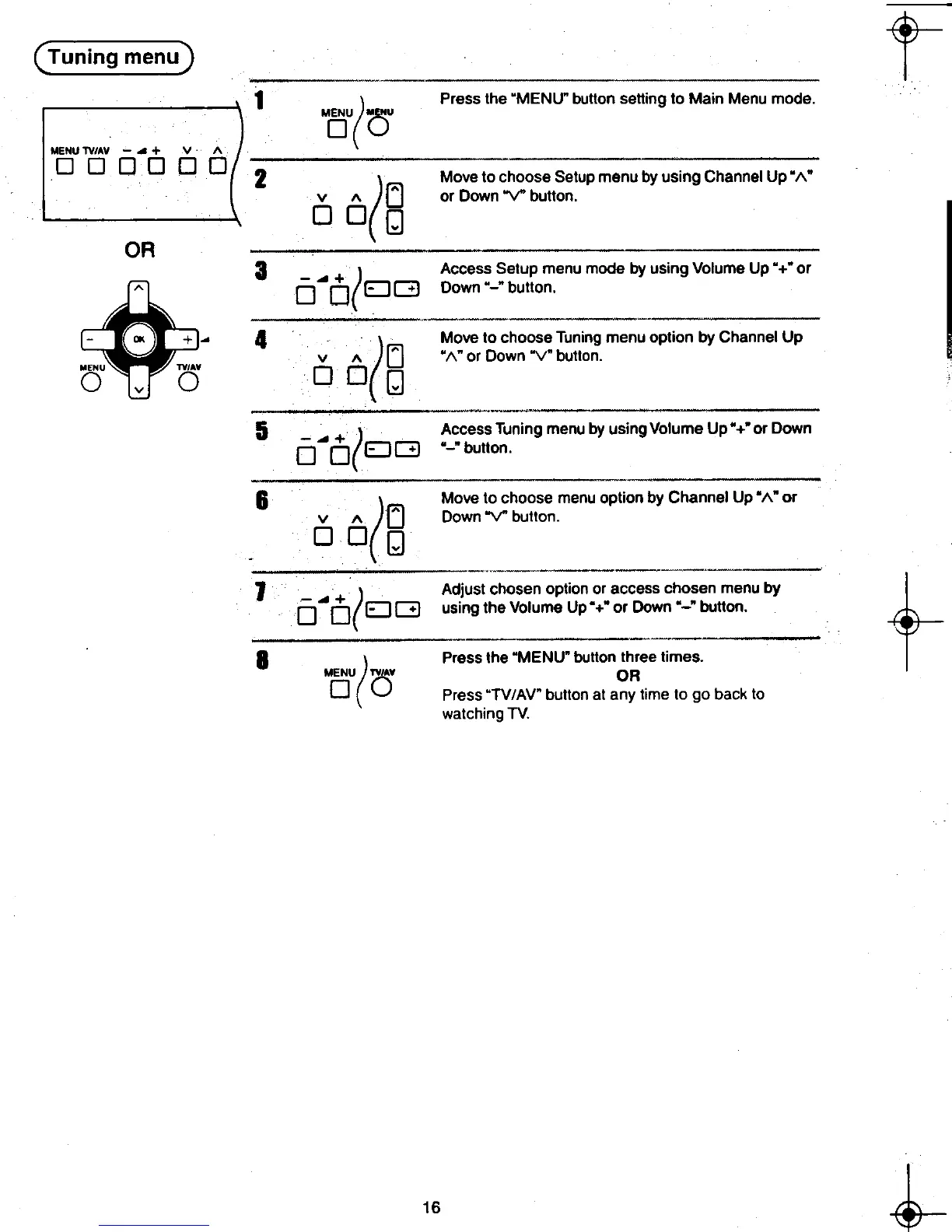
1 ) Press the "MENU" button setting to Main Menu mode.
MOU( au
( MOVe to choose Setup menu by using Channel Up"""
v 1\ [j or Down V button.
DD[J
3 Access Setup menu mode by using Volume Up "+" or
. Down "-" button.
-B + ~ 4
( Move to choose Tuning menu option by Channel Up
v I\ [j ",,"or Down "V" button.
MENU TV'A. DOn
0 v 0 ~
;~ "
5 -..+ J Access Tuning menu by using Volume Up" +" or Down
0 D(EJG "-"button.
S Move to choose menu option by Channel Up ",," or
Down V button.
Adjust chosen option or access chosen menu by
f-using the Volume Up"+" or Down "-" button.
8
( press the "MENU" button three times.
MENU nAV OR
0 () Press "TV/AV" button at any time to go back to
watching TV.
~ 16 ~
8-<t:- ~ ~8
."" l~)ilj I












 To Next Page