8 -$-ro2F2.~OA-2831_E.fm Pagc20 Tuc.day, January 11.2005 12:20PM ---+ 8
-r (Tuning menu) ~
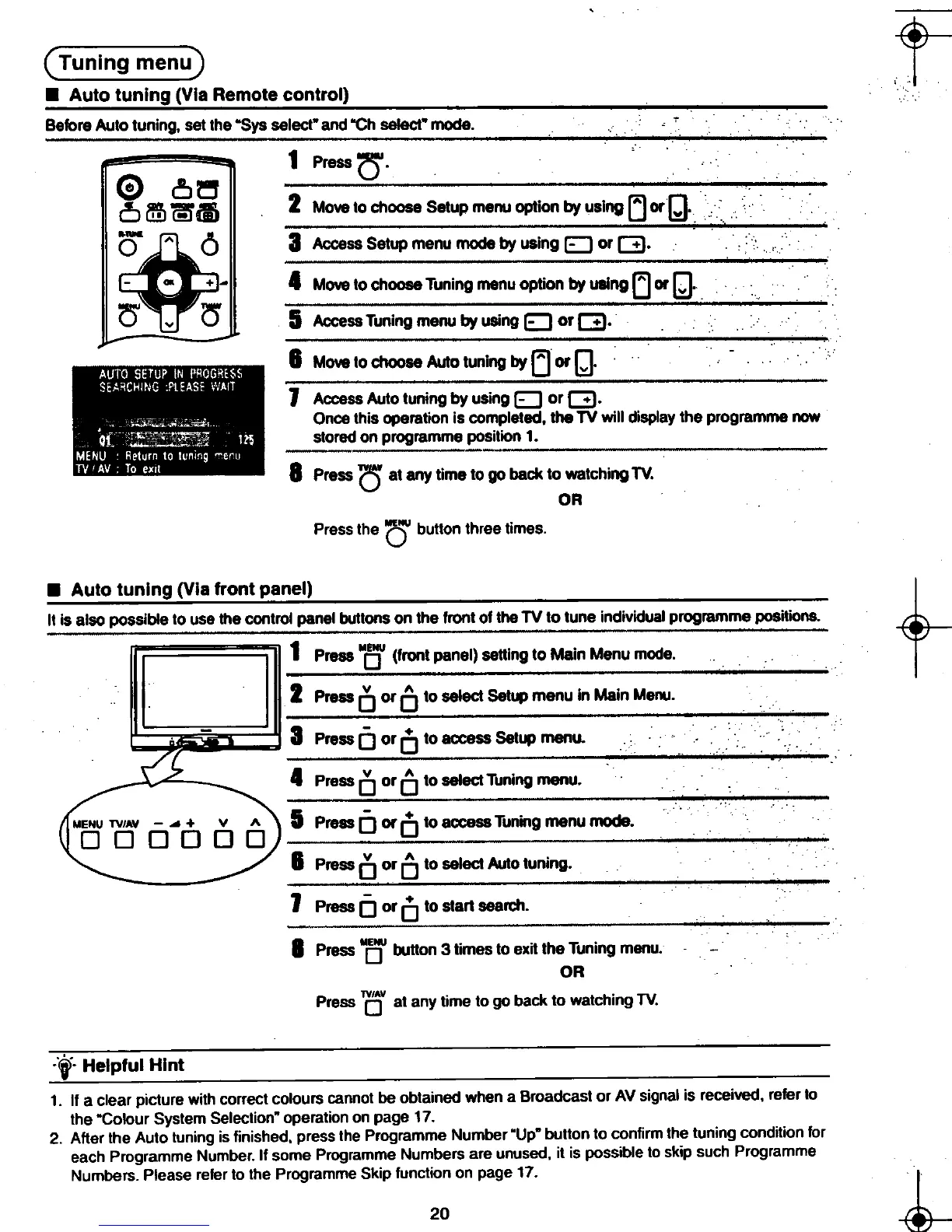
.Auto tuning (Via Remote control)
Before Auto tuning, set the .Sys select" and .Ch select" mode.
~ 1 Press 0'
0 D~ -
0 MJ @ ~ 2 Move to choose Setup menu option by using [j orQ.
~-"6 3A~~ess Setup menu mode by using 0 or G.
-~ +~
0 v '0 5A~~ssTuning menu by using 0 or G.
6 Move to choose Auto tuning by l] or Q.
j""'AccessAutotun;~b~'usingD orG.
Once this operation is completed, the TV will display the programme now
stored on programme position 1.
"
8 Press 0' at any time to go back to watching TV.
OR
Press the au button three times.
-+ .Auto tuning (Via front panel)
t-O 2 Press 0 or 0 to select Setup menu in Main Menu.
-3 Press (] or 0 to access Setup menu.
4 Press 0 or (] to select Tuning menu.
~
5 Press (] or 0 to access Tuning menu mode.
-
6 Press 0 or (] to select Auto tuning.
7 Press (] or 0 to start search.
.-,
8 Press "ou button 3 times to exit the Tuning menu.
OR
Press 0. at any time to go back to watching TV.
:t- Helpful Hint
9
1. If a clear picture with correct colours cannot be obtained when a Broadcast or AV signal is received, refer to
the .Colour System Selection" operation on page 17.
2. After the Auto tuning is finished, press the Programme Number "Up" button to confirm the tuning condition for
each Programme Number. If some Programme Numbers are unused, it is possible to skip such Programme
I Numbers. Please refer to the Programme Skip function on page 17. r
--$ 20 -$-
8t- ~ -to
.Ok" ...[",1o" .i"i"", ,1;"











 To Next Page