'-"'2F250A-2831_E.rm Page 10 Tucsday.January 11.2005 12:20PM ~ 8
(Picture menu) r
1
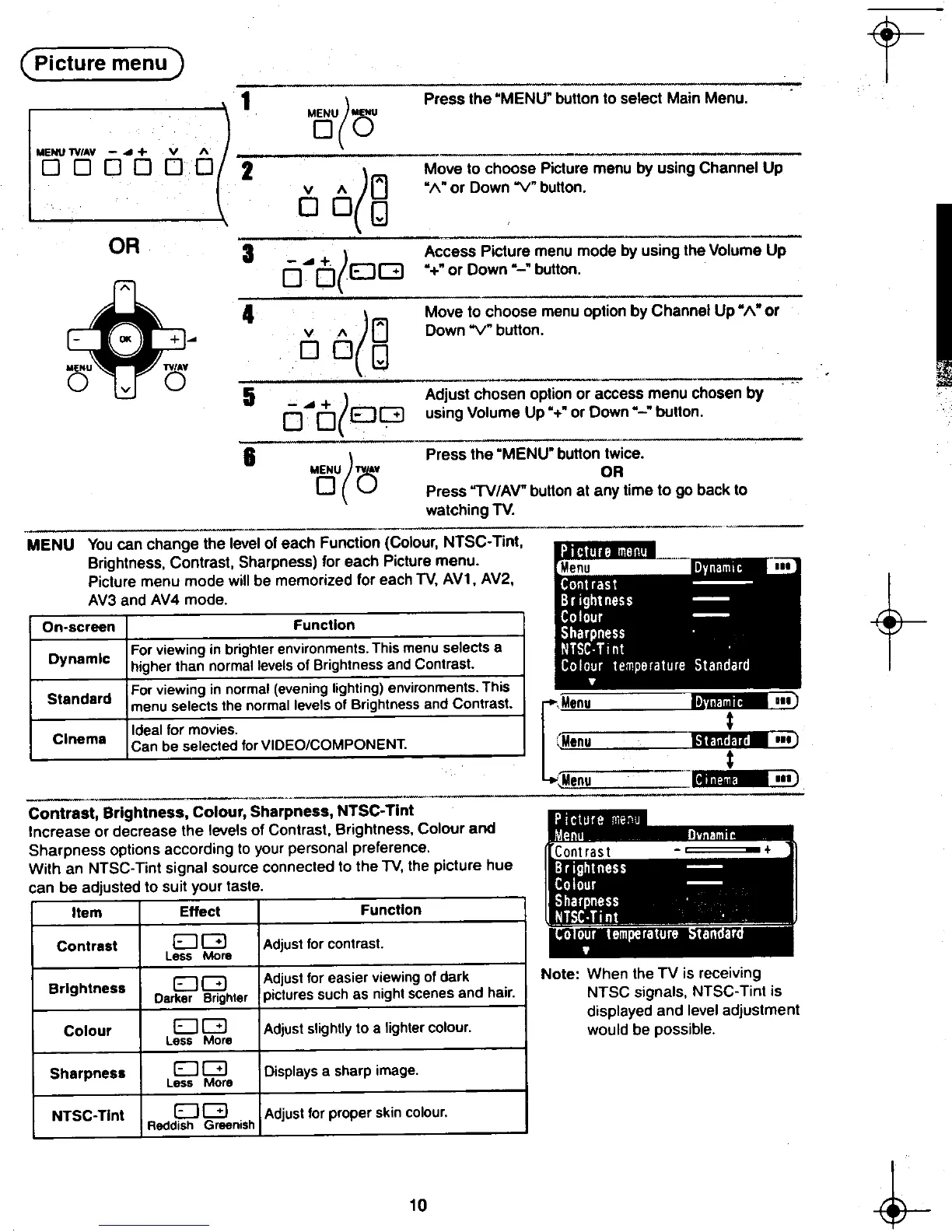
( press the "MENU" bullon to select Main Menu. .
MENU MENU
0 0
2
((j M;;;;I;;~~;;~~by using Channel UP-
v /\ "/\" or Down"Y" bullon.
DOg
3 -..+,co.co,( Access Picture menu mode by using the Volume Up
0 0 EJG "+"orDown"-"bullon.
~ - 4 (AMove to choose menu option by Channel Up' /\. or
-~ + -v /\ (j Down "V" bullon.
0 DOn
MENU "'AY ~
0 V 0 5;..; : +'
( Adjust ;;-t;;;~-;;-pji~~~ch~se~by~"""~
0 0 EJG using Volume Up "+'or Down "-" bullon.
-
-~"--,;,
6
( press the "MENU' bullon twice.
MENU "AY OR
0 (:5 Press "TV/AV" bullon at any time to go back to
watching TV.
--~ ---
MENU You can change the level of each Function (Colour, NTSC- Tint,
Brightness, Contrast, Sharpness) for each Picture menu.
~ Picture menu mode will be memorized for each TV, AV1, AV2,
t-AV3 and AV4 mode.
On-screen Function
D I For viewing in brighter environments. This menu selects a
ynam C higher than normal levels of Brightness and Contrast.
St d d For viewing in normal (evening lighting) environments. This
an ar .
menu selects the normal levels of BrIghtness and Contrast.
Ideal for movies.
Cinema Can be selected forVIDEO/COMPONENT.
---'. " '
Contrast, Brightness, Colour, Sharpness, NTSC- Tint
Increase or decrease the levels of Contrast, Brightness, Colour and
Sharpness options according to your personal preference.
With an NTSC- Tint signal source connected to the TV, the picture hue
can be adjusted to suit your taste.
Item Effect Function
Contrast EJ G Adjust for contrast.
Less More
I h EJ G Adjust for easier viewing of dark Note: When the TV is receiving
Br 9 tness Darker Brightar pictures such as night scenes and hair. NTSC signals, NTSC- Tint is
displayed and level adjustment
Cotour EJ G Adjust slightly to a lighter colour. would be possible
Less More .
Sharpness EJ G Displays a sharp image.
Less More
NTSC- Tint EJ G Adjust for proper skin colour.
Reddish Greenish
~ 10 ~
8t-'-' -to
""d'











 To Next Page