I
.0 ~"'-"A'.!'-"'m Pagc 15 Tucsday.January 11.2005 12:20PM ~ 8
~ ~~~~:~~~ ~ r
Child lock To Child lock any channel, press the Volume Up" +" or Down "-" button.
1. When channel is "Lock", sound is muted and screen becomes black screen colour.
2. If any of the channels is Child Locked, Tuning menu selection on the front panel will
not function and if the Volume Up" +" or Down "-" button on the front panel is pressed,
Child lock icon will blinking.
3. Main power On in Child Locked channel will display Child lock icon on screen to
remind user that the Child lock is On and is in Child Locked channel.
4. Each channel has its own memory for channels to be Child Locked.
-~-""'-'-- "'~_C"'_C~'-
Geomagnetic If you notice a slight tilt to the picture or if there are coloured patches at the corners of the
screen, use this feature to eliminate them (see page 9).
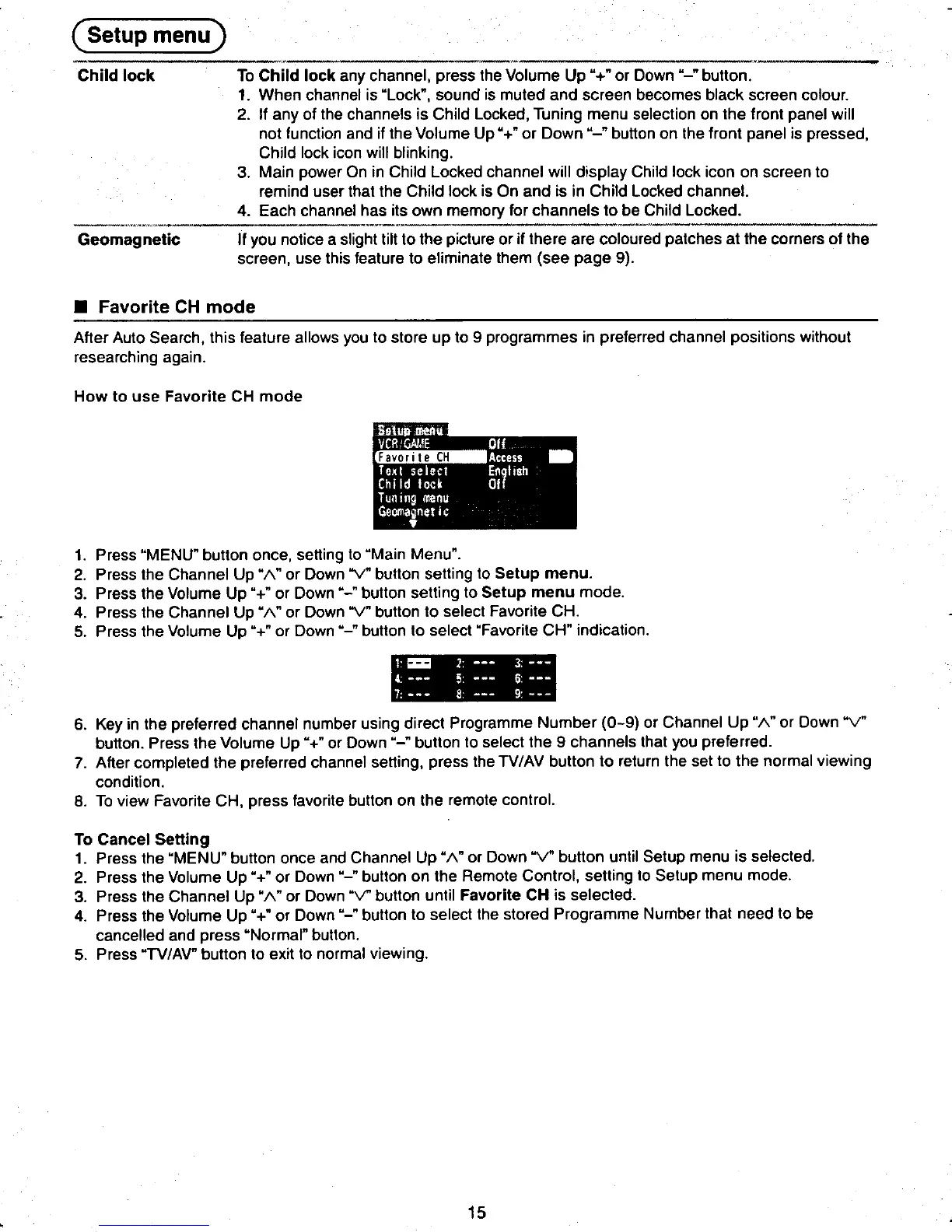
.Favorite CH mode
After Auto Search, this feature allows you to store up to 9 programmes in preferred channel positions without
researching again.
How to use Favorite CH mode
1. Press "MENU" button once, setting to "Main Menu".
~ 2. Press the Channel Up" 1\" or Down "V" button setting to Setup menu.
t3. Press the Volume Up" +" or Down "-" button setting to Setup menu mode.
4. Press the Channel Up "1\" or Down "V" button to select Favorite CH.
5. Press the Volume Up "+" or Down "-" butt~~;;H" indication. c
t_--
6. Key in the preferred channel number using direct Programme Number (0-9) or Channel Up "1\" or Down "V"
button. Press the Volume Up "+" or Down "-" button to select the 9 channels that you preferred.
7. After completed the preferred channel setting, press the TV/AV button to return the set to the normal viewing
condition.
8. To view Favorite CH, press favorite button on the remote control.
To Cancel Setting
1. Press the "MENU" button once and Channel Up" 1\" or Down "V" button until Setup menu is selected.
2. Press the Volume Up "+" or Down "-" button on the Remote Control, setting to Setup menu mode.
3. Press the Channel Up "1\" or Down "V" button until Favorite CH is selected.
4. Press the Volume Up" +" or Down "-" button to select the stored Programme Number that need to be
cancelled and press "Normal" button.
5. Press "TV/AV" button to exit to normal viewing.
~ 15 h
8t ~ ~8











 To Next Page