.~2F250A-2831_E.fm Pagc24 Tucsday, January 11,2005 12:20PM ~ 8
-r (Teletext Operation ) ~
.Telelexl fealures may vary depending on Ihe Broadcasting Companies and is
only available if the channel selecled is transmilting Teletexl.
0 0 'f5' .When in teletexl mode, Ihe volume may still be altered to the desired listening
C .!!/!. ,. level.
0 ~ @(:i) What is TOP mode?
~ -"6 In TOP (Table of pages) mode, the red button moves to the previous page number
and the green butlon moves to Ihe next page number. This is the currenl preferred
of operation in Australia.
-'* +A
What is List mode?
0 0" In List mode, four different coloured page numbers are situated at the botlom of
v the screen. Each of these numbers can be altered and stored in the TV's memory.
I [ ) I J [ J I ] I What is FASTEXT?
00 ., "'" ~ In FASTEXT mode, four differently coloured subjects are situated at the bottom of
@ ~ the display. To access more information about one of these subjects, press the
appropriately coloured button. This facility enables fast access to information of
the subjects shown. This is the current preferred method of operation in New
Zealand.
What are the advantages?
.Page selection at the touch of a Colour-coded button.
.Easy to use step-by-step selection of the topics subject.
.Reduction of waiting time.
.Page status line at bottom of screen so you always know which button will take
you to the desired information.
Note:
Characters will be illegible unless you select the Text Language which matches the
text being received.
Select the correct Text Language (refer to page 14).
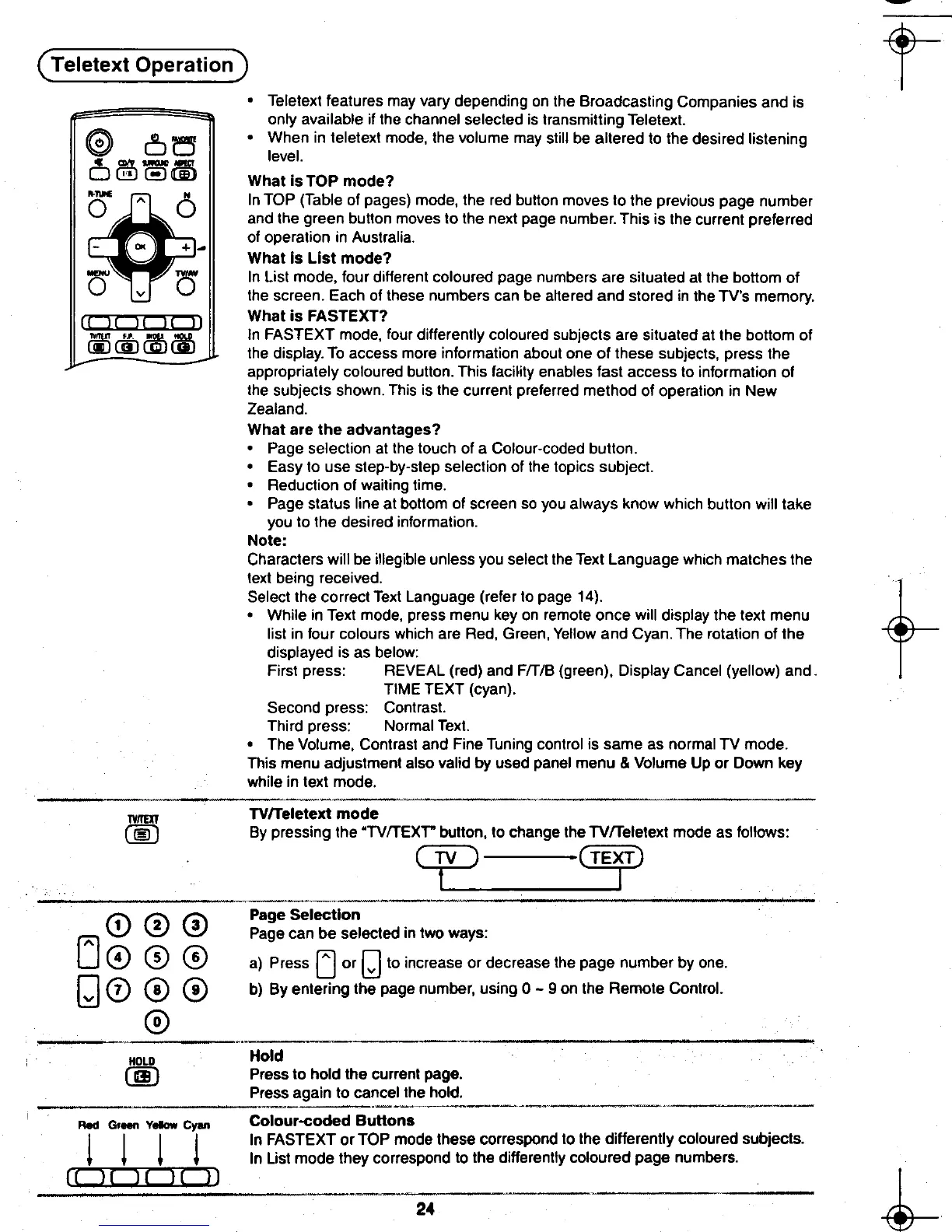
.While in Text mode, press menu key on remote once will display the text menu
list in four colours which are Red, Green, Yellow and Cyan. The rotation of the
displayed is as below:
First press: REVEAL (red) and F/T/B (green), Display Cancel (yellow) and
TIME TEXT (cyan).
Second press: Contrast.
Third press: Normal Text.
.The Volume, Contrast and Fine Tuning control is same as normal TV mode.
This menu adjustment also valid by used panel menu & Volume Up or Down key
while in text mode.
TYII£IT TVlTeletext mode
00 By pressing the "TV/TEXr button, to change the TVlTeletext mode as follows:
~==== = illfJ
I (;'\ ~ ~ Page Selection
~ \V I.V Page can be selected in two ways:
(J 0 0 @ a) Press ~ or [] to increase or decrease the page number by one.
[J 0 0 0 b) By entering the page number, using 0 -9 on the Remote Control.
@
~-~"
HOLO Hold
@ Press to hold the current page.
Press again to cancel the hold.
."-' " ~--, ,---
Red Gr- V- cv.. Colour-coded Buttons
I I I I In FASTEXT or TOP mode these correspond to the differently coloured subjects.
~ ~ ~ ~ In List mode they correspond to the differently coloured page numbers.
II )1)i1r 11 I
~ ' -, 24-~-'c. t
8.,- ~ -to
~ ,~. ...,











 To Next Page