.""'2F250A-2831_E.rffi Pogc 12 Tucsdoy.Jonuory 11.2005 12:20PM -~ ~ 8
-r C Sound menu) ~
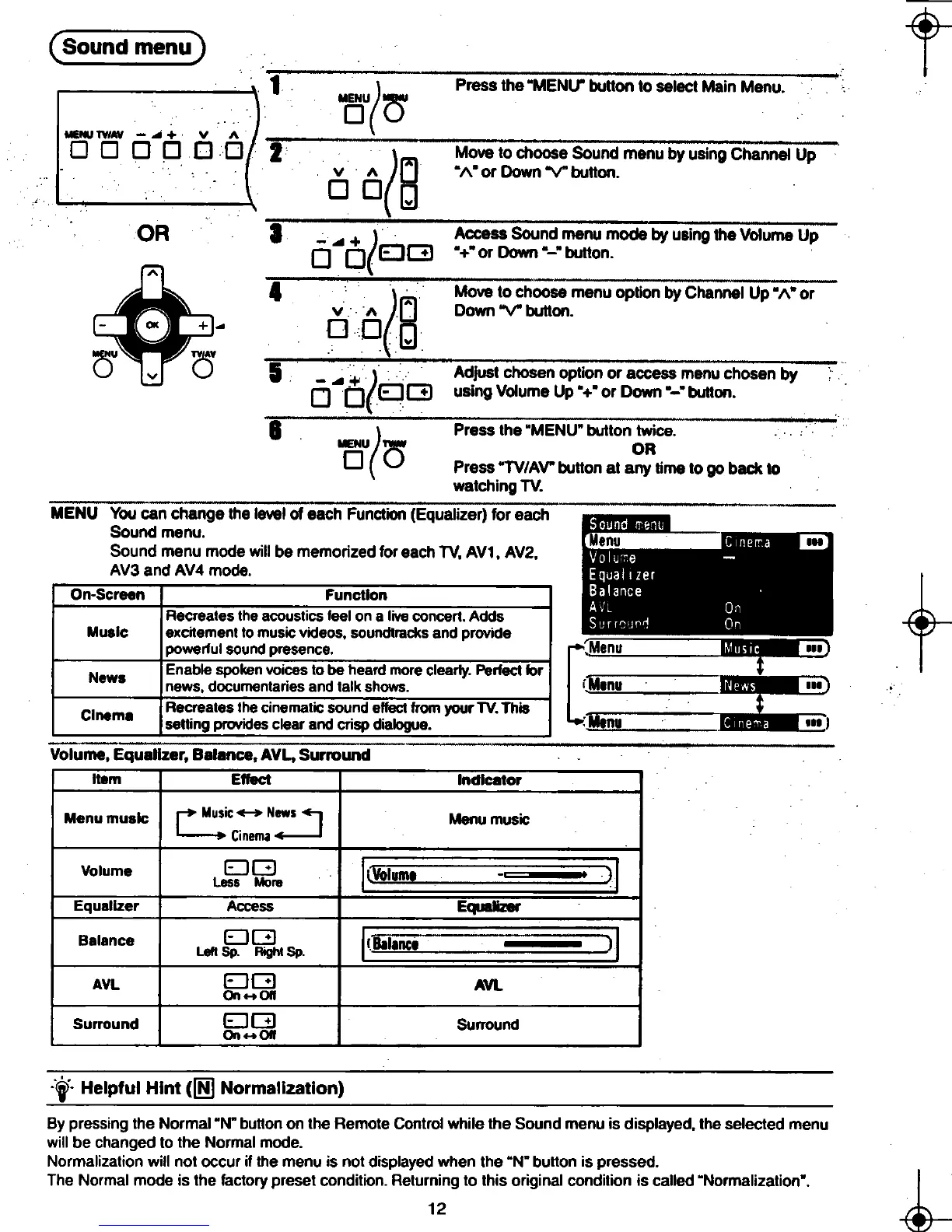
1 ) Press the "MENU" button to select Main Menu.
MOU( 0"
MENU TVIAV -..+ 0 0 0 0 2
(lJ Move to cho~so-;;;;d°menu by usingCha~
v 1\ "/\" or Down "V" button.
DOg
OR 3 + ( Access Sound menu mode by using the Volume Up
0 oEJG "+"orDown"-"button.
~ (P'l Move to ch;:;;;e;-;;:;;;;;; ~~;I UP"/\" or
0 v 1\ U Down "V" button.
-U +- 0 og
0" v 0"
0 O(EJ G using Volume Up "+" or Down "-" button.
&
( press the "MENU" button twice.
MENU TVlA' OR
0 0 Press "TV/A V" button at any time to go back to
watching TV.
MENU You canchange the level of each Function (Equalizer) for eaCh"--
lilill' '- Sound menu. -
S d d " Menu.. '"
oun menu mo e will be memorized for each TV, AV1, AV2, ,;
AV3 and AV4 mode. ,
On-Screen Function :. .
t-Recreates the acoustics feel on a live concert. Adds .:
Music excitement to music videos. soundtracks and provide
powerful sound presence.
[:Menu 1..", ",)
News Enable spoken voices to be heard more clearly. Perfect lor t -
news, documentaries and talk shows. ,Menu. '"
Ci Recreates the cinematic sound effect from your TV. This -Me!JLS--~~~~
nema setting provides clear and crisp dialogue. : Menu -'ft...~ !"l
~ Volume, Equalizer, Balance, AVL, Surround
Item Effect Indicator
Menu music r+ Music ~ News.., Menu music
L-.. Cinema ~
Volume DG '(Volume -;,1
Less More II..!UIU"'. -1.1
Equalizer Access Equalizer
Balance D~ I(Balance ~ )1
Left Sp. RIghi Sp. I '. g8'8""8 J 1
AVL EJ G AVL
On 011
Surround EJ G Surround
On orr
:'.':f- Helpful Hint (~ Normalization)
By pressing the Normal"N" button on the Remote Control while the Sound menu is displayed. the selected menu
will be changed to the Normal mode.
Normalization will not occur if the menu is not displayed when the "N" button is pressed.
~ The Normal mode is the factory preset condition. Retur~;g to this original condition is called "Normalization". ~
8-t- ~ -to
, ,- ,J"",...Ji.." ,













 To Next Page