"
~ ~2F250A-2831_E.fm Pagc3 Tucsday.January 11.2005 12:20PM -:4} 8
~ ( Before Operating This Set ) ~
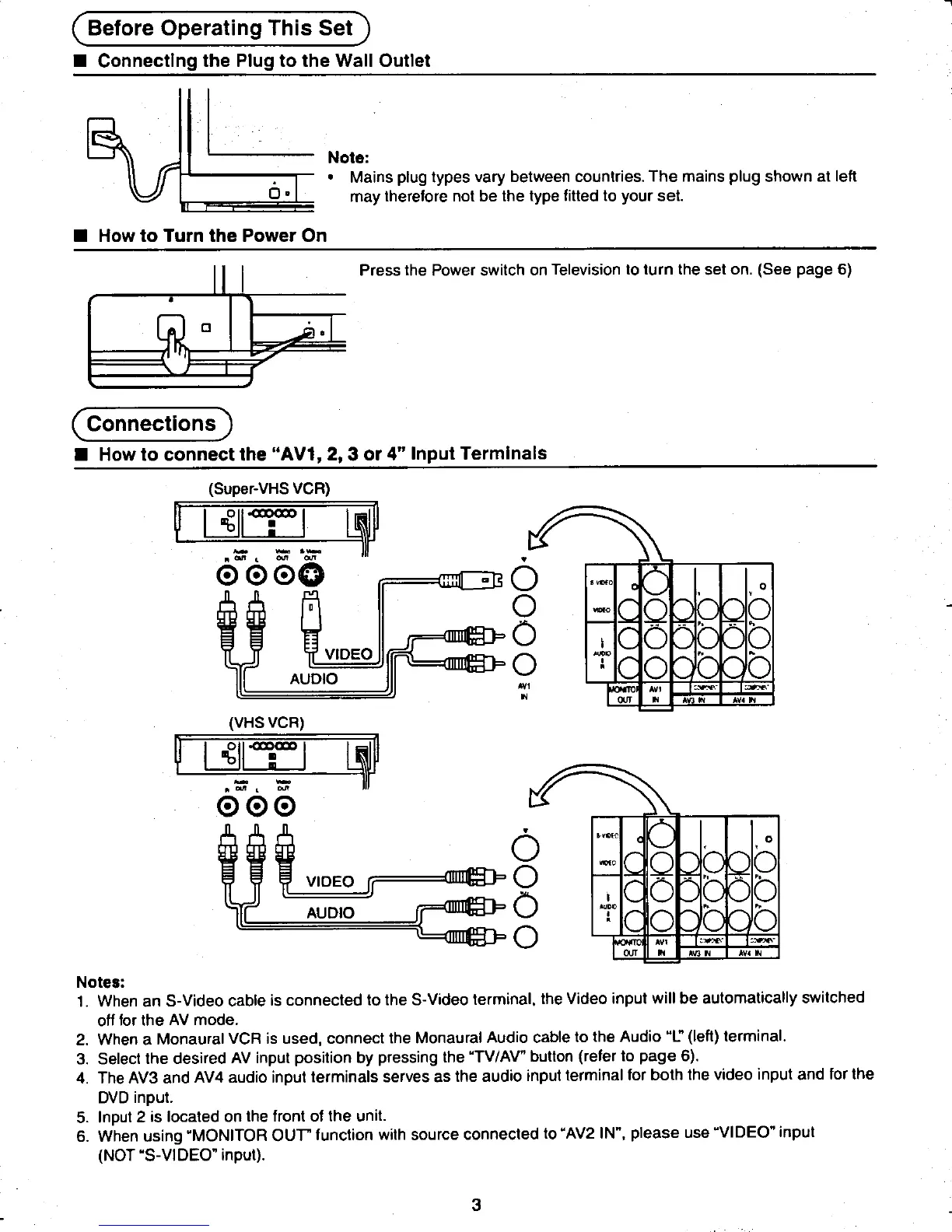
.Connecting the Plug to the Wall Outlet i
L
Note:
.Mains plug types vary between countries. The mains plug shown at left
may therefore not be the type fitted to your set.
.How to Turn the Power On
~~~~~~~~: Press the Power switch on Television to turn the set on. (See page 6)
C Connections)
.How to connect the "AV1, 2, 3 or 4" Input Terminals
(Super-VHS VCR)
~~~~~ ~
~ "~' ~ ~ .
0000 a 0 0
,0 b
~~~4~;VIDEO 8 .: ..p t.
AUDIO 0
", ~- ~
" '" 'v."
(VHS VCR)
~~~~ ~
000
t!!~:::~:3~ 6 ()
t~~Jj======:(In~ 0 ." " .b
AUDIO 0 ..
0
0 ,- ,-'
"'" 'v."
Notes:
1. When an S-Video cable is connected to the S-Video terminal, the Video input will be automatically switched
off for the AV mode.
2. When a Monaural VCR is used, connect the Monaural Audio cable to the Audio "L" (left) terminal.
3. Select the desired AV input position by pressing the "TV/AV" button (refer to page 6).
4 The AV3 and AV4 audio input terminals serves as the audio input terminal for both the video input and for the
DVD input.
5. Input 2 is located on the front of the unit.
6. When using "MONITOR OUT" function with source connected to "AV2 IN", please use "VIDEO" input
(NOT uS-VIDEO" input).
~~..3
.~ ~ ~8











 To Next Page