8.3. PAL Progressive mode (50p)
8.3.1. Preparation
1. Receive PAL monoscope pattern.
2. Set scan mode to progressive.
3. Set the Picture Menu to NORMAL.
4. Set the TV to Service Mode 1.
5. Set the Data of Service Mode 1 as follow
H-Parallel 16 Bottom-Corner 187
IVBL C 62 V-S-Correct 66
Top-Corner 186 C-Correct 16
6. Push [ 0 ] button so that set the Data of Coarse/Fine
Convergence to Zero Correction.
7. Push [ R-TUNE ] button so that projecting Green only.
8.3.2. V-Amp, V-Linear and V-Pos
Adjustment
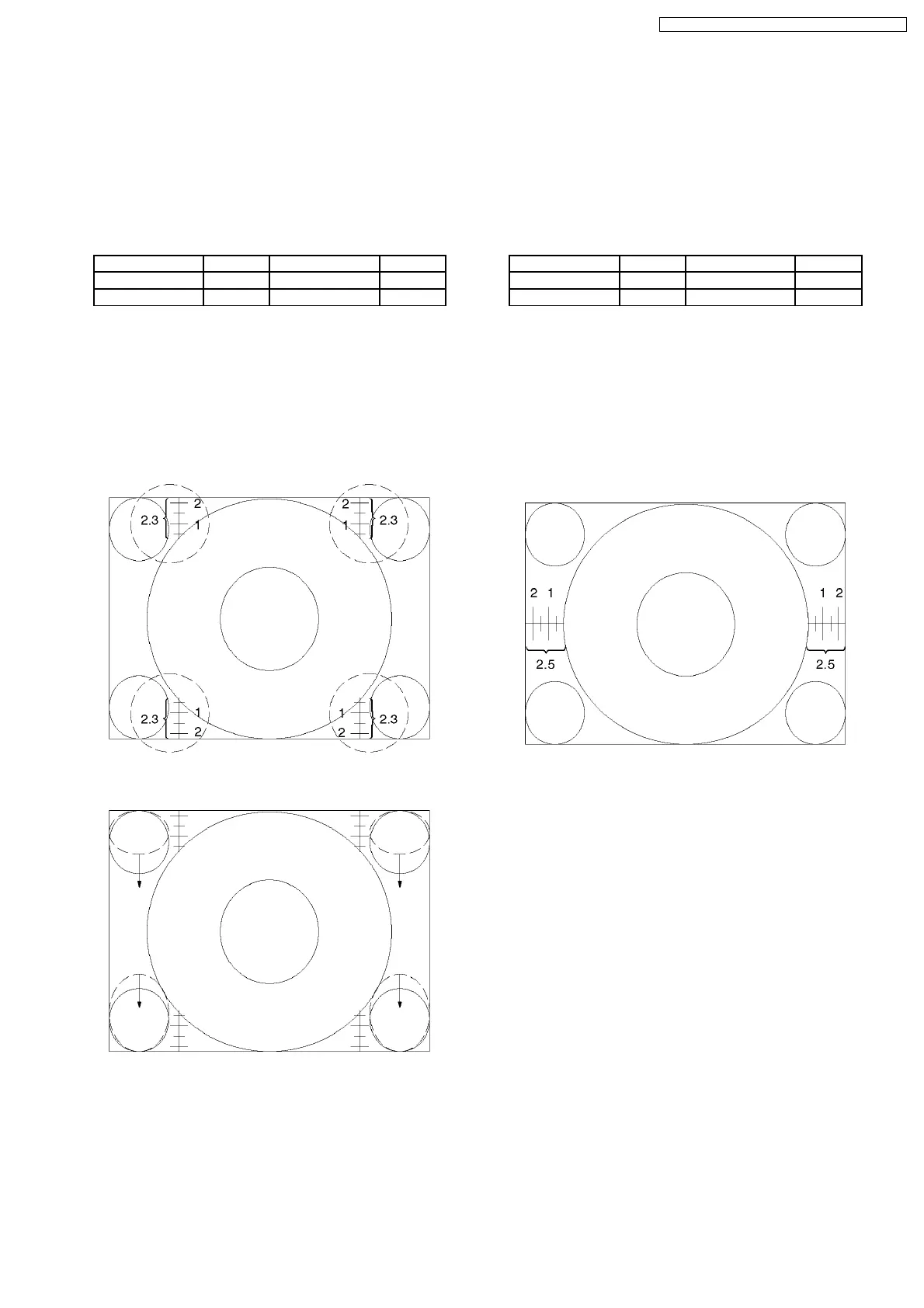
1. Adjust Vertical amplitude for 2.3 ± 0.1 division of a scale by
V-Amp control.
2. Confirm Vertical Linear as to the balance of circle, if need
adjust V-Linear control.
3. Confirm Vertical Center, if it is not correct, adjust
Monoscope pattern for center of the screen by V-Pos
control.
8.4. NTSC Progressive mode (60p)
8.4.1. Preparation
1. Receive NTSC monoscope pattern.
2. Set scan mode to Progressive.
3. Set the Picture Menu to NORMAL.
4. Set the TV to Service Mode 1.
5. Set the Data of Service Mode 1 as follow
H-Parallel 16 Bottom-Corner 188
IVBL C 22 V-S-Correct 46
Top-Corner 188 C-Correct 16
6. Push [ 0 ] button so that set the Data of Coarse/Fine
Convergence to Zero Correction.
7. Push [ R-TUNE ] button so that projecting Green only.
8.4.2. H-Pos and H-Amp Adjustment
1. Adjust Monoscope pattern for center of the screen by H-
Pos control.
2. Adjust Horizontal amplitude for 2.5 ± 0.1 division of a scale
by H-Amp control.
25
TX-51P950M / TX-51P950X / TX-43P950M / TX-43P950X



 To Next Page