43 inch model
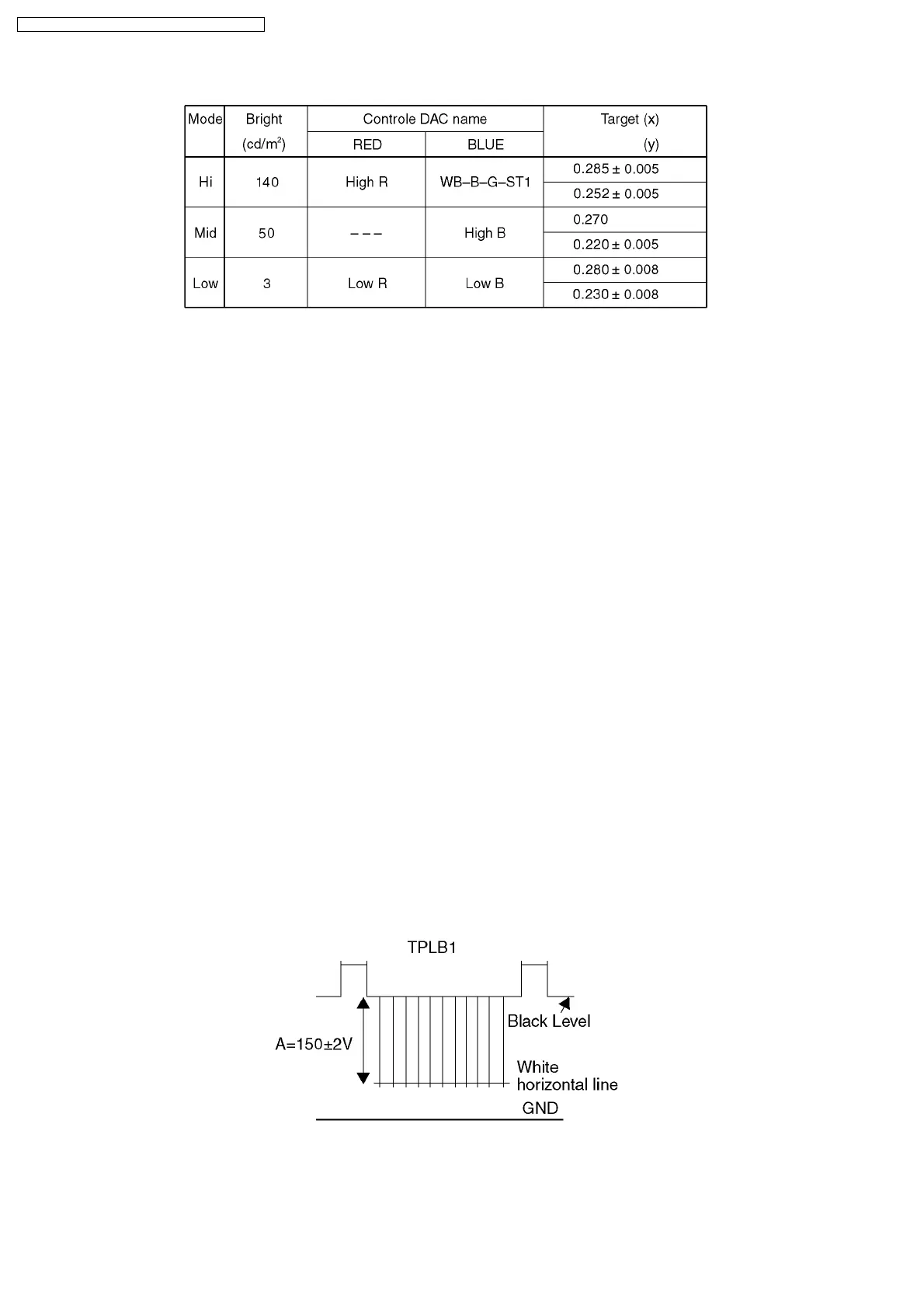
9.6. Sub Bright Adjustment
Preparation
Picture Menu : Dynamic P-NR : AUTO
C Temp : Dynamic Scan Mode : 100Hz (PAL)
AI : ON
Cut off and White Balance Adjustment has been adjusted
Adjustment
1. Set the White Balance Meter on Screen center.
2. Receive a PAL Window pattern.
3. Adjust Sub Bright so that the 6th paragraph shines faintly and the 7th paragraph does to the sinking style.
9.7. Blue Limit Adjustment
Preparation
Picture Menu : Dynamic
C Temp : Standard
AI : ON
P-NR : ON
Scan Mode : 100Hz (PAL)
White Balance Adjustment has been adjusted
Adjustment
1. Receive a Cross Hatch pattern.
2. Connect an oscilloscope to TPLB1 on LB-Board.
3. Adjust B-LIMIT so that the waveform A is 150 ± 2V.
30
TX-51P950M / TX-51P950X / TX-43P950M / TX-43P950X



 To Next Page