English
9/20
ICEP080E-ICEP120E
Default parameters
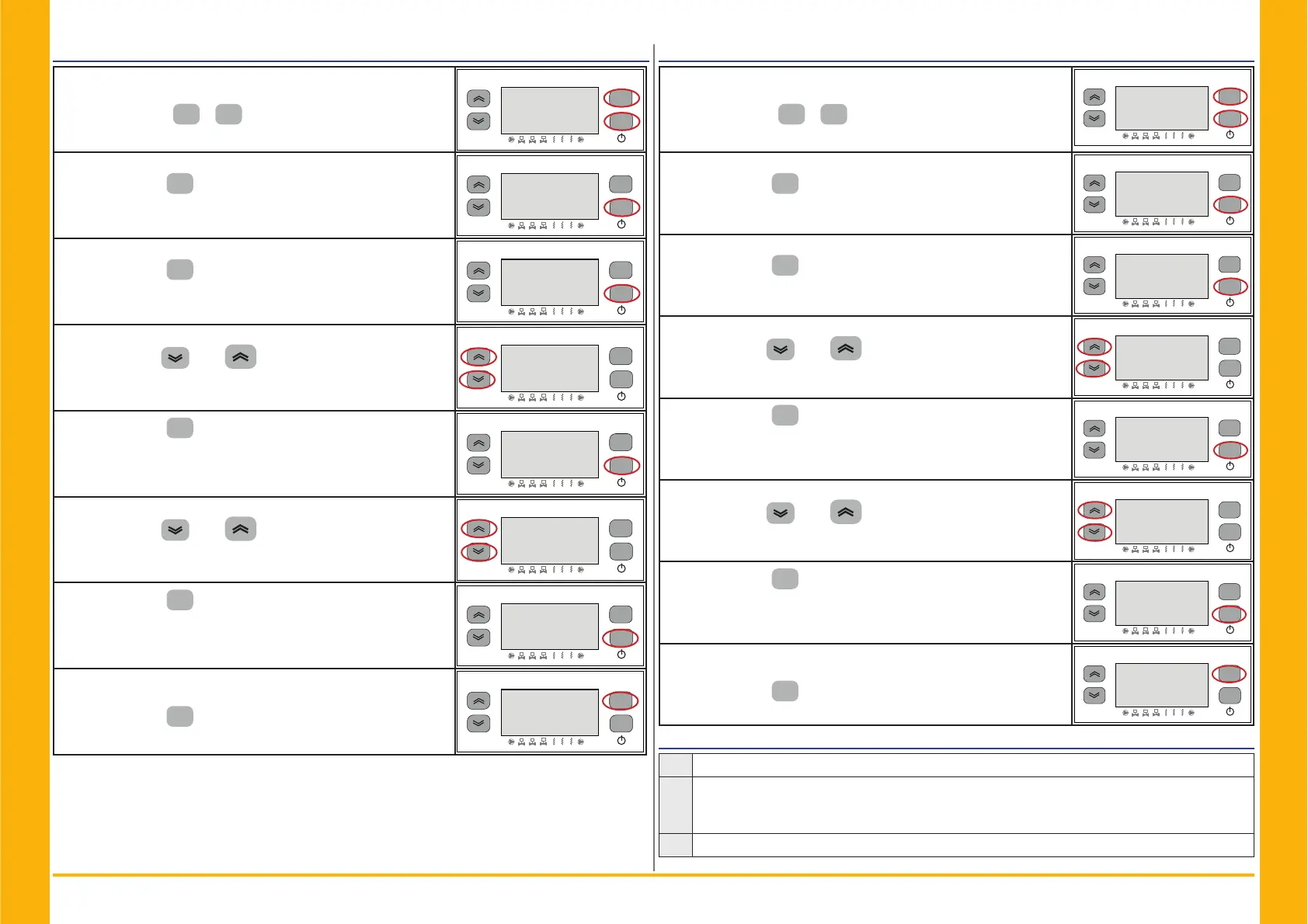
Switch ON the chiller “ON” using the Main disconnector switch QS,
and wait on display the indication “OFF”.
Press the buttons “
esc
” “
set
” together to enter on “D” parame-
ters.
esc
set
F1
F3
F2
1
2
3
1
2 3
2))
Parameter “3$U” appears.
Press the button “
set
” to enter.
esc
set
F1
F3
F2
1
2
3
1
2 3
3$U
Parameter “&IJ” appears.
Press the button “
set
” to enter.
esc
set
F1
F3
F2
1
2
3
1
2 3
&IJ
Parameter “$L” appears.
Use the buttons “
”and “ ” to select “G()” parameter.
esc
set
F1
F3
F2
1
2
3
1
2 3
$
Press the button “
set
” to enter.
esc
set
F1
F3
F2
1
2
3
1
2 3
'()
The default value is "))“
Use the buttons “
”and “ ” to change from“2))” to “21”.
esc
set
F1
F3
F2
1
2
3
1
2 3
))
Press the button “
set
” to confi rm.
esc
set
F1
F3
F2
1
2
3
1
2 3
21
After few seconds return to “)).
The parameters were automatically reset.
Press the button “
esc
” to exit, three time.
esc
set
F1
F3
F2
1
2
3
1
2 3
2))
Remote ON/OFF
Switch ON the chiller “ON” using the Main disconnector switch QS,
and wait on display the indication “OFF”.
Press the buttons “
esc
” “
set
” together to enter on “D” parame-
ters.
esc
set
F1
F3
F2
1
2
3
1
2 3
2))
Parameter “3$U” appears.
Press the button “
set
” to enter.
esc
set
F1
F3
F2
1
2
3
1
2 3
3$U
Parameter “&IJ” appears.
Press the button “
set
” to enter.
esc
set
F1
F3
F2
1
2
3
1
2 3
&IJ
Parameter “$L” appears.
Use the buttons “
”and “ ” to select “$” parameter.
esc
set
F1
F3
F2
1
2
3
1
2 3
$
Press the button “
set
” to enter.
esc
set
F1
F3
F2
1
2
3
1
2 3
$
The default value is “”
Use the buttons “
”and “ ”to select the mode:
(par. 4.5.1- Tab.2)
esc
set
F1
F3
F2
1
2
3
1
2 3
Press the button “
set
” to confi rm.
esc
set
F1
F3
F2
1
2
3
1
2 3
Automatically return to “$”
The parameter has now been stored.
Press the button “
esc
” to exit, three time.
esc
set
F1
F3
F2
1
2
3
1
2 3
$
Tab.2 Remote On / Off mode ($)
0
Remote On/Off disabled
1
Remote On/Off enabled together with local On/Off.
In case of loss of power, or the main switch is turned off, then, on return of power the chiller
must be restarted locally
2
Remote On/Off only, local On/Off disabled


 To Next Page