English
8/20
ICEP080E-ICEP120E
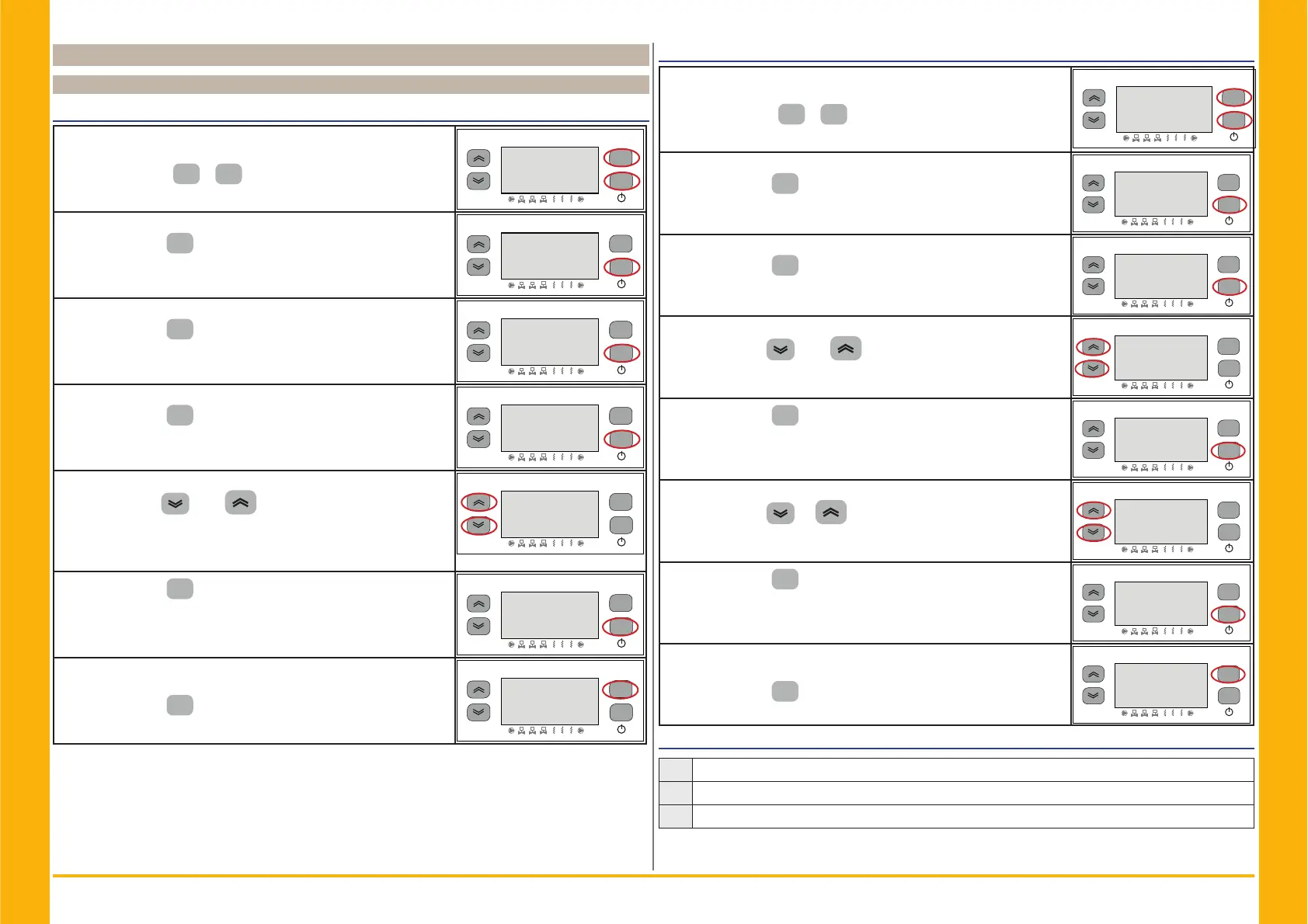
4.6 Change parameters (direct)
4.6.1 Chiller parameters “&)J”
Unit of measurement.
Switch ON the chiller “ON” using the Main disconnector switch QS,
and wait on display the indication “OFF”.
Press the buttons “
esc
” “
set
” together to enter on “D” parame-
ters.
esc
set
F1
F3
F2
1
2
3
1
2 3
2))
Parameter “3$U” appears.
Press the button “
set
” to enter.
esc
set
F1
F3
F2
1
2
3
1
2 3
3$U
Parameter “&IJ” appears.
Press the button “
set
” to enter.
esc
set
F1
F3
F2
1
2
3
1
2 3
&IJ
Parameter “$L” appears.
Press the button “
set
” to enter
esc
set
F1
F3
F2
1
2
3
1
2 3
$
The default value is "2))“ = °C
Use the buttons “
”and “ ” to select the unit of measur-
ment.
2)) : temperature = C°, Celsius ; pressure = Bar;
21 : temperature = °F, Fahrenheit; Pressure =PSI
esc
set
F1
F3
F2
1
2
3
1
2 3
))
Press the button “
set
” to confi rm.
esc
set
F1
F3
F2
1
2
3
1
2 3
Q
Automatically return to “$”
The parameter has now been stored.
Press the button “
esc
” to exit, three time.
esc
set
F1
F3
F2
1
2
3
1
2 3
$
Alarm management
Switch ON the chiller “ON” using the Main disconnector switch QS,
and wait on display the indication “OFF”.
Press the buttons “
esc
” “
set
” together to enter on “D” parame-
ters.
esc
set
F1
F3
F2
1
2
3
1
2 3
2))
Parameter “3$U” appears.
Press the button “
set
” to enter.
esc
set
F1
F3
F2
1
2
3
1
2 3
3$U
Parameter “&IJ” appears.
Press the button “
set
” to enter.
esc
set
F1
F3
F2
1
2
3
1
2 3
&IJ
Parameter “$L” appears.
Use the buttons “
”and “ ” to select “&)-” parameter.
esc
set
F1
F3
F2
1
2
3
1
2 3
$
Press the button “
set
” to enter.
esc
set
F1
F3
F2
1
2
3
1
2 3
&)-
The default value is "“
Use the buttons “
”e “ ” to select the alarm relay manage-
ment (par. 4.5.1- Tab.1)
esc
set
F1
F3
F2
1
2
3
1
2 3
Press the button “
set
” to confi rm.
esc
set
F1
F3
F2
1
2
3
1
2 3
Automatically return to “&)-”
The parameter has now been stored.
Press the button “
esc
” to exit, three time.
esc
set
F1
F3
F2
1
2
3
1
2 3
&)-
Tab.1 Alarm relay management (&)-.)
0
Relay normally deactivated, excited by an alarm.
1
Relay normally excited (also with control OFF), deactivated by an alarm.
2
Relay normally excited (only with control ON), deactivated by an alarm or with control OFF.


 To Next Page