English
15/20
ICEP080E-ICEP120E
4.8 Setting clock/date
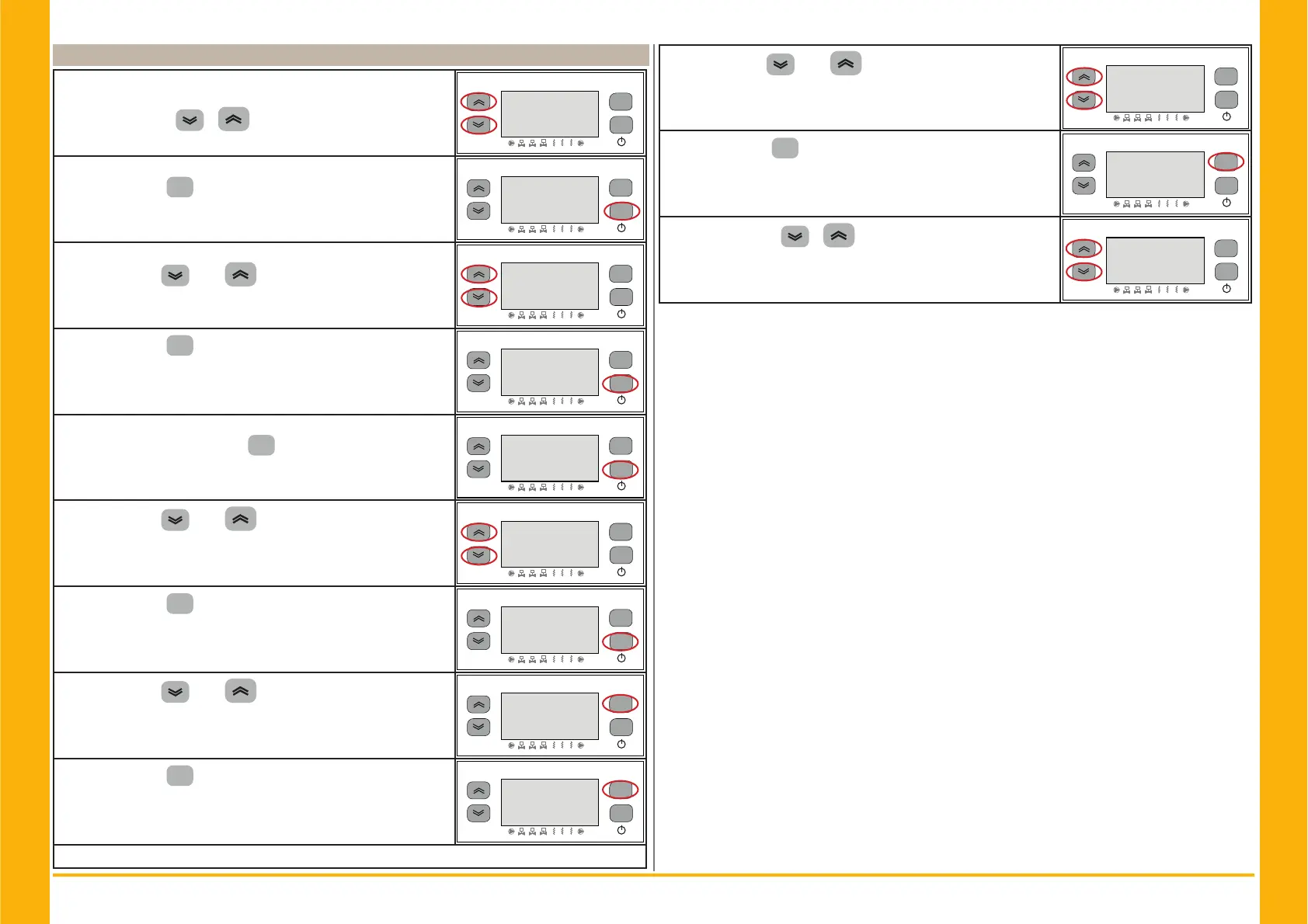
Switch ON the chiller “ON” using the Main disconnector switch QS,
and wait on display the indication “OFF”.
Press the buttons “
” “ ” together to enter on “Data/time”
menu.
esc
set
F1
F3
F2
1
2
3
1
2 3
2))
Parameter “)U((” appears.
Press the button “
set
” to enter.
esc
set
F1
F3
F2
1
2
3
1
2 3
)5((
Parameter “$L” appears.
Use the buttons “
”and “ ” to select “&/” parameter.
esc
set
F1
F3
F2
1
2
3
1
2 3
$L
Press the button “
set
” to enter.
esc
set
F1
F3
F2
1
2
3
1
2 3
&/
Parameter “+28U” appears.
Press for 5 seconds the button “
set
” .
Now the parameter is fl ashing.
esc
set
F1
F3
F2
1
2
3
1
2 3
+285
Use the buttons “ ”and “ ” to select date, hour or year to
change.
esc
set
F1
F3
F2
1
2
3
1
2 3
+2XU
Press the button “
set
” to enter.
esc
set
F1
F3
F2
1
2
3
1
2 3
<(DU
Use the buttons “ ”and “ ” to change the value (es:year)
esc
set
F1
F3
F2
1
2
3
1
2 3
Press the button “
set
” to confi rm.
esc
set
F1
F3
F2
1
2
3
1
2 3
<HDU
Use the buttons “ ”and “ ” to change another value
(es:date)
esc
set
F1
F3
F2
1
2
3
1
2 3
GDWH
Press the button “
esc
” to exit.
The parameter stops fl ashing.
esc
set
F1
F3
F2
1
2
3
1
2 3
GDWH
Press the buttons “ ” “ ” together to exit.
esc
set
F1
F3
F2
1
2
3
1
2 3
)UHH
! The memory of the “clock / date” has a maximum duration of three days, so if the controller is
left without power for more than three days, the data set hour / month / year are lost.
Adjust the clock at the start up of the machine, and whenever necessary.


 To Next Page