English
16/20
ICEP080E-ICEP120E
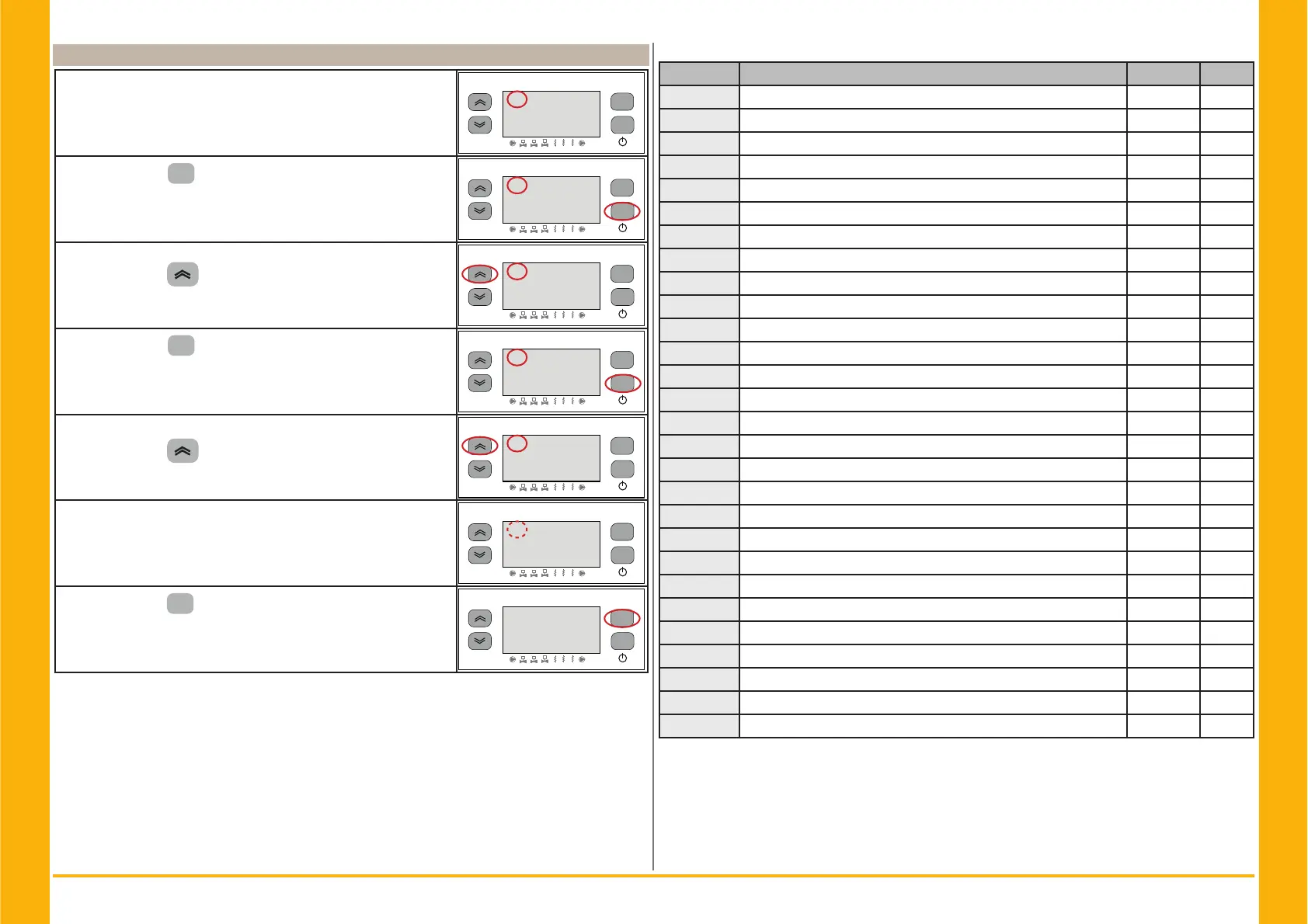
4.9 Alarm management
In the presence of an alarm, alarm code appear and a symbol at
the top left
Continuous = alarm presen
Flashing = warning present/ Alarm resetable
esc
set
F1
F3
F2
1
2
3
1
2 3
15.0
!
Press the button “
set
” to enter.
esc
set
F1
F3
F2
1
2
3
1
2 3
15.0
!
Parameter “$/+L” appears.
Press the button “
” to select “$/” parameter.
esc
set
F1
F3
F2
1
2
3
1
2 3
$/+L
!
Press the button “
set
” to enter.
esc
set
F1
F3
F2
1
2
3
1
2 3
$/
!
The code alarm appers es:“(5”.
Press the button “
” to check if there are more alarms pre-
sent.
esc
set
F1
F3
F2
1
2
3
1
2 3
(5
!
Repair the fault before performing the reset.
Once the fault has been repaired, the alarm symbol begins to
fl ash.
Now you can perform the reset.
esc
set
F1
F3
F2
1
2
3
1
2 3
(5
!
press the button “
esc
” until the alarm disappears.
esc
set
F1
F3
F2
1
2
3
1
2 3
15.0
Alarm/warning list
Code Description Action Reset
Er01
Sensor bt1 cutout or broken Alarm A
Er02
Sensor bt2 cutout or broken Alarm A
Er03
Sensor bt3 cutout or broken Alarm A
Er05
Sensor bt10 cutout or broken Alarm A
Er06
Sensor bP1 cutout or broken Alarm A
Er07
Sensor bP2 cutout or broken Alarm A
Er08
High pressure circuit 1 Alarm A
Er09
Low pressure circuit 1 Alarm A
Er10
High pressure circuit 2 Alarm A
Er11
Low pressure circuit 2 Alarm A
Er12
High temperature bt1 Alarm A
Er13
Low temperature bt1 Alarm A
Er14
High temperature bt2 Alarm A
Er15
Low temperature bt2 Alarm A
Er16
High temperature bt3 Alarm A
Er17
Low temperature bt3 Alarm A
Er18
Compressor thermal protection 1 Alarm A
Er19
Compressor thermal protection 2 Alarm A
Er20
Pump thermal protection 1 Alarm A
Er21
Pump thermal protection 2 Alarm A
Er22
Low water level / Differential pressure switch Alarm A
Er23
Phase monitor Alarm A
Er24
Expansion broken or disconnected Alarm A
Er25
Exceeded compressor 1 working hours Warning A
Er26
Exceeded compressor 2 working hours Warning A
Er27
Exceeded unit working hours Warning A
Er28
Clock Memory Warning A
Er29
Chiller confi guration Warning A
!


 To Next Page