Default IP Settings 14
SmartNode 200 User Manual 1 • SN200 Series Quick Start
Default IP Settings
ETH 0/0:
• 192.168.200.10 | 255.255.255.0
• DHCP Client
Default Login
Username: admin
Leave the password empty
Press the Enter key after the password prompt.
Analog Port Pinout
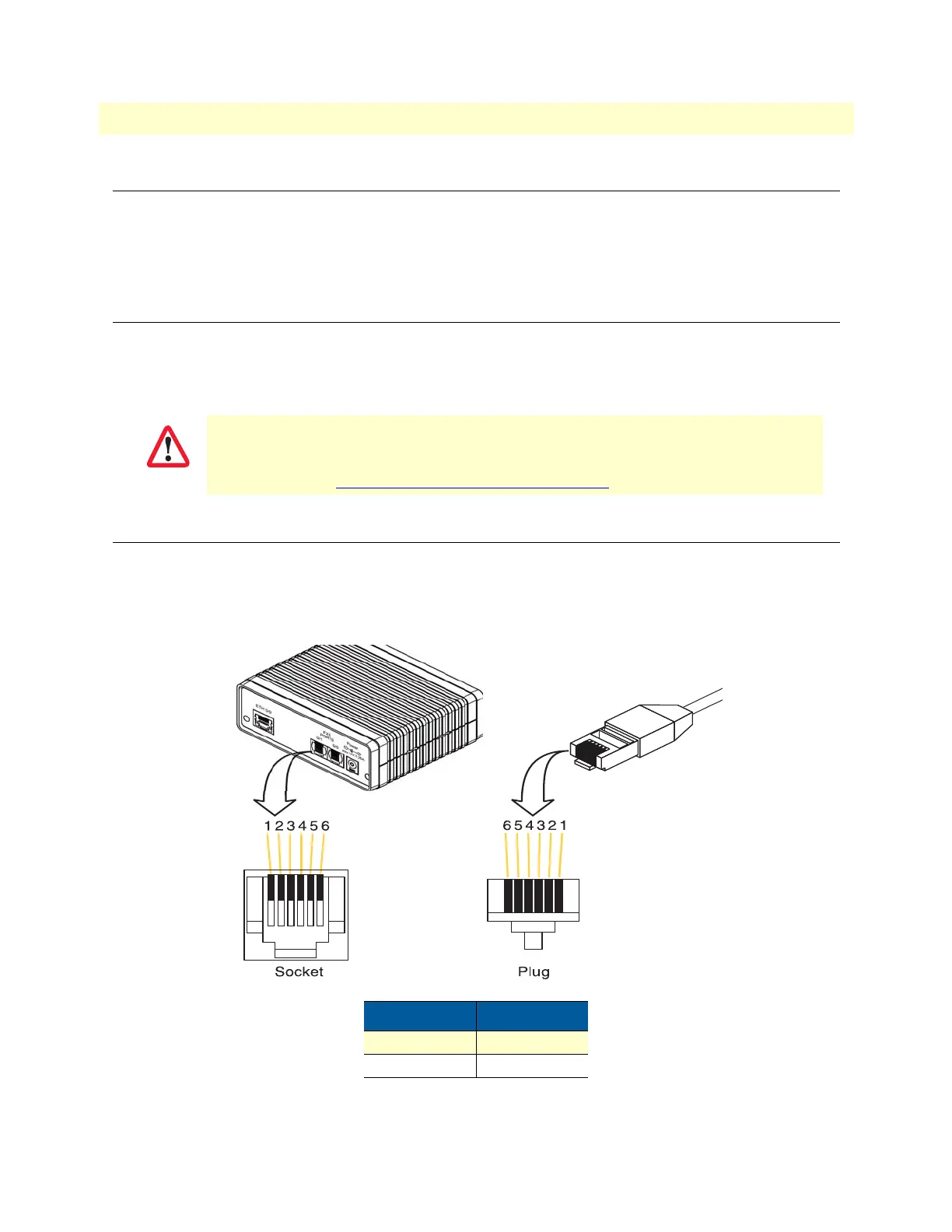
FXS ports use an RJ-11 connector with 6 positions. The middle 2 positions (3 and 4) are used as follows:
Note Pins not listed are not used.
You are responsible for creating a new administrator account to maintain system secu-
rity. Patton Electronics accepts no responsibility for losses or damage caused by loss or
misuse of passwords. Refer to Chapter 4 “Accessing the CLI”, section “Selecting a secure
password” in the
Trinity Command Line Reference Guide for more details.
Pin Signal
3 Ring (-)
4 Tip (+)


 To Next Page