Resetting the SmartNode device when it is operating and the Power LED is lit 55
SmartNode 200 User Manual F • Reset Button Functions
Resetting the SmartNode device when it is operating and the Power LED
is lit
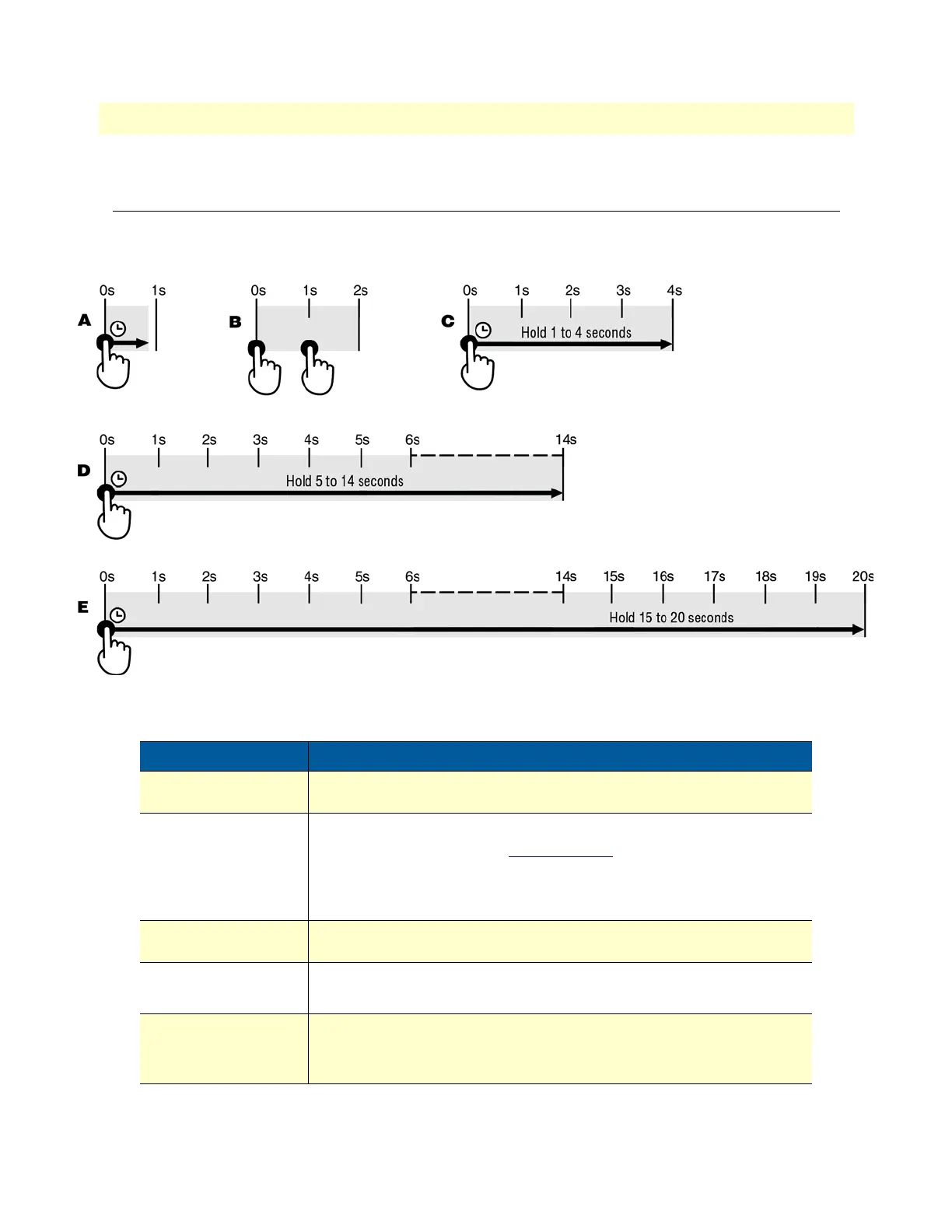
The Reset button has the following behaviors depending on how many seconds (see figure 17) the button is
pressed (see table 9 for the results from pressing the button).
Figure 17. Reset button periods (in seconds) for performing actions
Table 9. Results from pressing the Reset button
Period Action
A
(less than 1 second)
Reboot device
B
(press twice with
1-second gap between
presses)
Patton Cloud On-boarding procedure. Do the following:
1. Log into Patton Cloud at https://patton.io.
2. Click on Devices.
3. Click on Register Device(s) to register the SmartNode device.
C
(1 to 4 seconds)
No action
D
(5 to 14 seconds)
• Erase startup-config
• Reboot (indicated by the slow blinking of all LEDs
E
(15 to 20 seconds)
• Factory reset which erases entire flash memory except for shipping-
config, shipping wizards, default root CAs and software licenses
• Reboot (indicated by fast blinking of all LEDs)


 To Next Page