Machine Controls
Safety: Always wear appropriate PPE when operating this machine.
Operator Control Station
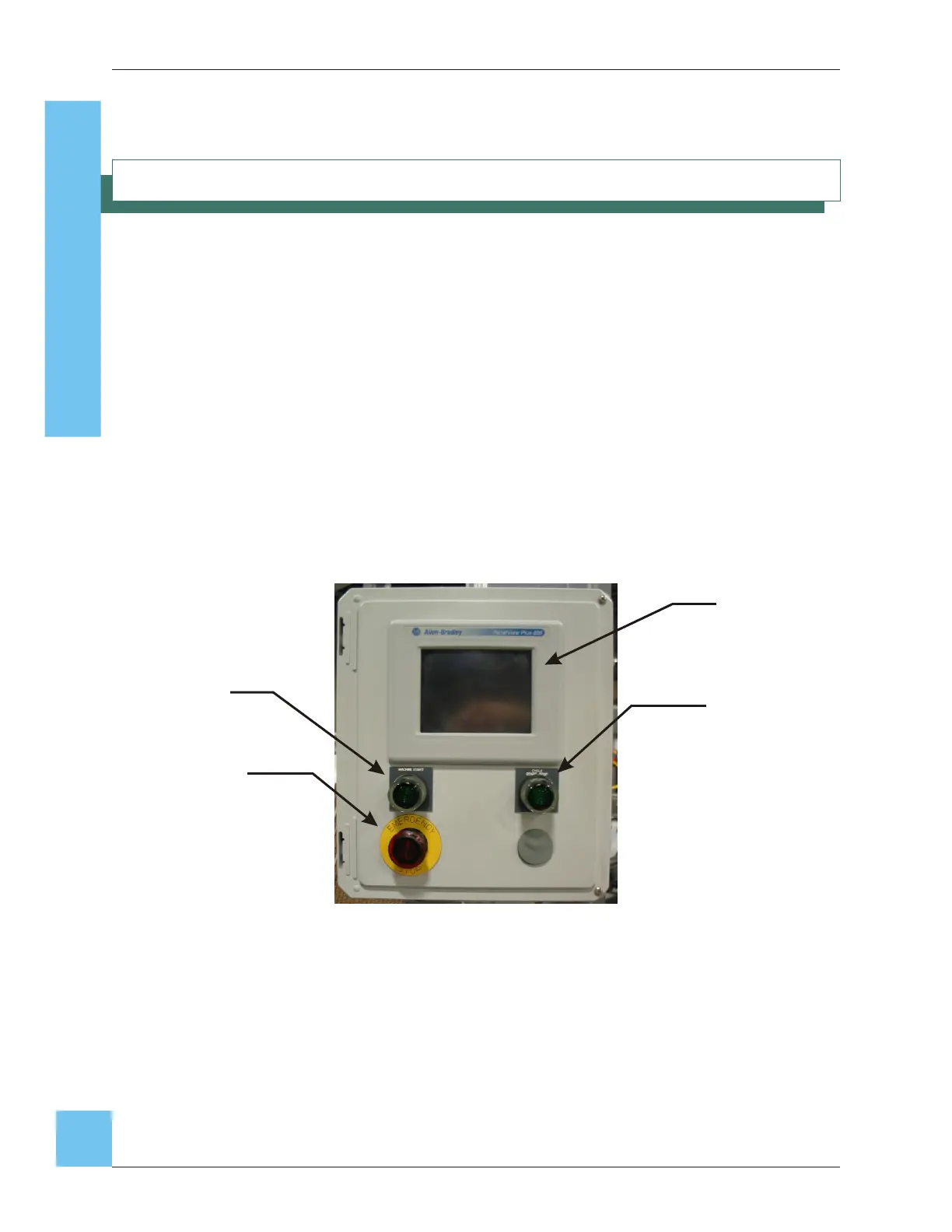
The operator control station has the controls that start or stop machine operation and stop
the Case erector in the event of an emergency.
A controlled Emergency Stop button (E-stop) is located on the right of the Operator
Control Station. When the E-Stop button is pushed, power to the machine is disrupted and
the machine immediately stops. The E-stop button must be pulled back out before the
machine can be restarted.
The green Machine Start button located on the left of the Operator Control Station starts
the machine.
The green Cycle Start/Stop button starts the machine cycling when pushed. When the
Cycle Start button is pushed again, the machine will cycle twice with the vacuum off
before coming to a complete stop. This will complete any cases in process.
CE35-T Case Erector Operations Manual
3/2/2010 M-CE35T-2c Horiz Mag
34
noitarepO enihcaM
Fig. 26: Operator Control Station
PanelView
Cycle
Start/Stop
Button
Emergency
Stop Button
Machine Start


 To Next Page