
 Need help?
Do you have a question about the Pearson CE35-T Case and is the answer not in the manual?
Defines operator message boxes used for important information, cautions, and warnings.
Describes the pullout magazine configuration, capacity, and included parts.
Details factory installation and shipping of the magazine section.
Refers to safety guidelines in the main CE35-T Case Erector manual.
Refers to changeover procedures in the main CE35-T Case Erector manual.
Provides solutions for common issues like magazine operation and blank feeding.
Details features of Allen-Bradley Beacon Indicator Lights, including horns and light banks.
Covers customer-specific layouts and Telemecanique beacon banks.
Instructions for remounting and assembling the beacon indicator light.
Refers to machine safety guidelines in the main manual.
Explains common configurations and functions of beacon light colors and horns.
Guides on how to fix lights that fail to illuminate or flash.
Explains the Dual Speed option utilizing an inverter duty motor for preset speeds.
States that this option is factory installed.
Refers to machine safety guidelines in the main manual.
Details how to select and adjust speeds using the HMI.
Refers to troubleshooting procedures in the main manual.
Discusses operating the machine safely with guards and protective devices.
Explains how interlocks shut down operation when doors are opened.
Warns about crush hazards and securing the set-up arm during servicing.
Outlines general safety practices like inspection, power disconnection, and PPE.
Details pneumatic and electrical energy isolating valves for safe maintenance.
Instructions for using emergency stop buttons and following shutdown procedures.
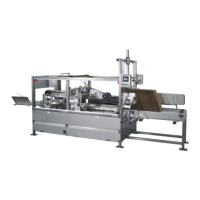
Identifies key assemblies like the horizontal magazine, adhesive station, and discharge.
Provides details on erected and knocked-down case size ranges.
Lists voltage, phase, frequency, and KVA requirements.
Instructions for inspecting the machine for shipping damage and identifying parts.
Steps for properly leveling the machine using leg levelers.
Details electrical power requirements and connection procedures.
Steps to perform before starting the machine, including motor rotation and safety checks.
Describes the step-by-step process of case erection, from blank stacking to sealing.
Explains the operator control station, including start, stop, and emergency stop buttons.
Provides steps for loading blanks into the magazine and preparing for operation.
Details the procedure for safely starting the machine, including checks and button presses.
Lists checks to ensure proper loading, adhesive system, and sensor function.
Outlines emergency and normal shutdown procedures for the machine.
Safety procedures related to the set-up arm during jams or emergencies.
Explains setting machine constants like the trailing minor flap kicker position.
Covers adjustments for magazine side guides to control blank placement.
Procedures for adjusting the pressure sensitive tape unit.
Instructions for adjusting the case discharge stop position.
Describes the PanelView Plus 600 as an electronic interface for operator interaction.
Lists and explains various HMI screens like Alarm Description and Alarm History.
Explains the screen that collects alarm frequency and cumulative active time.
Details how to access and change setup values for various machine points.
Describes the primary display screen for normal machine operation.
Explains how to manually manipulate machine functions like Dry Cycle and Energy Saver.
Guidelines for regular cleaning to ensure safe and trouble-free operation.
Provides a schedule for hourly, daily, and weekly maintenance tasks.
Details lubrication types and frequencies for various machine components.
Possible solutions for when the machine fails to start.
Troubleshooting steps for motor rotation and acceleration problems.
Steps to check if the Human-Machine Interface cable is loose or unplugged.
Solutions for when the flight chain fails to run, including debris and sprocket checks.
Checks for magazine size guides, bearings, pneumatics, and adjustments.
Solutions for when blanks from the magazine feed do not pull off correctly.
Steps to resolve issues when cases fail to set up or are damaged.
Procedures for clearing jams and checking alarm banners on the HMI.
Step-by-step guide for threading the tape head with a new tape roll.
Instructions for adjusting the brake to prevent tape roll over-spin.
Guide on adjusting tape side-to-side position using the centering adjustment.
Steps to increase or decrease tape tension using the adjustment roller.
Procedure for checking the hopper pullout assembly and flight timing.
Instructions for selecting and entering a new case size via the PanelView.
Steps for removing and replacing the primary belt on the machine.
Information on determining if part removal is necessary and general reassembly tips.
Details the information required to order replacement parts from Pearson Packaging Systems.
Steps for ordering parts under warranty and return authorization procedures.
Explains the layout and usage of the Bill of Material for identifying parts.
 General
| Brand | Pearson |
|---|---|
| Model | CE35-T Case |
| Category | Industrial Equipment |
| Language | English |

 To Next Page