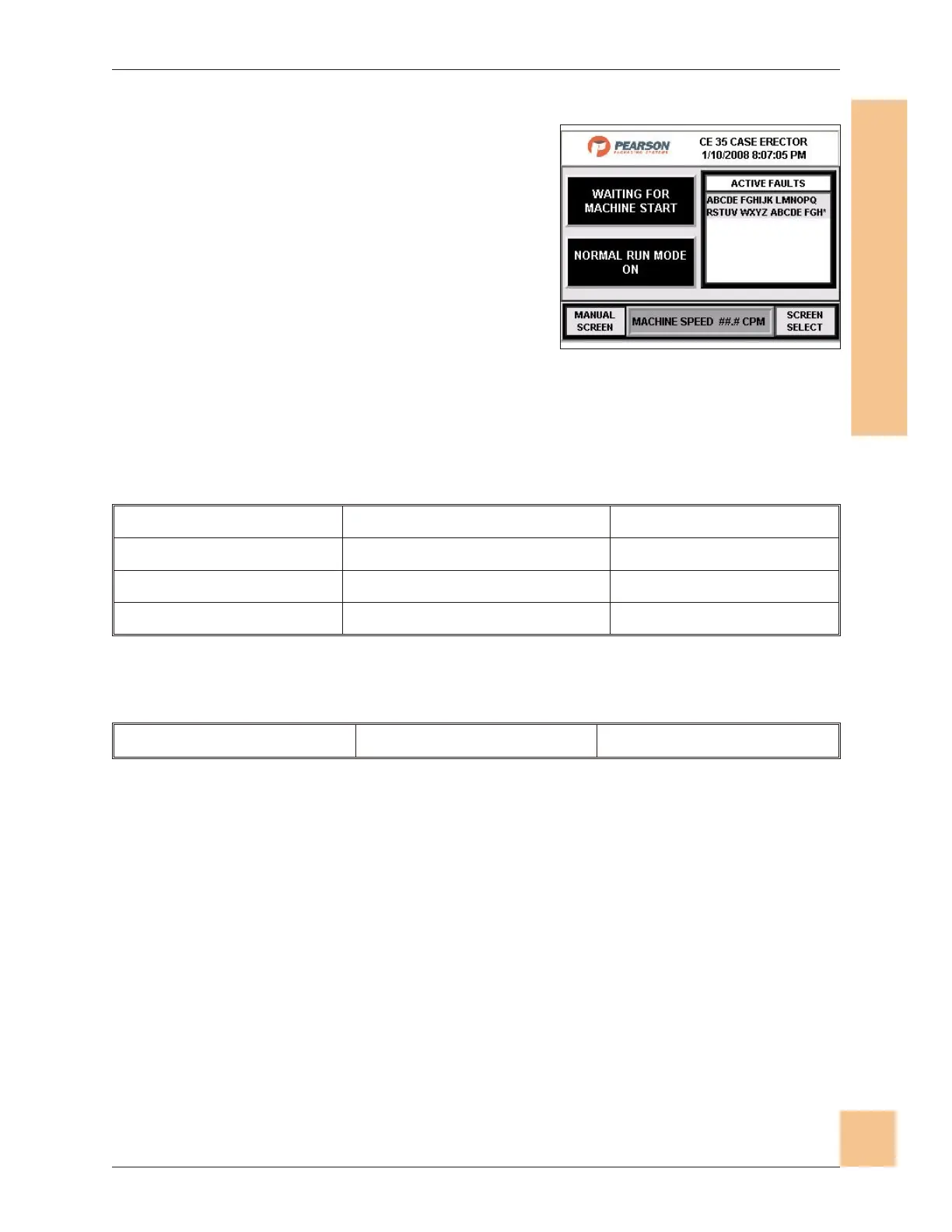
Main Operator Screen
1. The Main Operator Station screen is the
display shown on the HMI during
normal machine operation.
2. When first accessing the HMI the Log In
screen will appear. Enter your log in
information. Once the operator is logged
in the screen in Fig. will appear.
3. The message display at the top left is
variable, and gives current necessary
information. The messages are listed
below.
4. The message display on the right lists active faults.
No Control Power Discharge High Level Magazine Low Level
Waiting for Machine Start Magazine Depleted Tape Low Level
Waiting for Cycle Start Emergency Stop Depressed Tape Depleted
Machine Running Guard Door Open
5. The current machine mode is displayed at the center left of the screen. The
machine modes are listed below.
Normal Run Mode On Dry Cycle Mode On Manual Mode On
6. Press Manual Control to go to the Manual Control Screen.
7. Press Screen Select to go to the Screen Select screen.
Operations Manual CE35-T Case Erector
M-CE35T-2c Horiz Mag 3/2/2010
Human-Machine Interface
(HMI)
75
Fig. 71: Main Operator Screen


 To Next Page