BG 5195 BEN / A (2011-05) TPG261.oi 97
If your TPG 261 firmware needs updating, e.g. for
implementing a new gauge type, please contact
your local Pfeiffer Vacuum service center.
Most of the settings you may have defined in the Pa-
rameter and Test mode will not be affected by a firm-
ware update. To be sure, note your parameter settings
before upgrading the firmware (→ 96).
n Turn the TPG 261 off.
o Connect the TPG 261 with the serial COM1
(COM2) interface of your PC via a 9-pin D-Sub
extension cable (→ 23) (the firmware of the
TPG 261 cannot be loaded from a Mac).
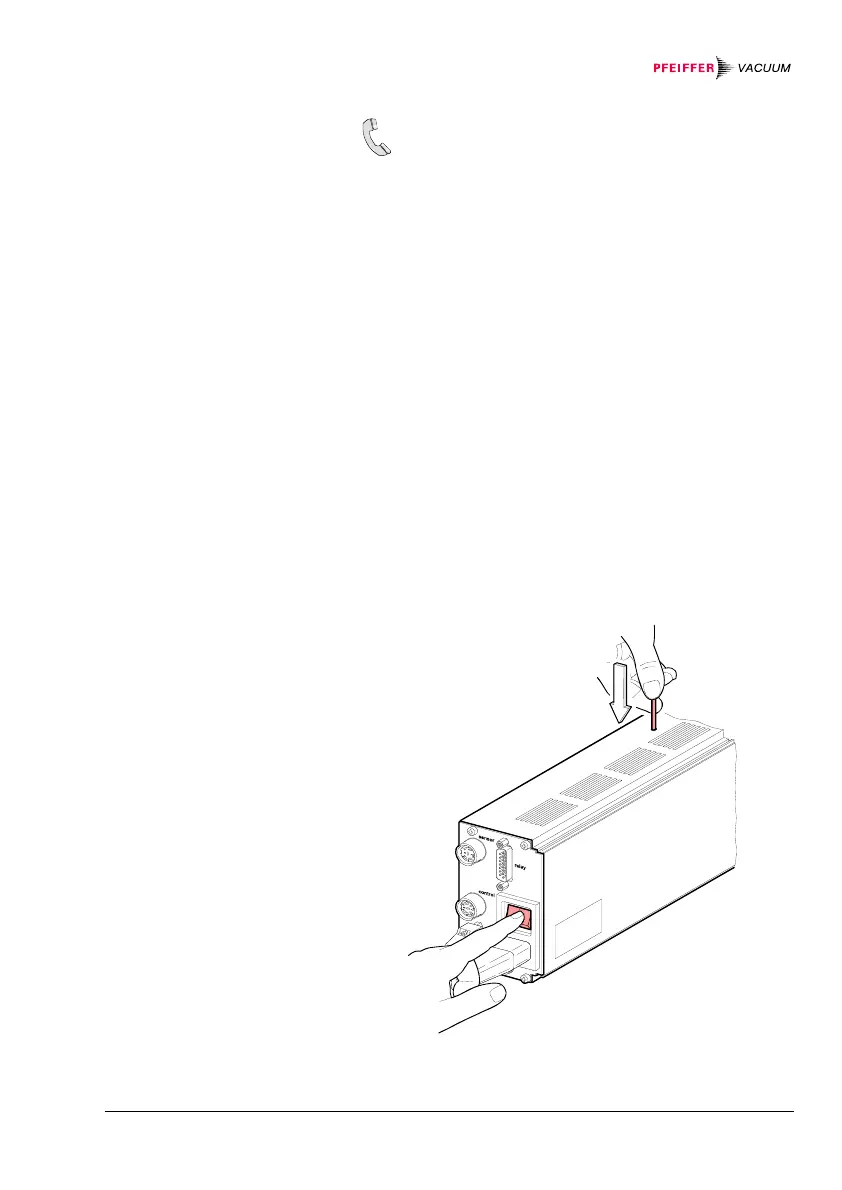
p With a pin (ø<2 mm), depress the switch on the
top of the unit, under the housing, and turn the
TPG 261 on.
After power on, the display remains dark.
C: Firmware Update
User parameters
Preparing the TPG 261
for a program transfer


 To Next Page