21 | P a g e
Analog Constant Pressure with Potentiometer and HOA Switch
The drives can be configured with a HOA switch that allows the user to either turn the motor off, control
motor speed with a potentiometer, or operate in constant pressure mode. Access to the keypad is not
required to operate in this mode.
1. Using the keypad, set the value of parameter SYSTEM CONFIG to 4. See Table 16 for details.
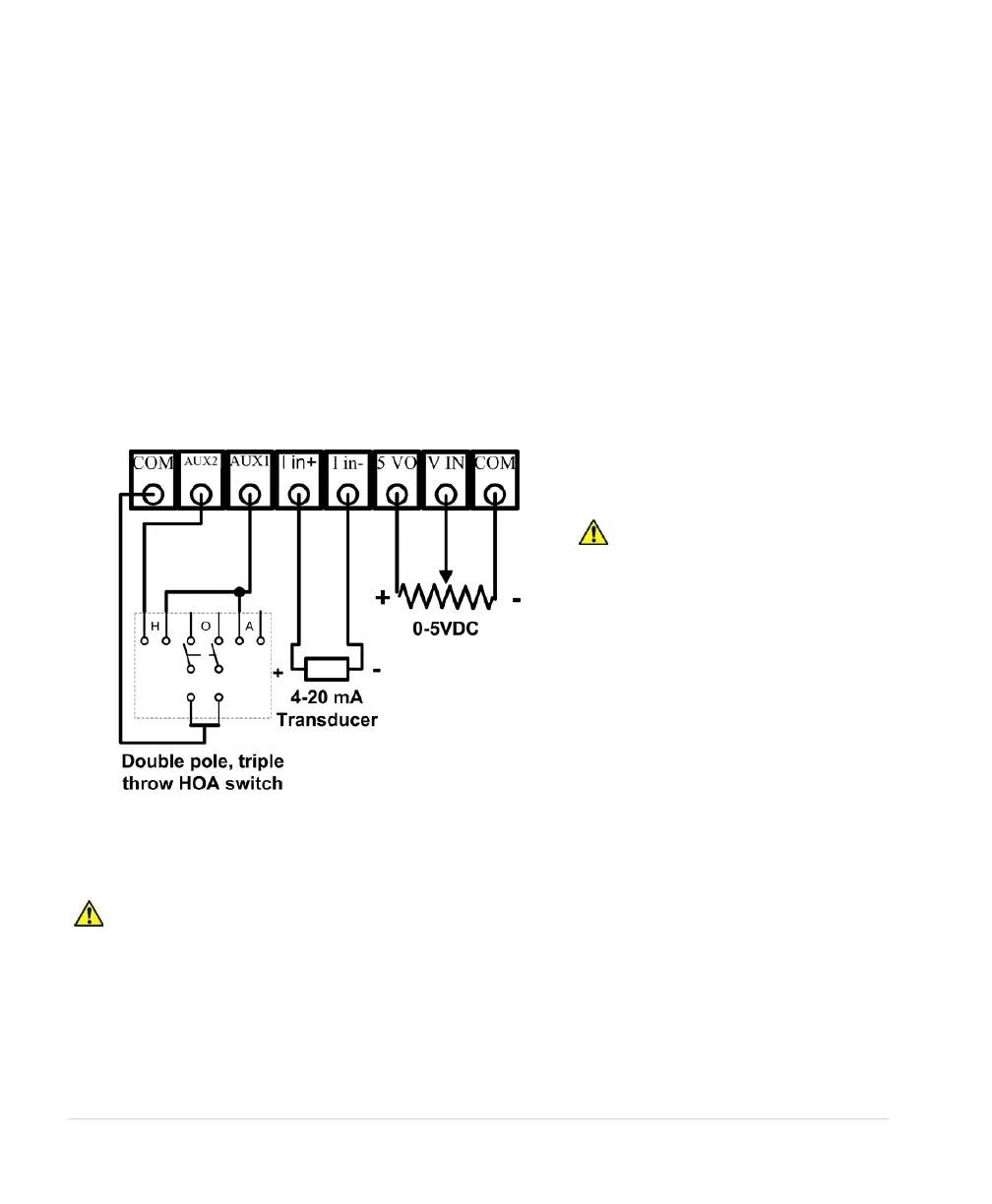
2. Connect the potentiometer and 4-20 mA transducer as in Figure 17 and Figure 18.
3. Connect a double pole, triple throw switch to AUX1 and AUX2 as shown in Figure 19.
4. Using the keypad, set the drive to operate in AUTO mode.
5. AUX1 must be closed to run.
The mechanical HOA switch allows the user to select between OFF, manual speed control with the
potentiometer, or analog constant pressure. In the H (manual) position, motor speed is controlled by the
potentiometer. In the O (off) position the motor will stop. In the A (auto) position motor speed will be
controlled by constant pressure parameters.
Figure 19 - Connections for Analog Constant Pressure with Potentiometer and HOA Switch
3.5 Installing Power Cables
CAUTION: Continuous metal conduit should be used on all power cables to reduce
electromagnetic interference. Conduit must be grounded to the drive enclosure and the motor case.
Mitigating Electromagnetic Interference (EMI)
Devices that utilize power switching electronics, such as SD & 2XD drives, produce high frequency
emissions commonly known as electromagnetic interference (EMI). These emissions can be conducted
on power cables or radiated through the air. Conducted and emitted noise can sometimes interfere with
CAUTION: When the HOA
switch is in the manual (H)
position, the drive will ignore the
status of AUX2 Control Terminal.



 To Next Page