20
LOCKING THE CHAMBER TEMPERATURE SETTING
The chamber temperature setting can be locked to avoid accidental changes. When the lock is ON, a
change of chamber temperature setting is not accepted even if the key on the control panel is operated.
Initial setting (factory setting): lock OFF
Display Lock status Setting of chamber temperature
L 0 Lock OFF Enabled to change
L 1 Lock ON Disabled to change
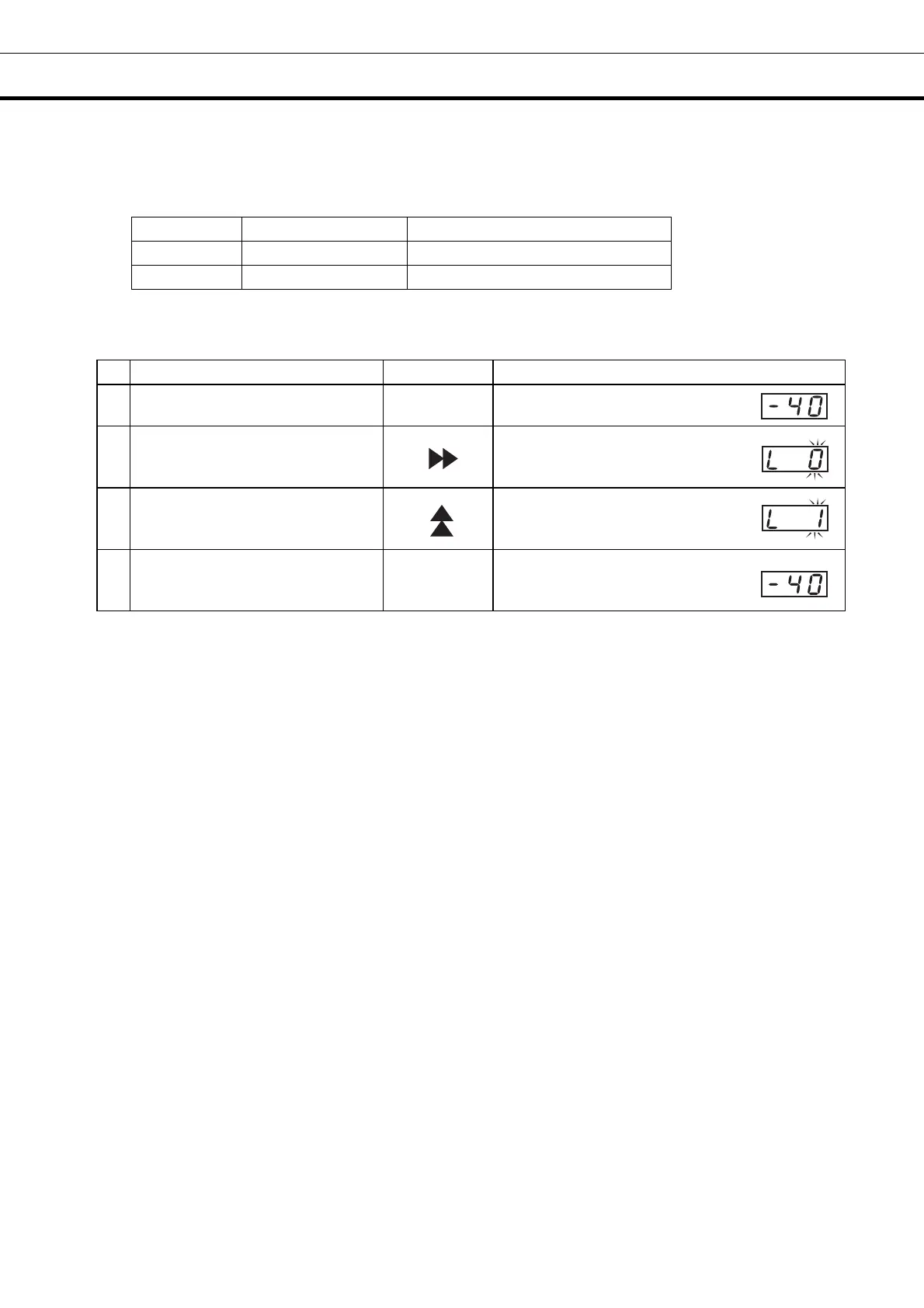
For example, to change the lock for chamber temperature setting from OFF (factory setting) to ON
(The following is only an example. Operate the key according to the desired lock status.)
Operation Key operated Display after operation
-----
The current chamber temperature is
displayed.
1 Press the scroll key for 5 seconds.
The current chamber temperature
changes to L 0 and the figure(0)
blinks.
2 Press the up arrow key once.
The display changes from L 0 to L 1.
3 Press the “Set” key once.
SET
The lock is set to ON and the current
chamber temperature is displayed.
The unit will return from setting mode to temperature display mode automatically after 90 seconds if no
key is operated (auto-return function). In this case, the setting is not changed.


 To Next Page