14
FREEZER COMPONENTS
Control panel
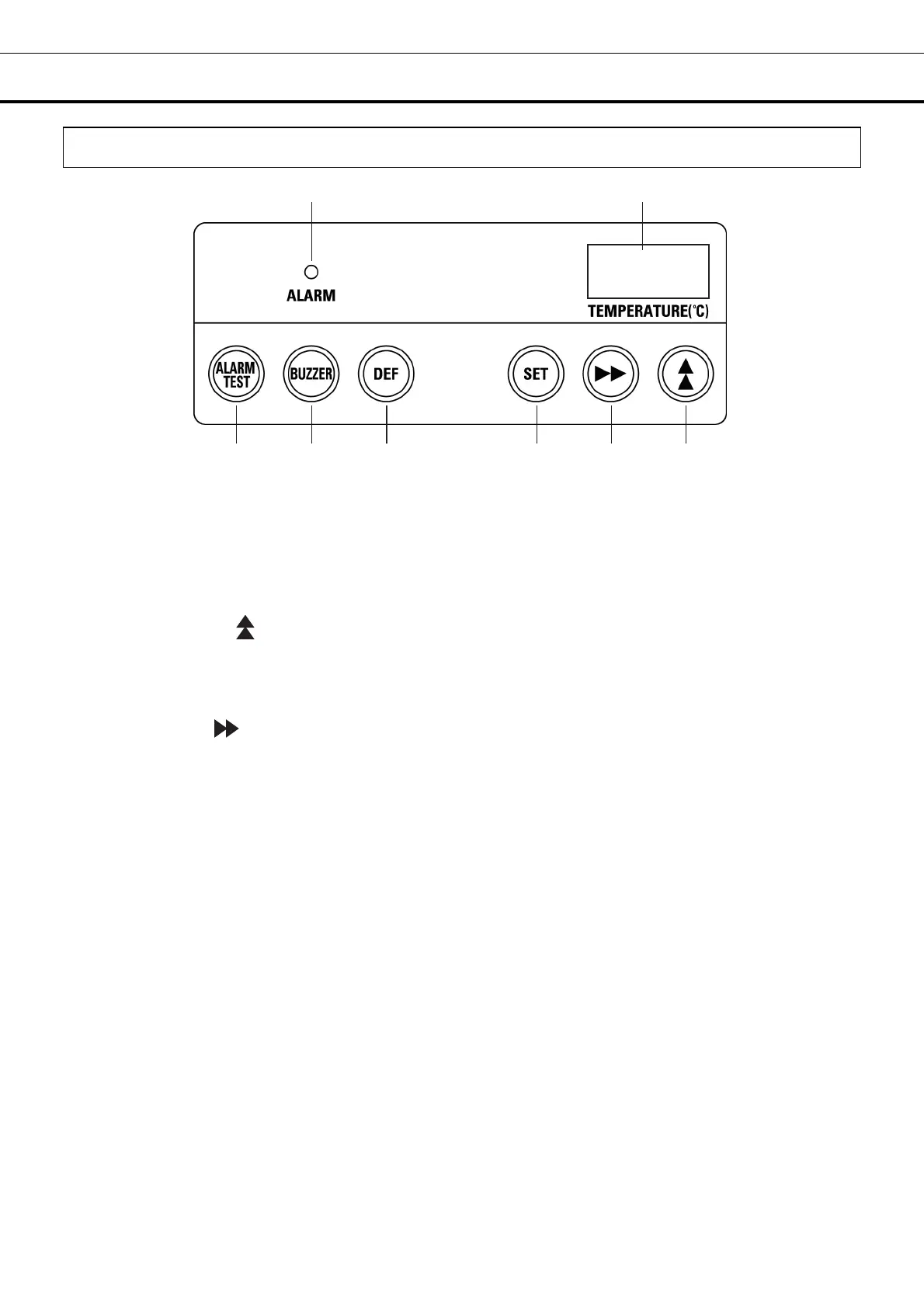
1. Alarm indicator (ALARM): The red LED lamp blinks in the event of an alarm [page 28].
2. Temperature display: In normal operation, this displays the current chamber temperature. During
temperature alarms, the display blinks [page 26]. When a self-diagnostic warning is triggered, a code is
displayed here [page 27].
3. Up arrow key ( ): During “temperature display mode”: pressing this key for more than 5 seconds
activates the setting mode. During “setting mode”: pressing this key allows the (blinking) figure on the
temperature display to be changed [pages 19 - 24]. The lock for the chamber temperature setting can
also be set to ON or OFF by pressing this key [page 20].
4. Scroll key ( ): During “temperature display mode”: pressing this key for more than 5 seconds
enables “locking of the chamber temperature setting” [page 20]. During “setting mode”: pressing this key
moves the user between the different (blinking) digits to be entered on the temperature display [pages 19
- 24].
5. Set key (SET): Pressing this key activates the chamber temperature setting mode [page 19]. Press
this key to enter the required value during the setting procedure [pages 19 - 24].
6. Defrost key (DEF.): At “temperature display mode”; pressing this key for more than 5 seconds will stop
freezer operation. Pressing this key again will resume freezer operation [page 29].
7. Buzzer stop key (BUZZER): The buzzer is silenced by pressing this key when the alarm indicator
blinks and the buzzer sounds.
The buzzer sounds again after 30 minutes (initial setting) even if the buzzer is stopped by pressing the
buzzer stop key (BUZZER) when the same alarm status continues.
The alarm indicator blinks and the buzzer sounds when a different alarm is triggered even after the
buzzer stop key (BUZZER) has been pressed.
8. Alarm test key (ALARM TEST): This key is used to check the operation of buzzer, alarm indicator and
remote alarm terminal [page 28].
“temperature display mode”: the status when the current chamber temperature is displayed on the
temperature display.
“setting mode”; the status when the input on the temperature display can be changed by pressing the
up arrow key for more than 5 seconds.
8 7 6 5 4 3
1 2


 To Next Page