21
SETTING THE ALARM TEMPERATURE
Setting the high-temperature alarm
An abnormality (chamber temperature rise) is indicated by the alarm indicator, and the chamber
temperature display blinking, and the buzzer sounding (15 minutes after blinking) if the chamber
temperature exceeds the set value of the high-temperature alarm. Always set the high-temperature alarm
to protect stored items from damage resulting from an increase in temperature.
Setting range of work temperature for high temperature alarm:
Between 5
o
C and 15
o
C higher than the chamber set temperature
Initial setting (factory setting): 10
o
C higher than the chamber set temperature
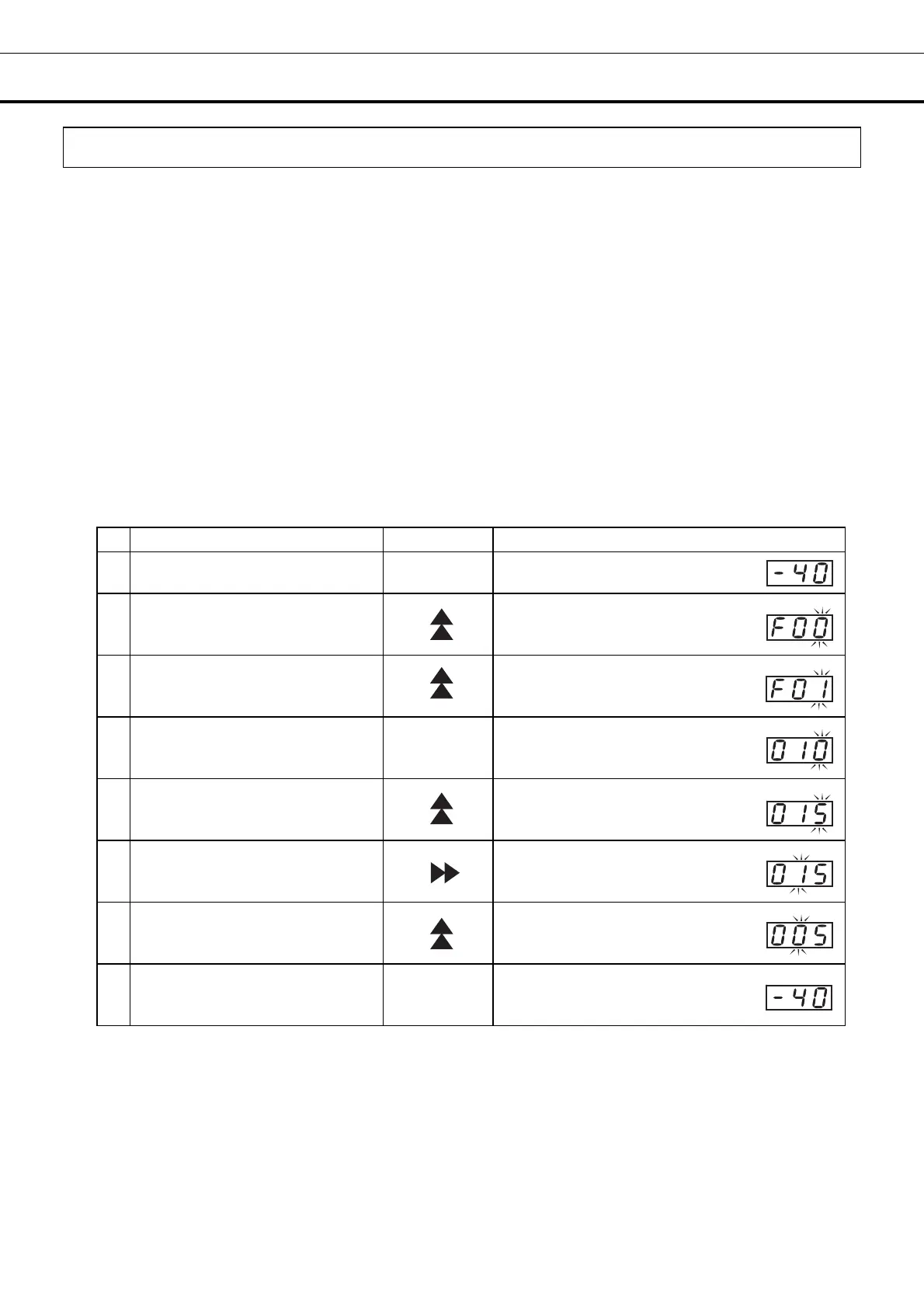
For example, to change the alarm temperature from chamber set temperature plus 10
o
C (i.e. the
high-temperature alarm works at 10
o
C higher than the chamber set temperature) to chamber set
temperature plus 5
o
C (i.e. the high-temperature alarm works at 5
o
C higher than the chamber set
temperature)
(The following is only an example. Choose the actual setting according to the desired alarm
temperature.)
Operation Key operated Display after operation
1
-----
The current chamber temperature is
displayed.
2
Press the up arrow key for 5
seconds.
The current chamber temperature
changes to function code F00 and
the right-hand figure (0) blinks.
3 Press the up arrow key once.
The display changes from F00 to F01.
4 Press the “Set” key once.
SET
The current setting (010) is displayed
and the right-hand figure (0) blinks.
5
Press the up arrow key (as many
times as needed to reach the
desired figure).
The display changes from 010 to 015.
6 Press the scroll key once.
The second figure 1 blinks.
7
Press the up arrow key (as many
times as needed to reach the
desired figure).
The display changes to 005 from 015.
8 Press the “Set” key once. SET
The new setting of the high-temperature
alarm is memorized and the current
chamber temperature is displayed.
The unit will return from setting mode to temperature display mode automatically after 90 seconds if no
key is operated (auto-return function). In this case, the setting is not changed.


 To Next Page