23
Go to cover page
DDC Instructions
170B6 LCD
4). Click (Write EDID) icon from the tool bar to write DDC data. then
the screen will be black for 2-3 seconds,then the screen recovers,
and "ATTENTION NO VIDEO INPUT"will come on the screen of the
monitor,wait for 20-30 seconds ,DDC data will be finished Writing.
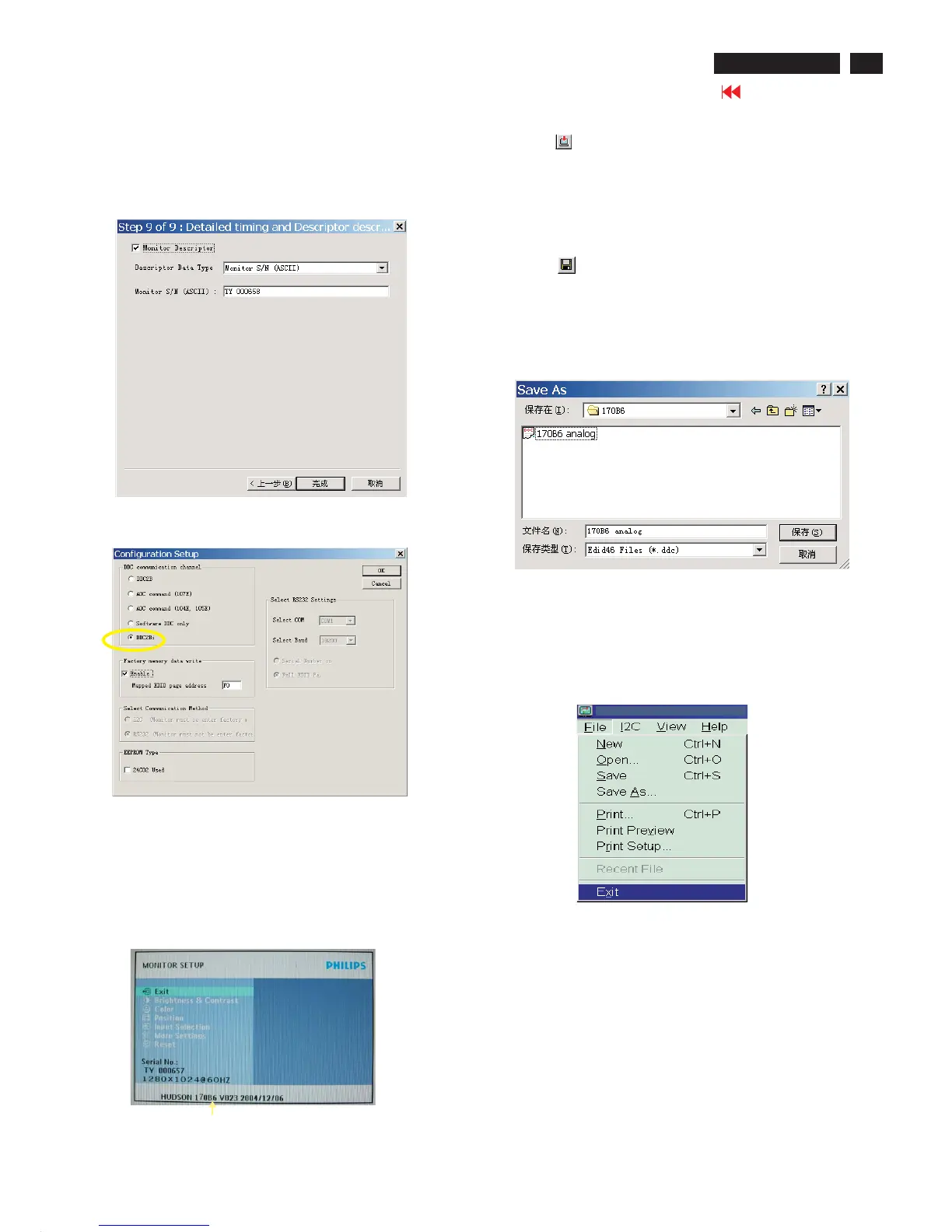
Fig. 24
3) Push Menu to exit OSD menu.""
Fig. 22
8. Click Next , bring up Fig. 22.
- Click Finish to exit the Step window.
- Serial number can be filled up at this moment (for example, TY
000658).
NOTE: You must modify the Serial NO. In step 9, otherwise the Serial NO.
In OSD Couldn't be modified correctly.
Step 5: Write DDC data
1. Configuration should be as Fig. 23. And press OK.
Fig. 23
2. Click Save.
Step 7: Exit DDC program
Pull down the File menu and select Exit as shown in Fig. 26.
Step 6: Save DDC data
Sometimes, you may need to save DDC data as a text file
for using in other IC chip. To save DDC data, follow the
steps below:
1. Click (Save) icon (or click "file"-> "save as") from the tool
bar and give a file name as shown in Fig. 25.
The file type is EDID46 file (*.ddc) which can be open in
WordPad. By using WordPad, the texts of DDC data & table
(128 bytes, hex code) can be modified. If DDC TEXTS &
HEX Table ar completely correct, it can be saved as .ddc flie
to re-load it into DDC IC for DDC Data application.
Fig. 26
Step 8: Turn off the monitor, exit the factory mode.
Fig. 25
2. Access Factory Mode
1). Turn off monitor.
2).
3).Press "OK" button, wait until the OSD menu with Characters
"HUDSON 170B6 V023 2004/12/06" (below OSD menu) come
on the Screen of the monitor(See Fig.24).
[Push "AUTO" & "OK" buttons at the same time and hold them]
+[Press "power" button untill comes out "Windows screen" ]
=> then release all buttons
Factory Mode
Indicator



 To Next Page