33
Go to cover page
ISP Instructions
170B6 LCD
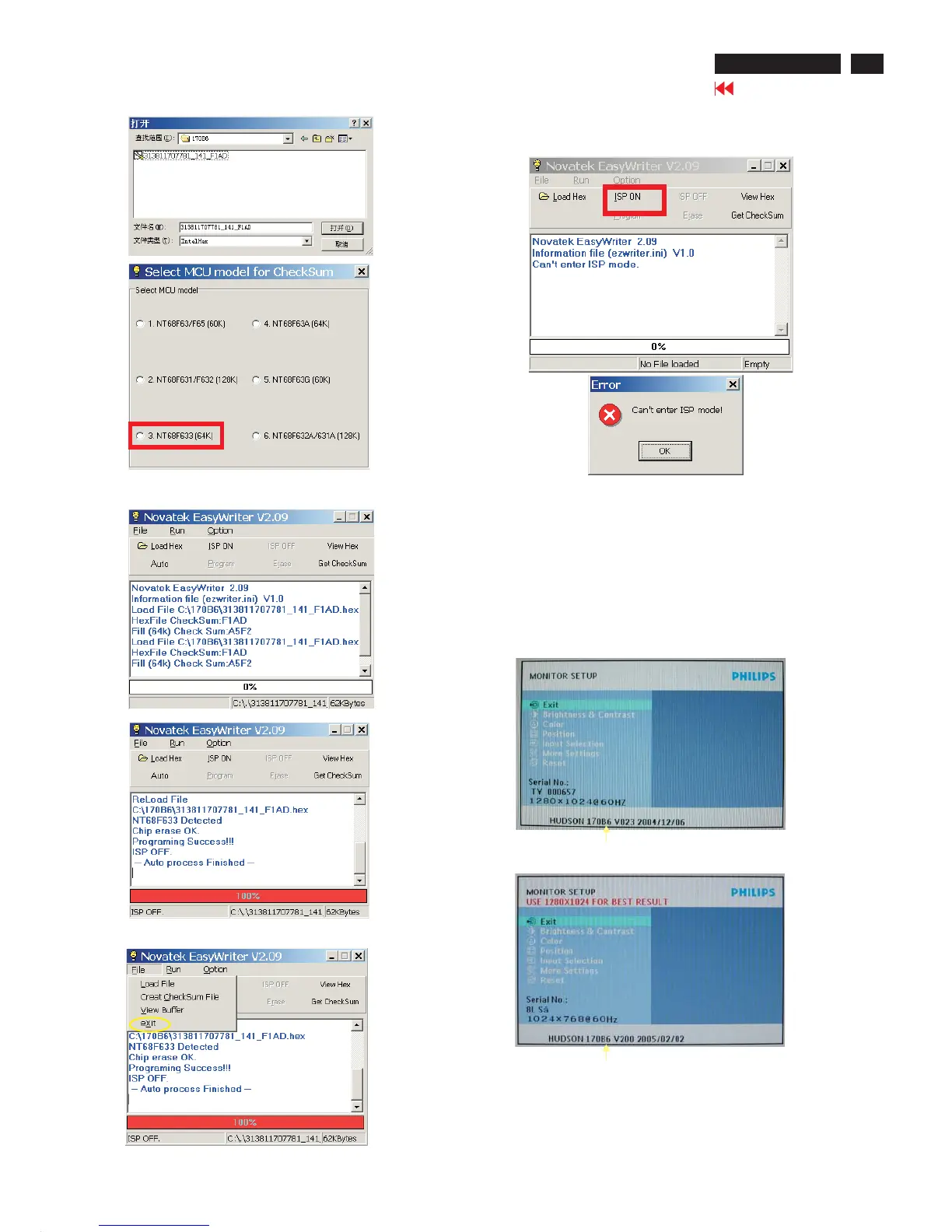
Fig. 8
If there is a warring message coming as shown in Fig 13. , you
have to check the AC power, Video cable, or Novatek MCU.
Fig. 9
Fig. 10
Fig. 11
Fig. 13
5 Press the file --> exit to end program , as shown in Fig. 12.
4) Turn off the monitor, exit the factory mode.
Fig. 14
6. Check the firmware version
1). Turn off monitor.
2).
3).Press "OK" button, wait until the OSD menu come on the
Screen of the monitor.You will find, after upgrade, the version
have already changed from The former "HUDSON 170B6 V023
2004/12/06" to the Present "HUDSON 170B6 V200 2005/02/02"
as shown in Fig. 14 and Fig. 15.
[Push "AUTO" & "OK" buttons at the same time and hold them]
+[Press "power" button untill comes out "Windows screen" ]
=> then release all buttons
Factory Mode
Indicator
4 Press the AUTO to running program , the firmware be updated
as shown in Fig. 10~11.
Fig. 12
Factory Mode
Indicator



 To Next Page