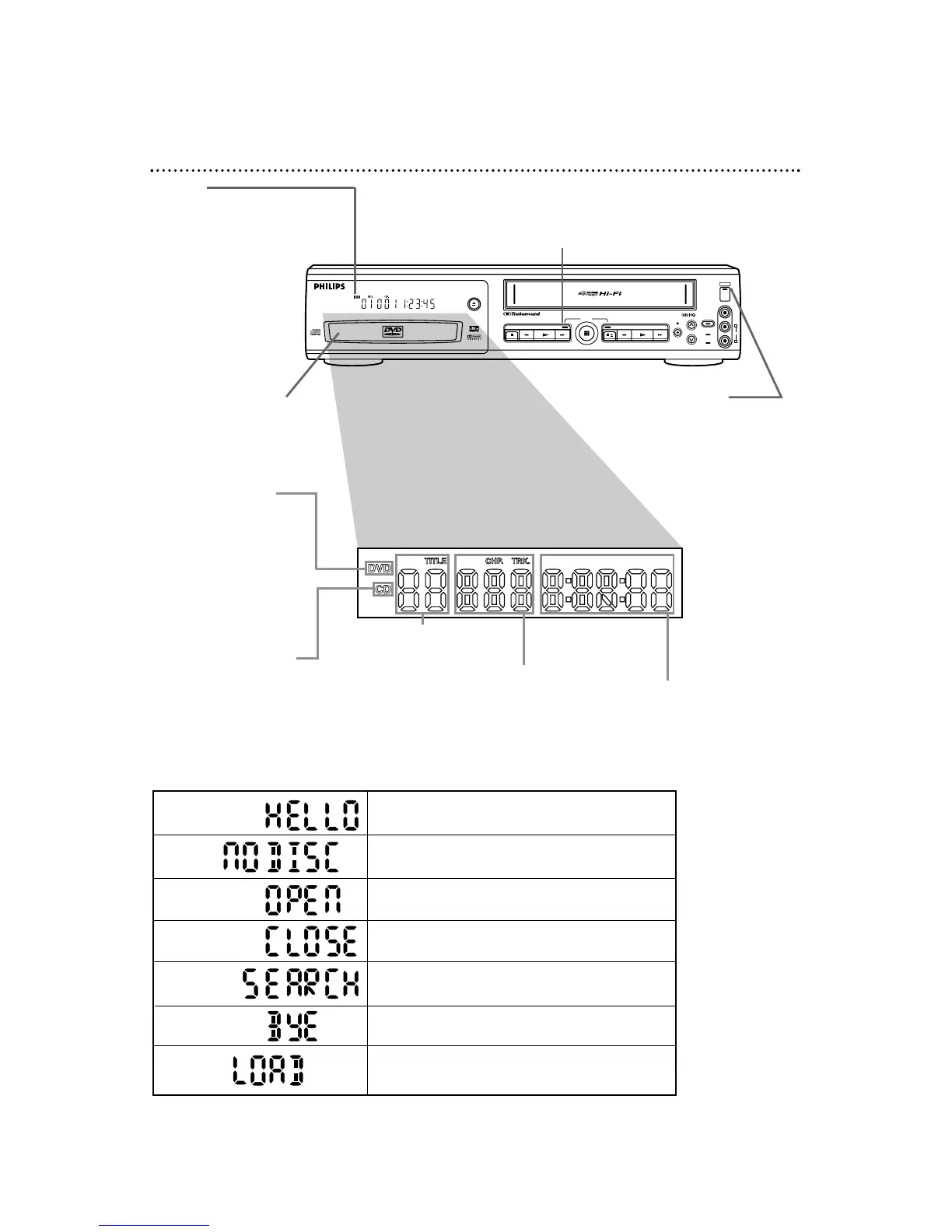
Lit when an Audio CD
is inserted. When the
CD light is on, the disc is
loaded completely and is
ready for playback.
Lit when a DVD is
inserted. When the
DVD light is on, the
disc is loaded completely
and is ready for playback.
Displays a chapter (DVD)
or track (Audio CD) number
Displays a title
number (DVD)
Displays the elapsed time
of the current title (DVD)
or track (Audio CD)
STOP
STOP/EJECT
REW PLAY
F.F W D
RECORD
CST.IN
VCR/TV
VIDEO
AUDIO
TIMER SET
CHANNEL
PLAY
DVD VCR
POWER
L
R
OPEN/CLOSE
OUTPUT
24 DVD/VCR Display - DVD Features
Display
Messages about current DVD
operations appear here. See
Display Messages below.
Disc loading tray
Insert a Disc here.
Power is turning off.
Tray is opening or is open.
Tray is closing.
Appears after the disc tray closes if the tray
is empty.
Appears briefly when you press the SKIP buttons
to search for the next or previous chapter/track.
Power is turning on.
Disc is loading.
Display Messages
POWER Light
This Light appears when the
power is on.
DVD Light (red)
This light appears when the DVD/VCR is in DVD mode. You can only
watch DVDs when the DVD light is on. To make the DVD light come
on, press the OUTPUT button on the front of the DVD/VCR.



 To Next Page