1
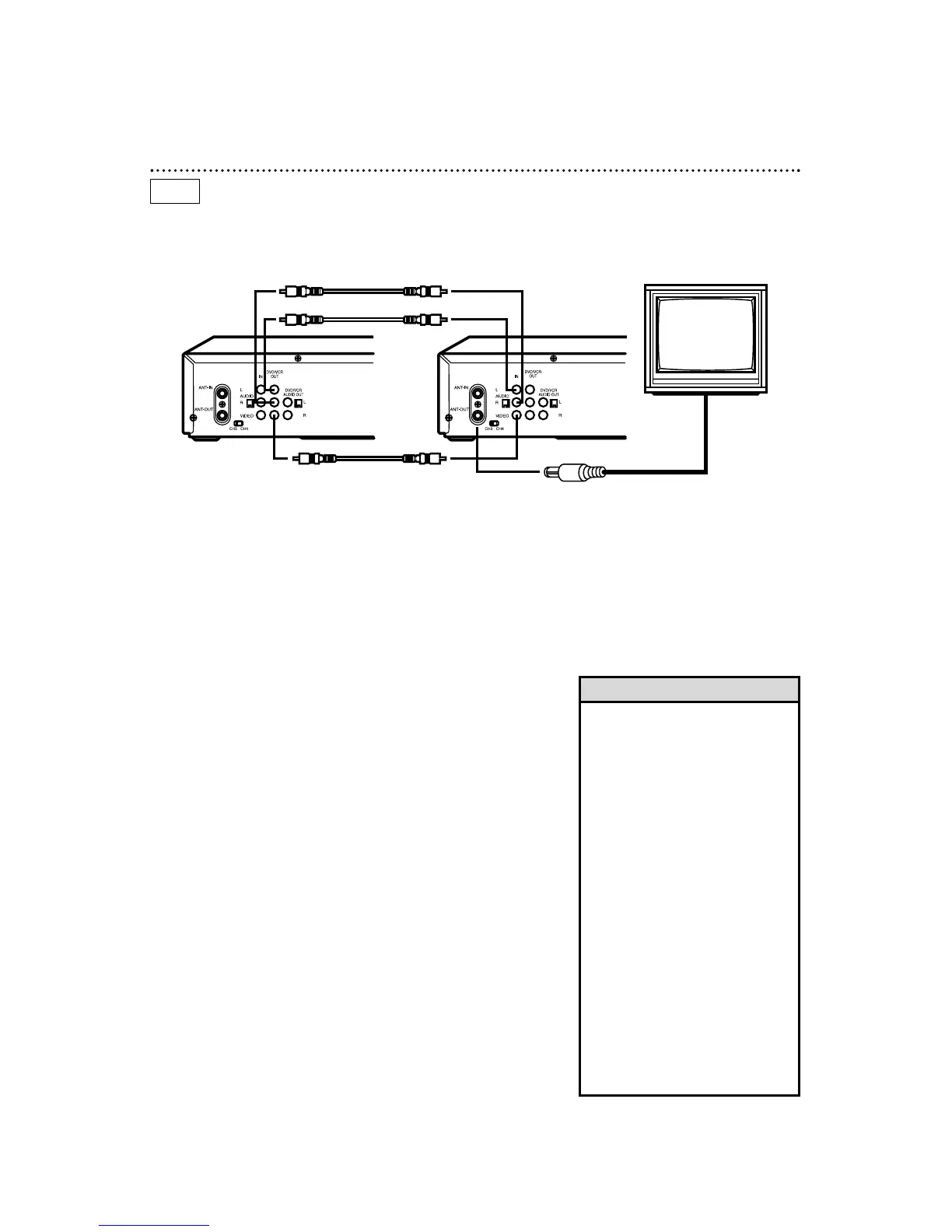
Make the connections shown above.
40 Rerecording (Tape Duplication)
3
DVD/VCR 2 will record your tape. Insert a blank tape in the
cassette compartment of DVD/VCR 2. The DVD/VCR must be
in VCR mode and VCR position. (The VCR light and the VCR mode
and VCR/TV light will appear on the front of the DVD/VCR.)
4
Turn on the TV and set it to channel 03 or 04, whichever
channel the CH3/CH4 switch on DVD/VCR 2 is set to.
5
Point the remote control at DVD/VCR 2. Press the VCR
button, then press the Number buttons 0, 0, 1 or 0, 0, 2.
(See Helpful Hints at right.)
6
Press the SPEED button to select SP or SLP at DVD/VCR 2.
7
Press the VCR PLAY button on DVD/VCR 1 and the
RECORD button on DVD/VCR 2 at the same time.
To stop recording, press the STOP/EJECT button on DVD/VCR 1,
then press the STOP/EJECT button on DVD/VCR 2.
DVD/VCR 1
Playing unit
DVD/VCR 2
Recording unit
2
DVD/VCR 1 will play your tape. Put a prerecorded tape into
the cassette compartment of DVD/VCR 1.
1. Audio cables from DVD/VCR AUDIO OUT Jacks of
DVD/VCR 1 to AUDIO IN Jacks of DVD/ VCR 2
2. Video cable from DVD/VCR VIDEO
OUT Jack of DVD/VCR 1 to VIDEO
IN Jack of DVD/VCR 2
3. RF coaxial cable from the ANT-OUT
(Antenna Out) jack of DVD/VCR 2 to
the TV’s ANTENNA IN Jack
• If you use the AUDIO and VIDEO
IN Jacks on the back of DVD/VCR
2, press Number buttons 0, 0, 1 at
step 5. AV REAR will appear on the
TV screen.
• If you use the AUDIO and VIDEO In
Jacks on the front of DVD/VCR 2,
press Number buttons 0, 0, 2 at
step 5. AV FRONT will appear on
the TV screen.
• Unauthorized recording of copyright-
ed television programs, video tapes,
or other materials may infringe on
the rights of copyright owners and
violate copyright laws.
• If a program has copyright protec-
tion, it may not record clearly.
• These instructions show you how to
copy tapes using two DVD/VCRs
like yours. Different VCRs may oper-
ate differently.
• You cannot record DVD material
onto a video cassette tape using a
single unit.
Helpful Hints
The instructions on this page show you how to copy tapes. The illustration uses two DVD/VCRs. Different
VCRs may operate differently. To duplicate a tape, make the connections shown, then follow steps 1-7.
VCR



 To Next Page