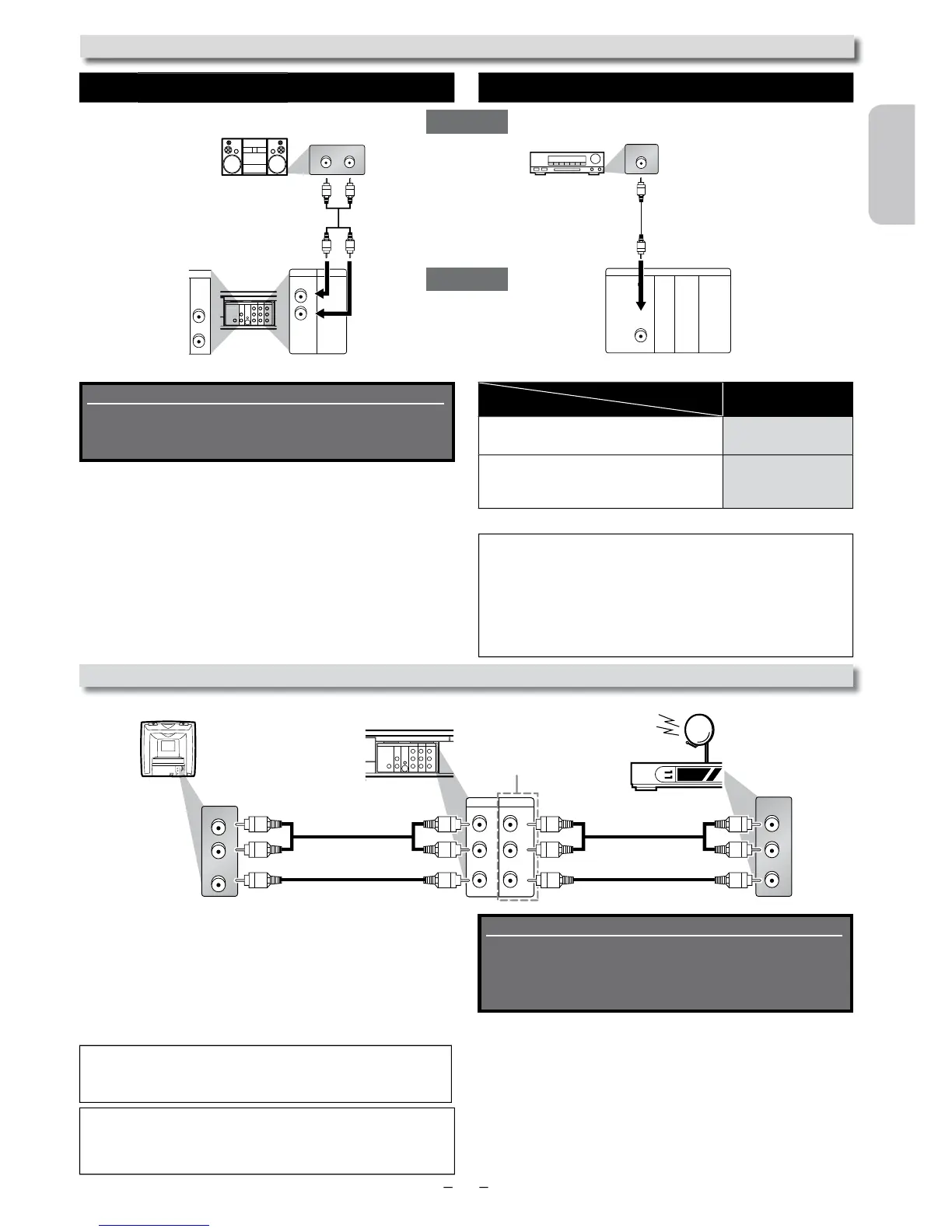
Playing 2 Channel Analog Audio Playing Multi Channel Digital Audio
UDIO OUT DIGITAL AUDIO OUT
SETUP > QUICK >
DOLBY DIGITAL
onnecting to a Dolby Digital decode
or Dolby Digital audio output.
onnecting to other device (an MD dec
or DAT deck etc.) without Dolby Digital
To complete these settings, refer to pages 24-25.
ormat cannot be recorded as digital sound by an MD or DAT deck.
•
using incorrect settings may generate noise
onnection to an External Tuner (Cable/Satellite or DTV to analog TV Converter Set-top box)
sing the Unit with an External Tuner (Cable
Satellite or Converter Set-top Box)
onnect RCA audio and video cables to the audio and video
output jacks of your External Tuner (Cable/Satellite or
onverter Set-top Box) and to the audio and video input jacks at
the rear of the Unit.
2. Press
on your Remote Control until “L1” is
.
DIGITAL
AUDIO OUT
COAXIAL
AUDIO
OUT
DVD VCR
DVD/VCR
S-VIDEO
OUT
COMPONENT
VIDEO OUT
VIDEO IN
AUDIO OUT
VIDEO OUT
L
LY
R
AUDIO IN
L
R
R
AUDIO IN
VIDEO IN
L
R
C
B
/
P
B
C
R
/
P
R
AUDIO IN
VIDEO IN
VCRDVD/VCR
AUDIO OUT
L
VIDEO OUT
R
L
R
VIDEO IN
AUDIO IN
L
R
AUDIO OUT
VIDEO OUT
L
R
Audio
This Unit
RCA audio cable
RCA video cable
RCA audio cable
RCA video cable
Cable/Satellite or Converter Set-to
Refer to “Front & Rear Terminals” on page 13 for more
information.
ote(s):
• Your Cable/Satellite Set-top Box can be accessed only by connecting it
to L1 (rear panel jacks) on the Unit.
Connection
Setting
Supplied cables used in this connection are as follows:
• RCA audio cable (L/R) x 1
• RCA video cable x 1
Please purchase the rest of the necessary cables at your
local store.
Special Note when connected to an External Tuner
Cable/Satellite or Converter Set-top Box)
• Only the active channel on your External Tuner may be viewed
or recor
.
• Always use the LEFT (white) audio output jack from the External
or this Unit. If you use the RIGHT (red) jack, you will record the
y.
Supplied cables used in this connection are as follows:
• RCA audio cable (L/R) x 1
Please purchase the rest of the necessary cables at your
local store.
Continued on next
L R
DIGITAL
AUDIO OUT
COAXIAL
AUDIO
OUT
DVD VCR
DVD/VCR
S-VIDEO
OUT
COMPONENT
VIDEO OUT
AUDIO IN
VIDEO IN
AUDIO OUT
VIDEO OUT
L
LY
R
L
R
R
C
B
/
P
B
C
R
/
P
R
V
VCRDVD/VCR
AUDIO OUT
L
R
AUDIO
OUT
DVD
L
R
analog audio
input jacks
RCA audio cable
digital audio
input jack
DIGITAL
AUDIO OUT
COAXIAL
AUDIO
OUT
DVD
S-VIDEO
OUT
COMPONENT
VIDEO OUT
COAXIAL
stem
Dolby Digital decoder,












 To Next Page