EasyManua.ls Logo

Philips DVP3355V - Preparation for Use; Clock Setting

Philips DVP3355V
30 pages
Print Icon
To Next Page IconTo Next Page
To Previous Page IconTo Previous Page
Loading...
Español
Français
English
12
EN
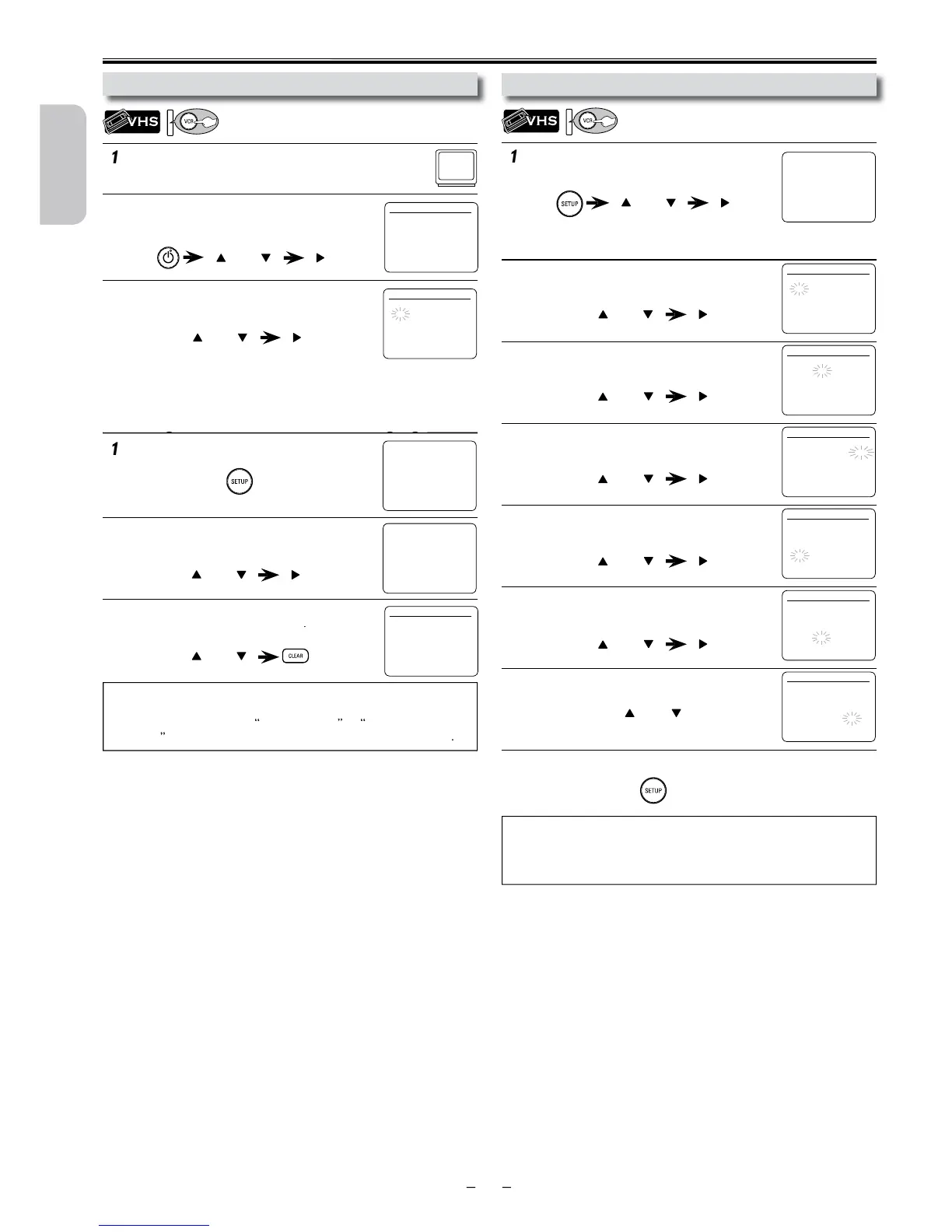
1
Be sure your TV’s input is set to VIDEO. (Name ma
y
v
ary with TV manufacturer. See your TV manual fo
r
d
etails.)
2
Select your on-screen language.
Th
en press
[
B
]
to cont
i
nue.
3
When “CLOCK SET” menu appears,
go to step 2 in “Clock Setting” on this page.
or
1
P
ress
[
SETUP
]
and select “CLOCK SET”.
Th
en press
[
B
]
to go to next step
.
If the clock is not set, “CLOCK SET” menu appears when you
press
[
SETUP
]
.
In this case, go to step 2.
2
Select the current month.
Th
en press
[
B
]
t
o go
t
o nex
t
s
t
ep
.
3
Select the current day.
Th
en press
[
B
]
to go to next step
.
4
Select the current year.
Th
en press
[
B
]
to go to next step
.
5
Select the current hour.
Th
en press
[
B
]
t
o go
t
o nex
t
s
t
ep
.
6
Select the current minute.
Th
en press
[
B
]
to go to next step
.
7
Select “AM” or “PM”.
8
P
ress
[
SETUP
]
to exit “CLOCK SET” menu.
T
o Chan
g
e the Selected On-screen Lan
g
ua
ge
ggg
Preparation for Use
p
N
ote(s):
T
o go
b
ac
k
, press
[
s
]
during steps 2 to 7.
Clock setting will be lost after a power failure or this Unit has been
unplugged for more than 30 seconds.
or
o
r
or
or
or
or
or
LANGUAGE SELEC
T
B
ENGLISH
[
ON
]
FRANCAIS
ESPAÑO
L
-
M
E
N
U
-
TIMER PROGRAMMING
SATELLITE LIN
K
AUT
O
REPEAT
[O
FF
]
B
CLOCK SE
T
LANGUAGE SELECT
C
LOCK SET
MONTH DAY YEA
R
1 0 / - - - - -
-
HOUR MINUTE AM/PM
- - : - - -

-
C
LOCK SET
MONTH DAY YEA
R
1 0 / 0 2 TUE 2 0 1 2
HOUR MINUTE AM/PM
- - : - - -

-
C
LOCK SET
M
O
NTH DAY YEAR
1 0 / 0 2 TUE 2 0 1 2
H
O
UR MINUTE AM/PM
0 5 : - - -
-
C
LOCK SET
MONTH DAY YEAR
1 0 / 0 2 TUE 2 0 1 2
HOUR MINUTE AM/PM
0 5 : 4 0 -
-
C
LOCK SET
MONTH DAY YEAR
1 0 / 0 2 TUE 2 0 1 2
HOUR MINUTE AM/PM
0 5 : 4 0 P M AM
B
PM
T
urning on Unit for the First Tim
e
C
lock Setting
Pl
ease note: most instructions in t
h
is manu
-
a
l refer to Remote Control use.
N
ote(s):
• If you accidentally select Spanish or French and need English:
P
ress
[
SETUP
]
an
d
c
h
oose
SELEC. IDIOM
A
or
S
ELECTION
LANGU
E
.
P
ress
[
B
]
and select “ENGLISH”. Finally, press
[
CLEAR
]
.
C
LOCK SET
MONTH DAY YEAR
1 0 / – – – – – –
HOUR MINUTE AM/PM
– – : – – – –
or
1
P
ress
[
SETUP
]
unti
l
t
h
e main menu appears.
2
Select “LANGUAGE SELECT”
.
Th
en press
[
B
]
to go to next step.
3
Selec
t
“ENGLISH”
,
“FRANCAIS” o
r
“ESPAÑOL”. Then press
[
CLEAR
]
.
LANGUAGE SELEC
T
B
ENGLISH
[
ON
]
FRANCAIS
ESPAÑO
L
-
M
E
N
U
-
TIMER PROGRAMMING
SATELLITE LIN
K
AUTO REPEAT
[
OFF
]
CLOCK SET
B
LANGUAGE SELEC
T
o
r
o
r
-
M
E
N
U
-
B
TIMER PROGRAMMING
SATELLITE LIN
K
AUTO REPEAT
[
OFF
]
CLOCK SET
LANGUAGE SELECT
C
LOCK SET
MONTH DAY YEA
R
1 0 / 0 2 - - -
-
HOUR MINUTE AM/PM
- - : - - -
-
Continued on next
p
a
g
e
.

Table of Contents

Other manuals for Philips DVP3355V

Related product manuals