anguage options are not avai
iscs.
• If “OTHER” is selected on “AUDIO”
“SUBTITLE” or “DISC MENU” screen
press 4-digit number to enter the code
or the desired Language. Refer to the
“Language Code List” on page 28.
• Only the Languages supported by the
2
• “LANGUAGE” setting for
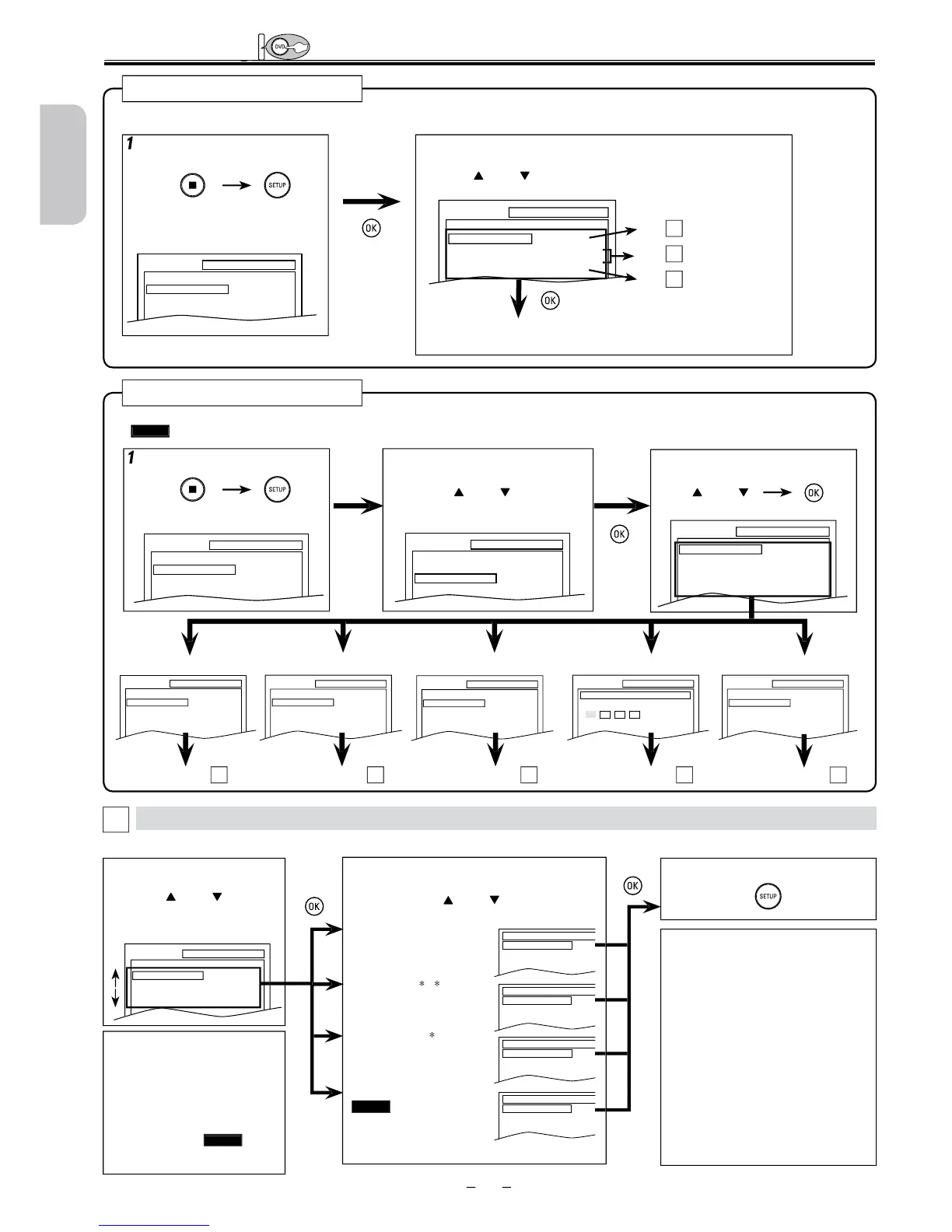
Follow steps 1 to 3 in the “CUSTOM Menu” section above.
Select the desired Language.
Sets the audio Language.
SUBTITLE:
Default: OFF)
Sets the subtitle Language.
DISC MENU:
Default: ENGLISH)
Sets the Language for DVD
menu.
Sets the Language for the
on-screen
Select the desired item.
• Refer to the sections “LANGUAGE”
“PROG. SCAN” or “DOLBY DIGITAL” section on page 24 or 25.
SETUP
QUICK
CUSTOM
INITIALIZE
SETUP QUICK
OSD LANGUAGE
TV ASPECT
PROG. SCAN
DOLBY DIGITAL
ENGLISH
4:3 LETTER BOX
OFF
BITSTREAM
ou can select “OSD LANGUAGE”, “TV ASPECT”, “PROG. SCAN” or “DOLBY DIGITAL” from “QUICK” menu quickly.
AUDIO
ORIGINAL
ENGLISH
FRENCH
SUBTITLE
OFF
ENGLISH
FRENCH
DISC MENU
ENGLISH
FRENCH
SPANISH
OSD LANGUAGE
ENGLISH
FRANÇAIS
ESPAÑOL
SETUP LANGUAGE
AUDIO
SUBTITLE
DISC MENU
OSD LANGUAGE
ORIGINAL
OFF
ENGLISH
ENGLISH
SETUP CUSTOM
LANGUAGE
DISPLAY
AUDIO
PARENTAL
OTHERS
SETUP OTHERS
ANGLE ICON ON
SETUP AUDIO
DRC
DOWN SAMPLING
DOLBY DIGITAL
ON
ON
BITSTREAM
SETUP DISPLAY
TV ASPECT
STILL MODE
PROG. SCAN
4:3 LETTER BOX
AUTO
OFF
ou can change the Settings of the Unit.
•
QUICK
on pages 24-25 indicates DVD setting menus also accessible from “QUICK” menu.
SETUP menu
SETUP LANGUAGE
AUDIO
SUBTITLE
DISC MENU
OSD LANGUAGE
ORIGINAL
OFF
ENGLISH
ENGLISH
SETUP PARENTAL
PASSWORD
Please enter a 4-digit password.
SETUP
QUICK
CUSTOM
INITIALIZE
SETUP
QUICK
CUSTOM
INITIALIZE
UICK” menu, “OSD
LANGUAGE”
“PROG. SCAN” or “DOLBY
DIGITAL” are available. “
UICK”
menu consists of the setting menu
requently used and they are
settings in
“CUSTOM” menu.
Continued on next page












 To Next Page