EasyManua.ls Logo

Philips DVP3355V - Repeat; Random; Programmed Playback; Repeat Playback

Philips DVP3355V
30 pages
Print Icon
To Next Page IconTo Next Page
To Previous Page IconTo Previous Page
Loading...
Español
Français
English
22
EN
1
P
ress
[
MODE
]
once.
2
U
sing
[
K
/
L
]
to se
l
ect
d
esire
d
trac
k
.
P
ress
[
OK
]
.
• Up to 99 tracks can be programmed
.
If eight or more tracks were in a program,
use
[
S
(
Previous
)
] o
r
[
r
T
(
Next
)
] to see a
ll
t
h
e trac
k
s
.
3
P
ress
[
B
(PLAY)
]
to start programme
d
p
l
ay
b
ac
k
.
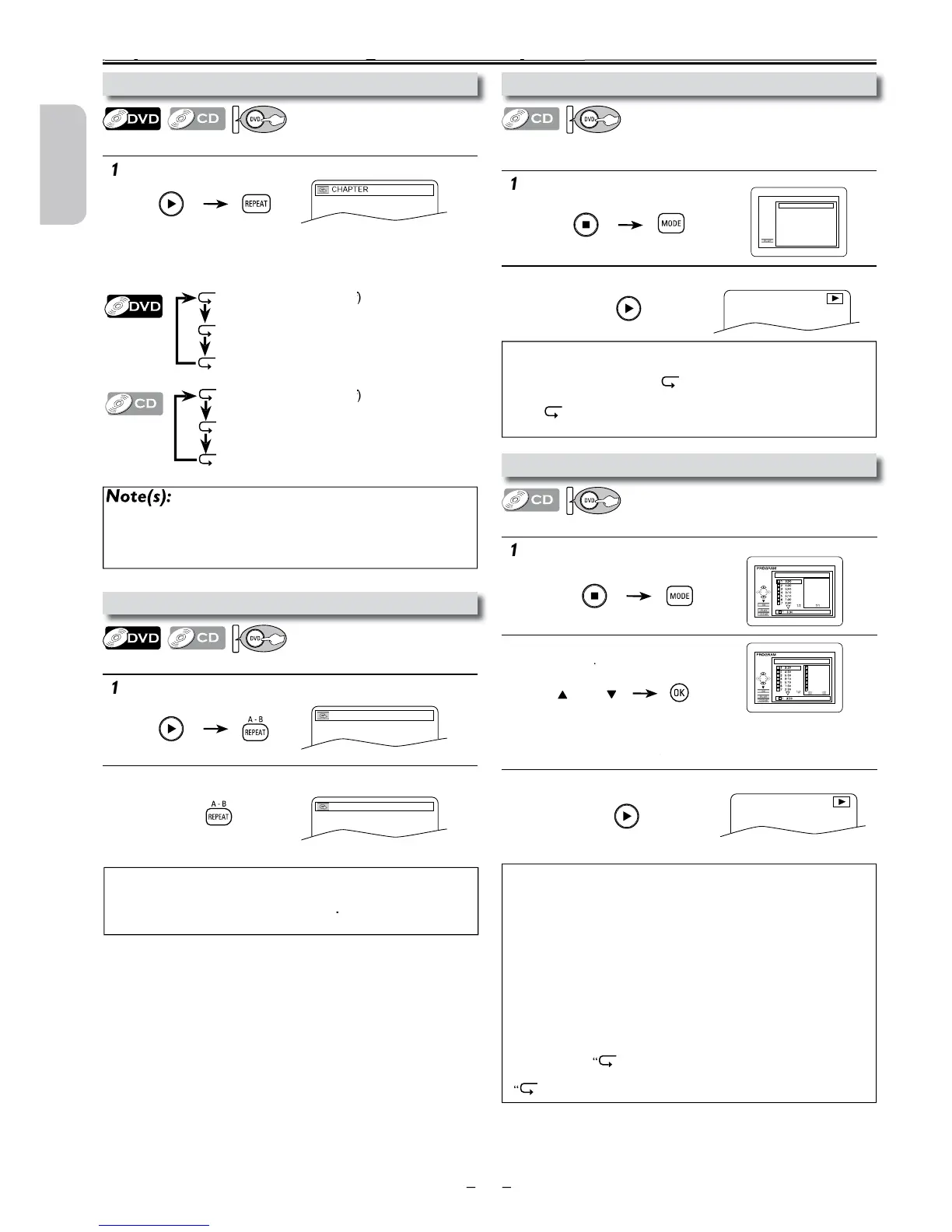
1
P
ress
[
MODE
]
tw
i
ce
.
2
P
ress
[
B
(PLAY)
]
to start ran
d
om p
l
ay
b
ac
k
.
1
P
ress
[A
-
B
REPEAT]
at your desired starting point (A).
2
P
ress
[A
-
B
REPEAT]
at your desired ending point (B).
Point B should be in the same title or track as point
A
.
1
P
ress
[REPEAT]
d
uring p
l
ay
b
ac
k
.
Repeat / Random / Programmed Playback
pgy
A-
A-B
CD-DA TOTAL 0:45:55
RANDOM PROGRAM
--no indication--
RANDOM
CD-DA TOTAL 0:00:00
CD-DA TOTAL 1:03:30
2/3
1 3:30
5 5:10
10 4:20
11 3:00
12 3:20
17 4:10
22 2:50
Repeat setting (except “ALL”) will be cleared when moving to another
tit
l
e, c
h
apter or trac
k
.
This function is not available with some discs or during repeat A-B
p
l
ay
b
ac
k
.
N
ote(s):
P
ress
[
CLEAR
]
at step 2 to erase the most recently entered track.
To erase all programmed tracks at once, select “ALL CLEAR’’ and press
[
OK
]
at step 2.
Wh
i
l
e a program is
b
eing p
l
aye
d
b
ac
k
,
[
C
(STOP)] works as follows
;
-
P
ress
[
C
(
STOP
)]
a
n
d
[
B
(
PLAY
)]
next, so t
h
at t
h
e programme
d
playback restarts. (CD playback restarts from the current point.)
-
P
ress
[
C
(STOP)
]
twice an
d
[
B
(PLAY)
]
next, so t
h
at p
l
ay
b
ac
k
r
estarts from the first track in the original order. However, you
r
programmed playback can be restarted when you follow the above
steps. (Your programs are still stored until either the disc tray is
open or power is turned off.)
T
o repeat t
h
e current trac
k
in t
h
e program, press
[REPEAT]
r
epeate
dl
y unti
l
TRACK’’
appears
d
uring p
l
ay
b
ac
k
.
T
o repeat t
h
e entire program, press
[REPEAT]
repeate
dl
y unti
l
ALL’’ appears during playback.
N
ote(s):
T
o repeat t
h
e current trac
k
in t
h
e ran
d
om mo
d
e, press
[REPEAT]
repeatedly until
TRACK” appears during playback.
T
o repeat t
h
e entire ran
d
om se
l
ections, press
[REPEAT]
repeate
dl
y
until
ALL” appears during playback.
D
uring ran
d
om p
l
ay
b
ac
k
, you cannot go
b
ac
k
to t
h
e previous trac
k.
N
ote(s):
T
o exit t
h
e sequence, press
[A
-
B
REPEAT]
until “OFF” appears.
To cancel point
A
, press
[
CLEAR
]
at step
1
.
This function is not available in the other repeat modes.
R
epeat
Pl
ay
b
ac
k
Repeat function is available only during playback.
P
rogramme
d
Pl
ay
b
ac
k
Y
ou may
d
etermine t
h
e or
d
er in w
h
ic
h
trac
k
s wi
ll
p
l
ay
b
ac
k
.
R
an
d
om
Pl
a
yb
ac
k
T
his function shuffles the playing order of tracks instead o
f
playing the tracks back in sequence
.
R
epeat
A
-
B
Pl
ay
b
ac
k
Repeat function is available only during playback.
E
ac
h
time you press
[REPEAT],
repeat function changes as
examp

l
e
b
e
l
ow.
O
FF
C
HAPTER
TITLE
(
repeat
off
)
f
f
(
current c
h
a
p
te
r
r
epeat)
(
current title
r
epeat)
O
FF
T
RAC
K
ALL
(
repeat
off
)
f
f
(
current trac
k
r
epeat)
(
entire disc
r
epeat)
e.g.) DV
D
or

Table of Contents

Other manuals for Philips DVP3355V

Related product manuals