EasyManua.ls Logo

Philips DVP3355V - On-Screen Display

Philips DVP3355V
30 pages
Print Icon
To Next Page IconTo Next Page
To Previous Page IconTo Previous Page
Loading...
Español
Français
English
20
EN
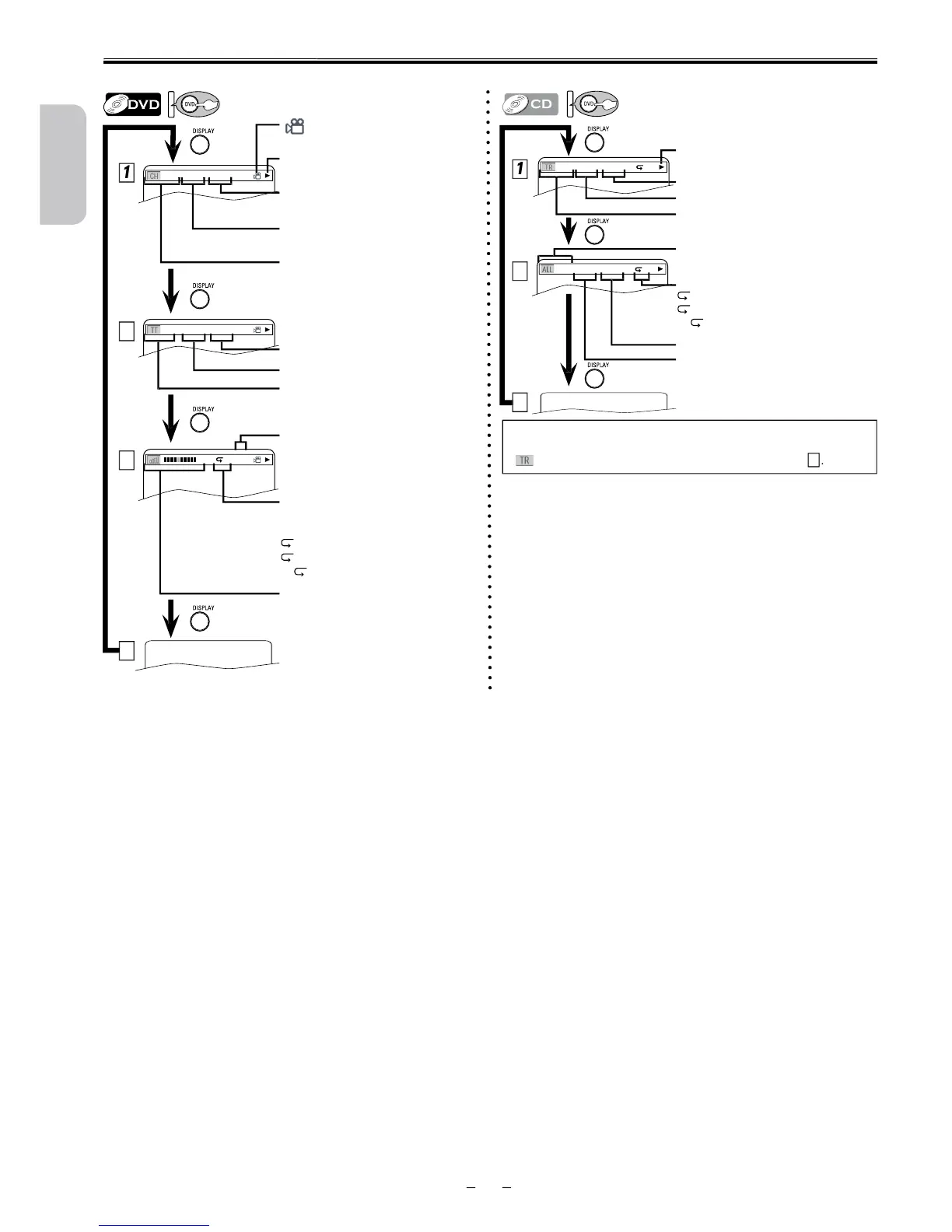
You can check the information about the current disc by pressing
[
DISPLAY
]
on the Remote Control.
On-Screen Display
py
C
H(Chapter):
current chapter number /
tota
l
c
h
apter
s
TT(Title):
current title number / total title
s
current repeat sett
i
ng, appears
on
l
y w
h
en t
h
e repeat setting is
a
ct
i
ve
.
C
: Chapter repea
t
T
:
T
it
l
e repea
t
A
B:
A
-B repeat
11/16 0:00:00 - 0:03:30
1/3 0:00:00 - 1:23:45
TL1
0
bit rate: the amount of audio and
v
i
d
eo
d
ata current
l
y
b
eing rea
d
elapsed time of the current
c
h
apte
r
0
r
emaining time of the current
c
h
apte
r
elapsed time of the current title
r
emaining time of the current title
l
ayer num
b
ers, appears on
l
y w
h
en
p
l
aying a two-
l
ayere
d
d
isc.
L0: Layer 0 is playing
L1: Layer 1 is playing
current p
l
ay
b
ac
k
statu
s
appears only in a case multi-
a
ng
l
e is avai
l
a
bl
e on t
h
e
DVD
.
1
2
3
4
4/12 0:03:21 - 0:02:15
T
4/12 0:13:45 - 0:45:40
T
TR(Track):
current track number / total tracks
()
current repeat setting, if active
T
:
T
rac
k
repea
t
A
:
A
ll Tracks repea
t
A
B:
A
-B repea
t
A
LL:
current track number / total track
s
elapsed time of the current trac
k
r
emaining time of the current trac
k
elapsed time of the entire disc
r
emaining time of the entire disc
current p
l
ay
b
ac
k
statu
s
1
2
3
N
ote
(
s
)
:
Wh
en you are p
l
aying a
d
isc in program or ran
d
om mo
d
e,
P
ROGRAM (or RANDOM) will be displayed instead of

2
.

Table of Contents

Other manuals for Philips DVP3355V

Related product manuals