10 EN
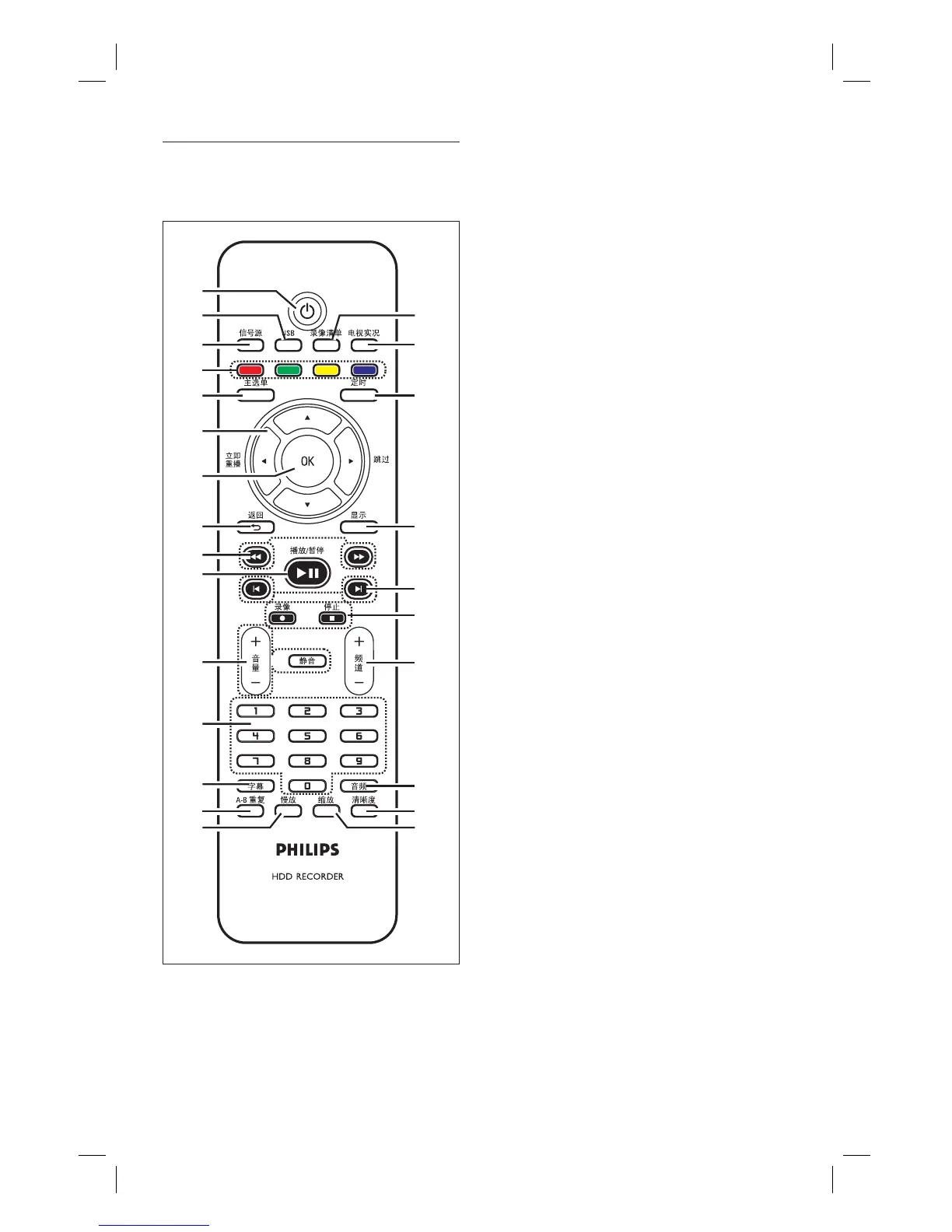
a
2
Turns on the recorder or switches to
standby mode.
b USB
Access the contents of the connected
USB device.
c 信号源
Selects the recorder video source
(Tuner, CVBS or YPbPr).
d Colour coded buttons
Selects the corresponding screen
option.
e 主选单
Access/ exits the home menu.
f W X :
Cursor keys for moving to the left/
right.
During viewing of a TV programme,
press and hold to replay or skip
forward.
ST :
Cursor keys for moving up/ down.
g OK
Confi rms an entry or selection.
h 返回
Returns to the previous menu.
During play of DivX Ultra fi les, press
to return to the main DivX menu.
i m M
Fast reverse or fast forward search.
j 播放/暂停 u
Starts/ pauses play or recording.
k 音量+/ -
Adjusts the volume of the TV
(compatible TVs only).
静音
Mute the volume output from the
recorder.
•
•
•
•
•
•
•
•
•
•
•
•
•
•
•
1
2
3
4
5
6
7
8
9
q;
qa
qs
qd
qh
qj
qf
qg
qk
ql
w;
wa
ws
wd
wg
wf
Remote Control
1_DVR2008-93_eng_wk822.indd 101_DVR2008-93_eng_wk822.indd 10 2008-05-26 10:53:13 AM2008-05-26 10:53:13 AM



 To Next Page