EN 9
English
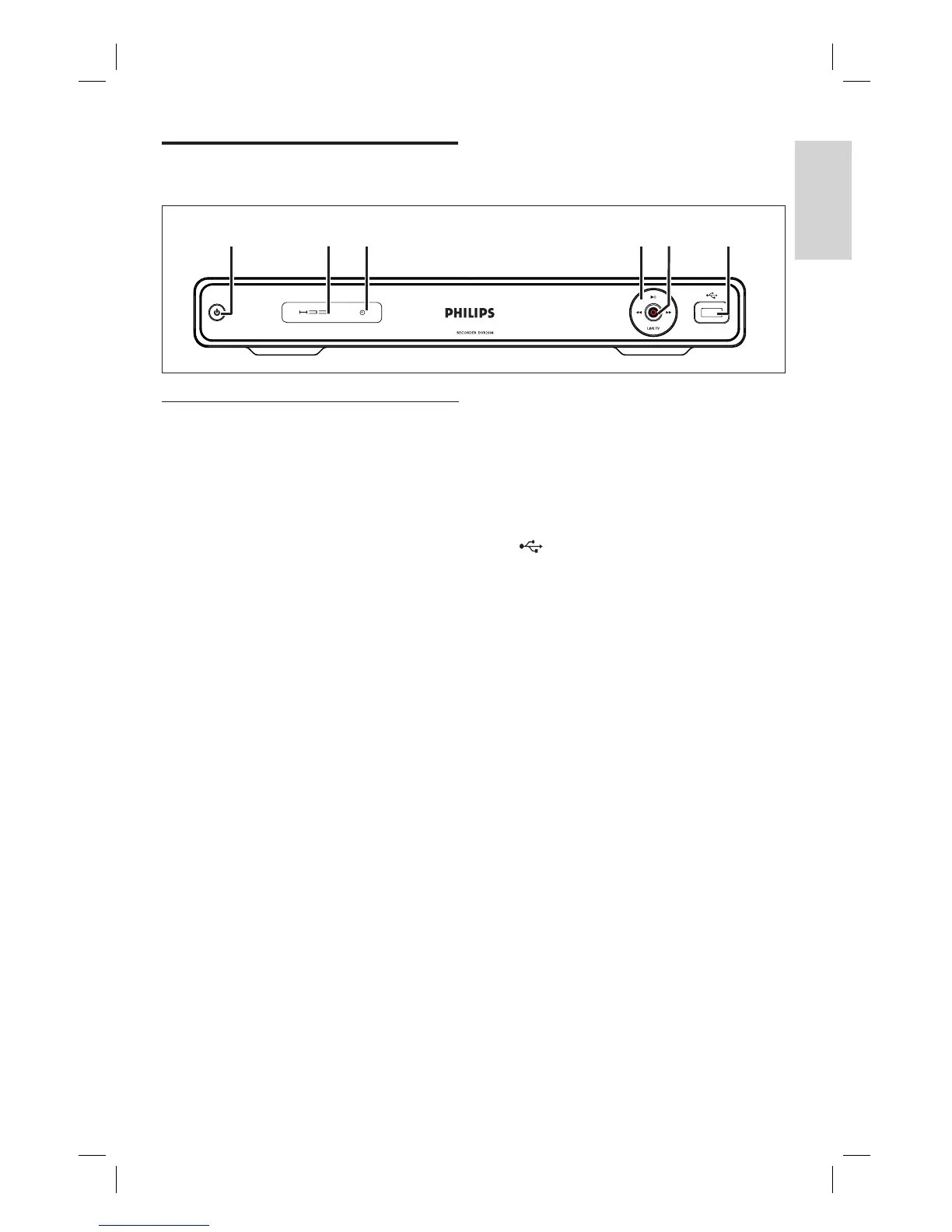
Your Product
HDD
a b c e fd
Main Unit
a 2 (Standby-on)
Turns on this unit or switches to
standby mode.
Blinks rapidly when receiving
command signals from the remote
control.
b HDD Indicator
c X
Lights up when a timer has been
programmed.
d u (Play/Pause)
Starts/ pauses playback or recording.
m M
Press to make a forward/ reverse
search.
LIVE TV
Go to tuner mode.
In time shift mode, go to current
broadcast position.
•
•
•
•
•
•
•
Product Overview
e z (Record)
Starts recording the current TV
channel or the current video source.
Press repeatedly to extend the
recording time.
Indicator lights up during recording.
f USB
Input for USB device or digital camera.
Only brands and models of digital
cameras and devices which conform
to USB Mass Storage Device class
standard are supported.
•
•
•
•
•
1_DVR2008-93_eng_wk822.indd 91_DVR2008-93_eng_wk822.indd 9 2008-05-26 10:53:12 AM2008-05-26 10:53:12 AM



 To Next Page