EN 13
English
Connect
Connect video/audio cables
To view the playback from this recorder,
connect the recorder to the TV.
Before you start, select the best video
connection.
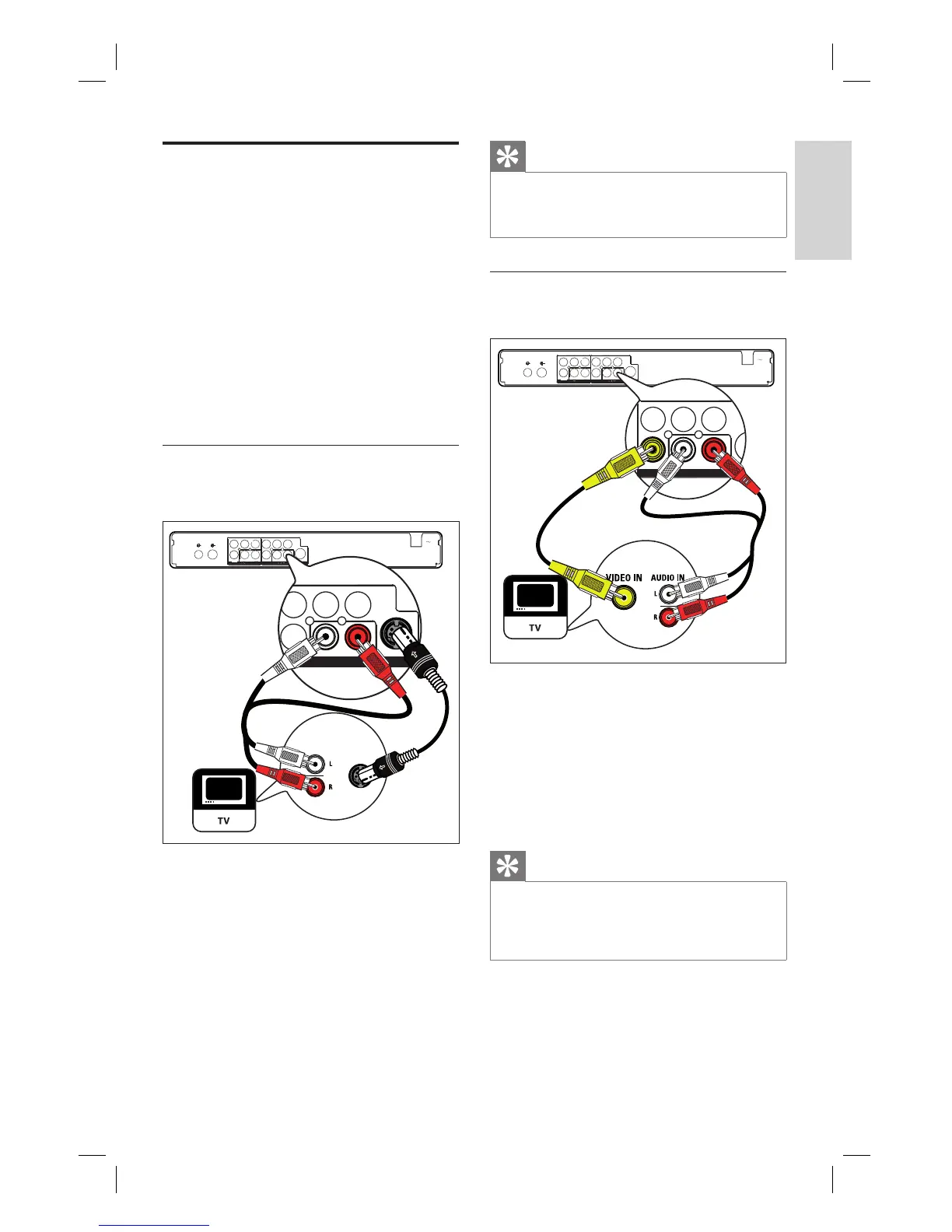
Option 1: Connect to S-video socket
(for a standard TV).
Option 2: Connect to composite video
sockets (for a standard TV).
Option 3: Connect to component video
sockets (for a Progressive Scan TV).
Option 1: Connect to S-Video
socket
TV-OUT
ANTENNA-IN
MAIN S
Y
Pr
Pb
VIDEO
S-VIDEO
Y Pb
Pr
VIDE
AUDIO
L R
CVBS
O
Y
Pr
Pb
VIDEO
OUTPUT
AUDIO
LR
CVBS
S-VIDEO
S-VIDEO IN
AUDIO IN
2
2
1
OUTPUT
1 Connect an S-Video cable (not supplied)
from the S-VIDEO OUTPUT socket to
the S-Video input socket on the TV.
2 Connect an audio cable (red/white ends)
from the AUDIO OUTPUT sockets to
the matching audio input sockets on the
TV.
•
•
•
Tips
The S-video input socket on your TV may be
labelled as Y/C or S-VHS.
This connections provides standard picture quality.
•
•
Option 2: Connect to composite
video sockets
TV-OUT
ANTENNA-IN
MAIN S
Y
Pr
Pb
VIDEO
S-VIDEO
Y Pb
Pr
VIDE
AUDIO
L R
CVBS
O
Y
Pr
Pb
VIDEO
OUTPUT
AUDIO
LR
CVBS
S-V
1
2
2
OUTPUT
1 Connect a composite video cable (yellow
end) from the CVBS OUTPUT socket to
the video input socket on the TV.
2 Connect an audio cable (red/white ends)
from the AUDIO OUTPUT sockets to
the matching audio input sockets on the
TV.
Tips
The video input socket on your TV may be
labelled as A/V IN, VIDEO IN, COMPOSITE or
BASEBAND.
This connections provides standard picture quality.
•
•
1_DVR2008-93_eng_wk822.indd 131_DVR2008-93_eng_wk822.indd 13 2008-05-26 10:53:13 AM2008-05-26 10:53:13 AM



 To Next Page