16 EN
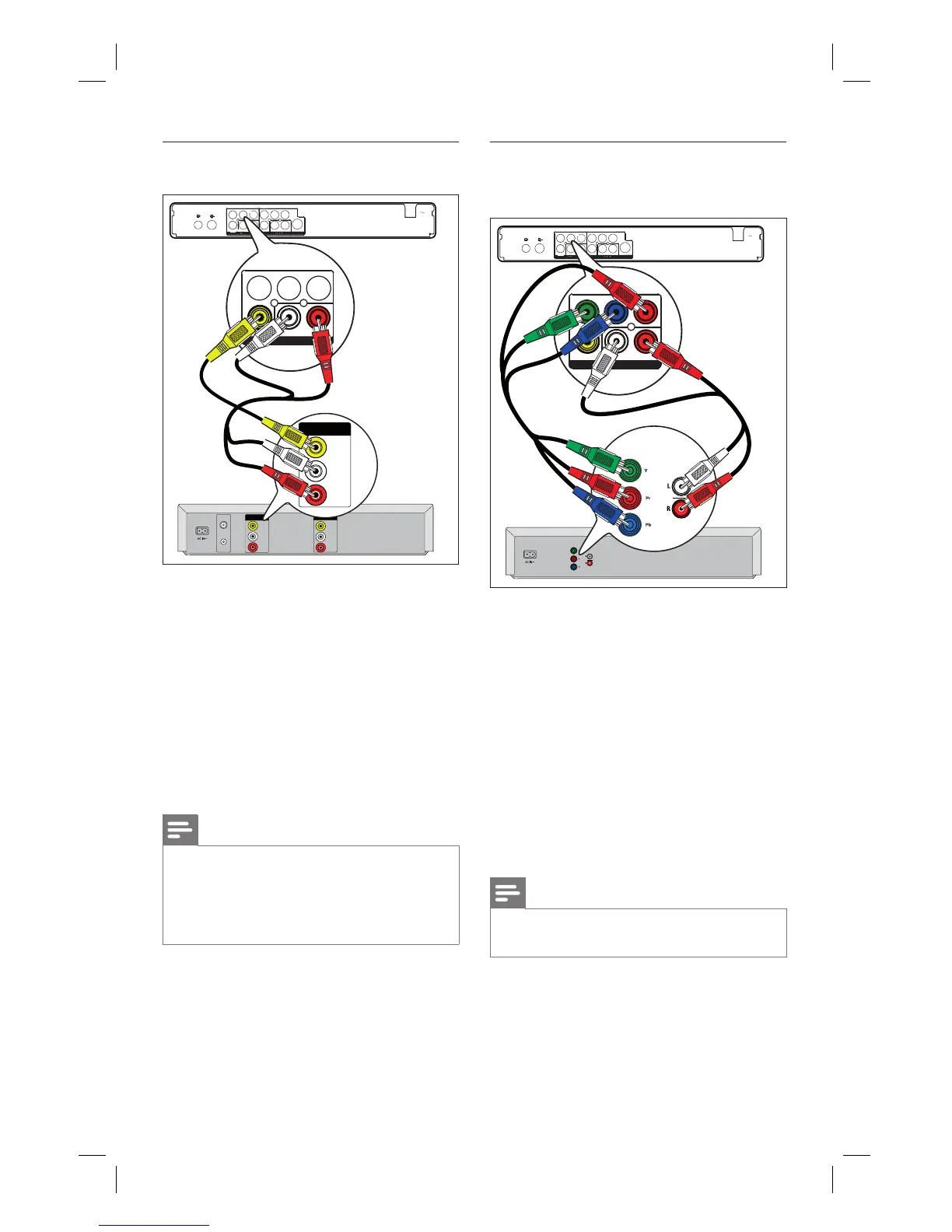
Connect to VCR or similar device
TV-OUT
ANTENNA-IN
MAIN S
Y
Pr
Pb
VIDEO
S-VIDEO
Y Pb
Pr
VIDE
AUDIO
L R
CVBS
O
VIDEO
IN
OUT
IN
VIDEO
OUT
AUDIO
L
R
AUDIO
L
R
VHF/UHF
RF IN
VHF/UHF
RF OUT
OUT
VIDEO
OUT
AUDIO
L
R
Y Pb
Pr
VIDE
AUDIO
L
R
CVBS
O
1
2
2
INPUT
1 Connect a composite video cable (yellow
end) from the CVBS INPUT socket to
the video output socket on the device.
2 Connect an audio cable (red/white ends)
from the AUDIO INPUT sockets to the
matching audio output socket on the
device.
To view the video input, press
信号源 repeatedly until ‘CVBS’ is
displayed.
Notes
Your new recorder replaces the VCR for all your
recording needs. Just unplug all the connections to
your VCR.
Most commercial video tapes and DVDs are copy-
protected and therefore cannot be recorded.
•
•
•
Connect to DVD player or similar
device
TV-OUT
ANTENNA-IN
MAIN S
Y
Pr
Pb
VIDEO
S-VIDEO
Y Pb
Pr
VIDE
AUDIO
L R
CVBS
O
IN
Y Pb
Pr
VIDE
AUDIO
L
R
CVBS
O
AUDIO OUT
Component
Video Out
Component
Video Out
AUDIO OUT
1
2
INPUT
1 Connect a component video cable (red/
blue/green ends - not supplied) from the
Y Pb Pr INPUT socket to the
component video output socket on the
device.
2 Connect an audio cable (red/white ends)
from the AUDIO INPUT sockets to the
matching audio output socket on the
device.
To view the video input, press
信号源 repeatedly until ‘YPbPr’ is
displayed.
Note
Most commercial video tapes and DVDs are copy-
protected and therefore cannot be recorded.
•
•
1_DVR2008-93_eng_wk822.indd 161_DVR2008-93_eng_wk822.indd 16 2008-05-26 10:53:14 AM2008-05-26 10:53:14 AM



 To Next Page