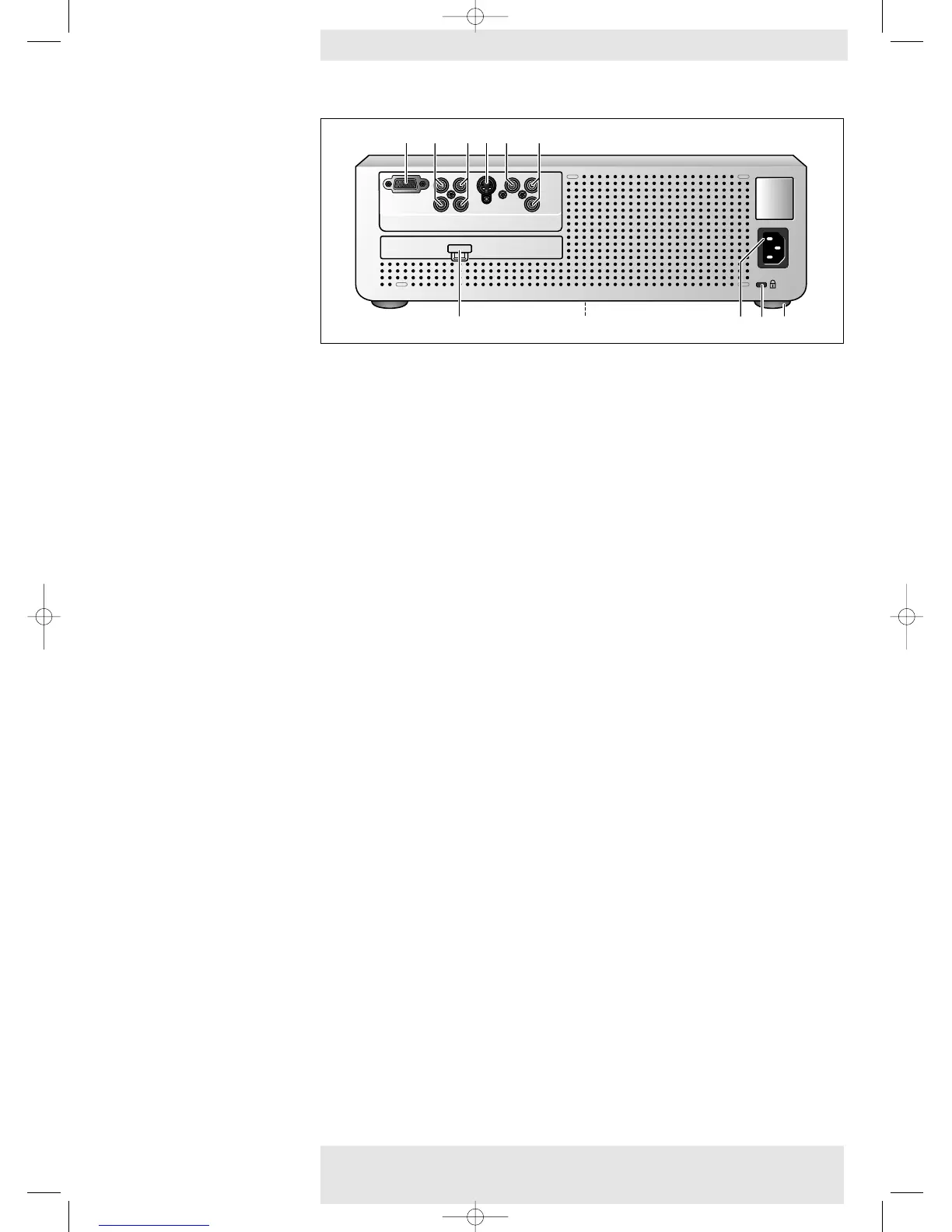
Video source connections
Input sockets to connect to DVD- and HDTV-video equipment
These sockets can be connected to the following output sockets:YPbPr, RGBsync, RGsogB,
(480p, 720p, 1080 i).
Input socket to connect to the S-Video out socket of a S- video recorder, a VCR,
DVD player, video camera or TV with AV output socket.
This socket can be connected to a S-Video (Y/C) output socket.
Input socket to connect to the Video out socket of a video recorder, DVD player, video camera
or TV with AV output socket.
This socket can be connected to Video (CVBS) output sockets.
Input sockets to connect to the Audio out sockets of a video recorder, DVD player, video
camera or TV with A/V output socket.
Data source connection
Input socket to connect to the Data out terminal of a computer.
General
Dust filter
To connect the projector to the mains.
To insert an optional locking device (Kensington lock)
To adjust a possible oblique displayed picture.
Component in 1
(PR/R, PB/B,Y/G, S)
S-Video 2
Video 3
Audio L/R 4
Multimedia 5
Filter 6
Lamp compartment 7
Mains inlet socket 8
Lock slit 9
Horizontal adjuster 0
Philips Home Cinema Projector 14 English User guide LC 6281 / LC 6285
2. Functional overview










 To Next Page