>
Congratulations on your purchase of one of the most sophisticated and reliable products on the
market today.We are sure that, used properly, it will bring you years of enjoyment.You will want
to keep this manual handy, as it is a convenient source of information about your projector.
For your own protection and prolonged operation of your projector, please read the enclosed
Safety Sheet.
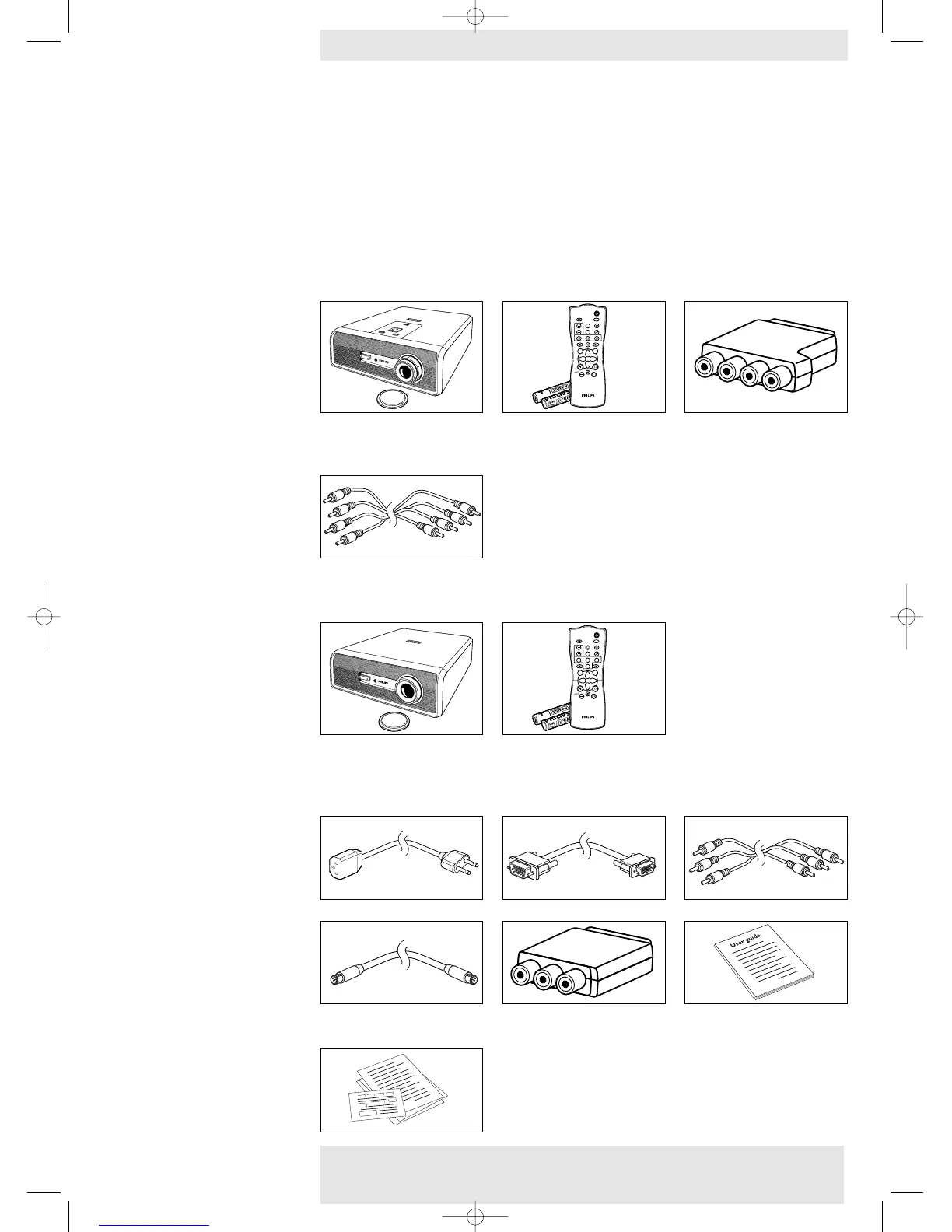
Please confirm that the following items are packed in the projector box.They are provided to
help you use or set up your projector.
LC 6285
Projector -
Lens cap
Remote control + batteries
Scart/RCA component
2 X AAA Zinc Carbon, 1.5 V Video adapter
(not for USA version)
Component cable
LC 6281
Projector -
Lens cap
Remote control + batteries
2 X AAA Zinc Carbon, 1.5 V
General
Mains Lead VGA cable Audio/Video RCA Cable
S-Video cable
Scart/RCA Audio Video Printed User Guide
adapter (not for USA version)
Quick set up Card and
Safety Sheet
Packaging contents
Philips Home Cinema Projector 8 English User guide LC 6281 / LC 6285
1. Introduction










 To Next Page