>
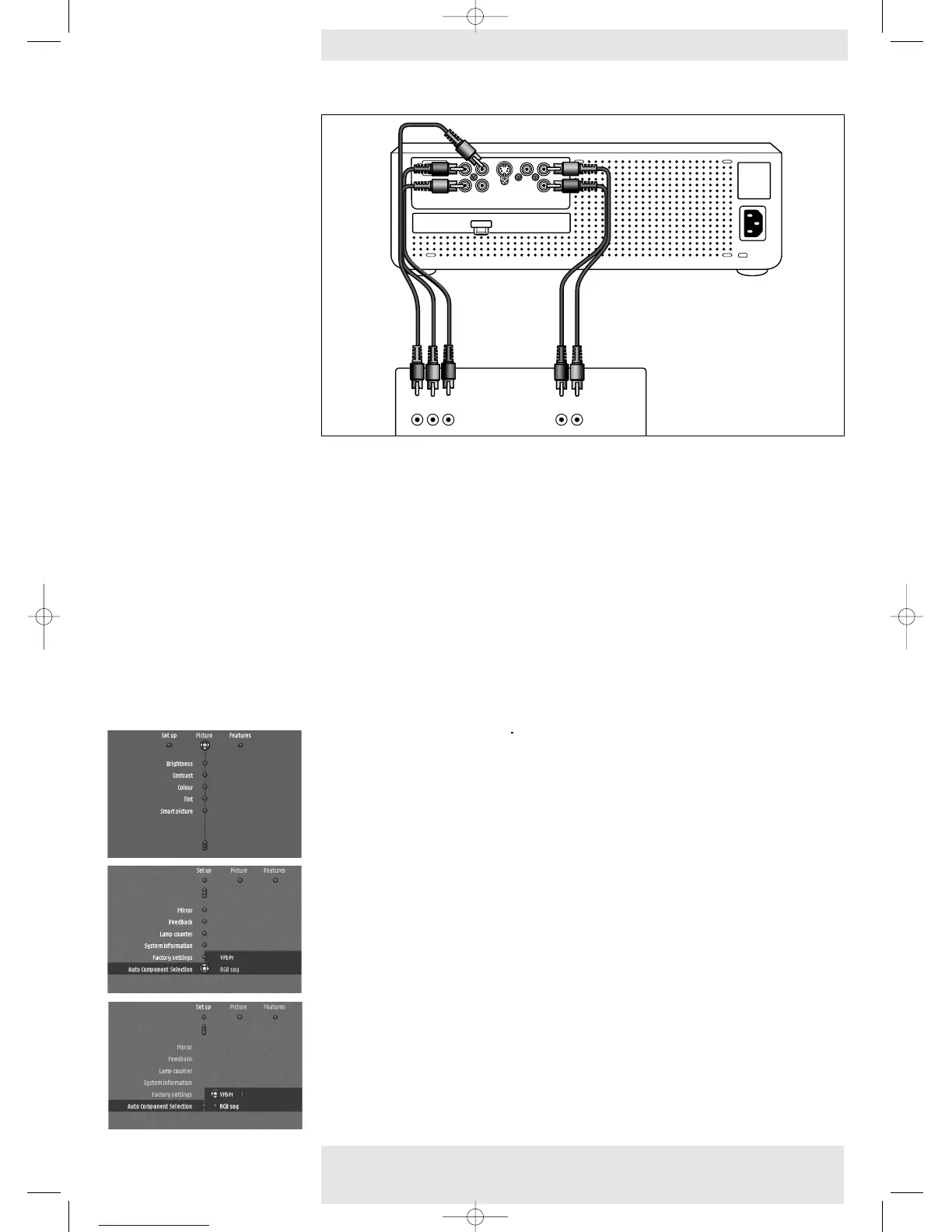
YPbPr/RGsogB
• Connect the Component in sockets of the projector (
Pr/R, Pb/B,Y/G) to the appropriate
output sockets of your Component- or HDTV-video equipment (YPbPr/YCbCr/RGB).
For this, use the audio/video connection cable supplied (1).
• If required you can connect the Audio out L/R sockets of the Component- or HDTV-video
equipment to the Audio (in) L/R sockets of the projector.
For this, use an optional audio connection cable (2).
– Audio information from the Component- or HDTV-video equipment will be played via the
projector speaker.
When YPbPr connection has been made:
1 Use Cursor Control to select ‘Source’ in the ‘Set up’ menu. See ‘On Screen Display Menu’ -
‘General explanation’ on how to navigate through the menu.
2 Press Menu.
– The menu bar appears on the screen.
The ‘Picture’ item is highlighted.
3 Use Cursor Control left to select ‘Set up’.
4 Use Cursor Control down to select ‘Auto Component Selection’.
5 Use Cursor Control right to select ‘YPbPr’.
6 Confirm with OK.
Component/HDTV
Philips Home Cinema Projector 21 English User guide LC 6281 / LC 6285
4. Installation










 To Next Page