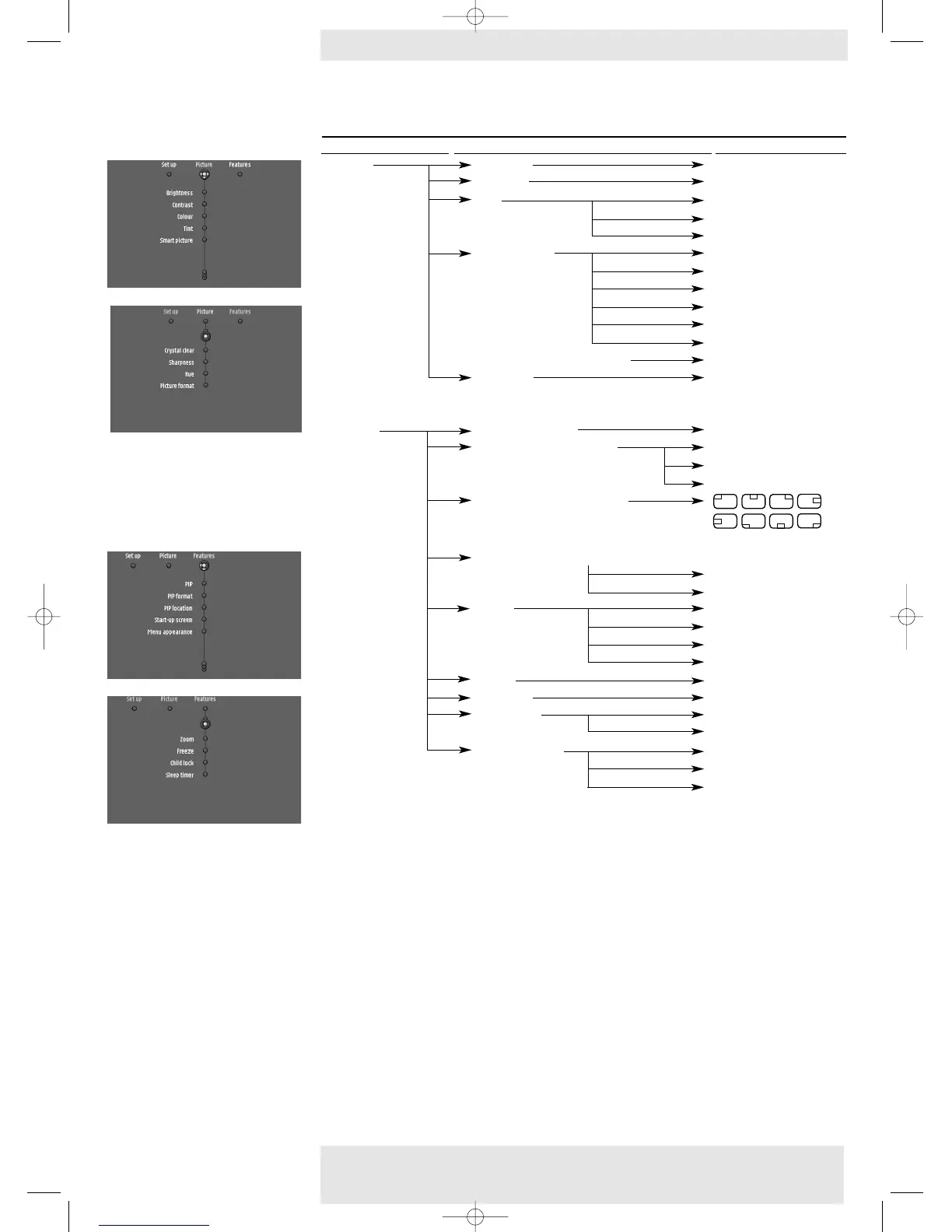
MULTIMEDIA MODE
Main menu Sub menu Setting
Picture Brightness 0 (min) - 100 (max)
Contrast 0 (min) -100 (max)
Tint Warm
Normal
Cool
Smart picture Movie
Nature
Sports
Cartoon
Game
Internet
CrystalClear (LC 6285 only) Off On
Sharpness 0 (soft) - 5 (sharp)
Features PIP (LC 6285 only) Off On
PIP format (LC 6285 only) Small,
Medium
Large
PIP Location (LC 6285 only)
Menu Appearance (LC 6285 only)
Menu Appearance 1.
Menu Appearance 2
Zoom Off
4 x
9 x
16 x
Freeze On Off
Child lock On Off
Sleep timer Off
1minute - 180 minutes
Start-up screen Philips
Personal
None
Menu tree
Philips Home Cinema Projector 28 English User guide LC 6281 / LC 6285
5. Operation >On Screen Display Menu










 To Next Page