14 Philips · HDP15x0 & HDP15x0TV
Connecting Using an Audio/
Video (CVBS) Adapter
Cable
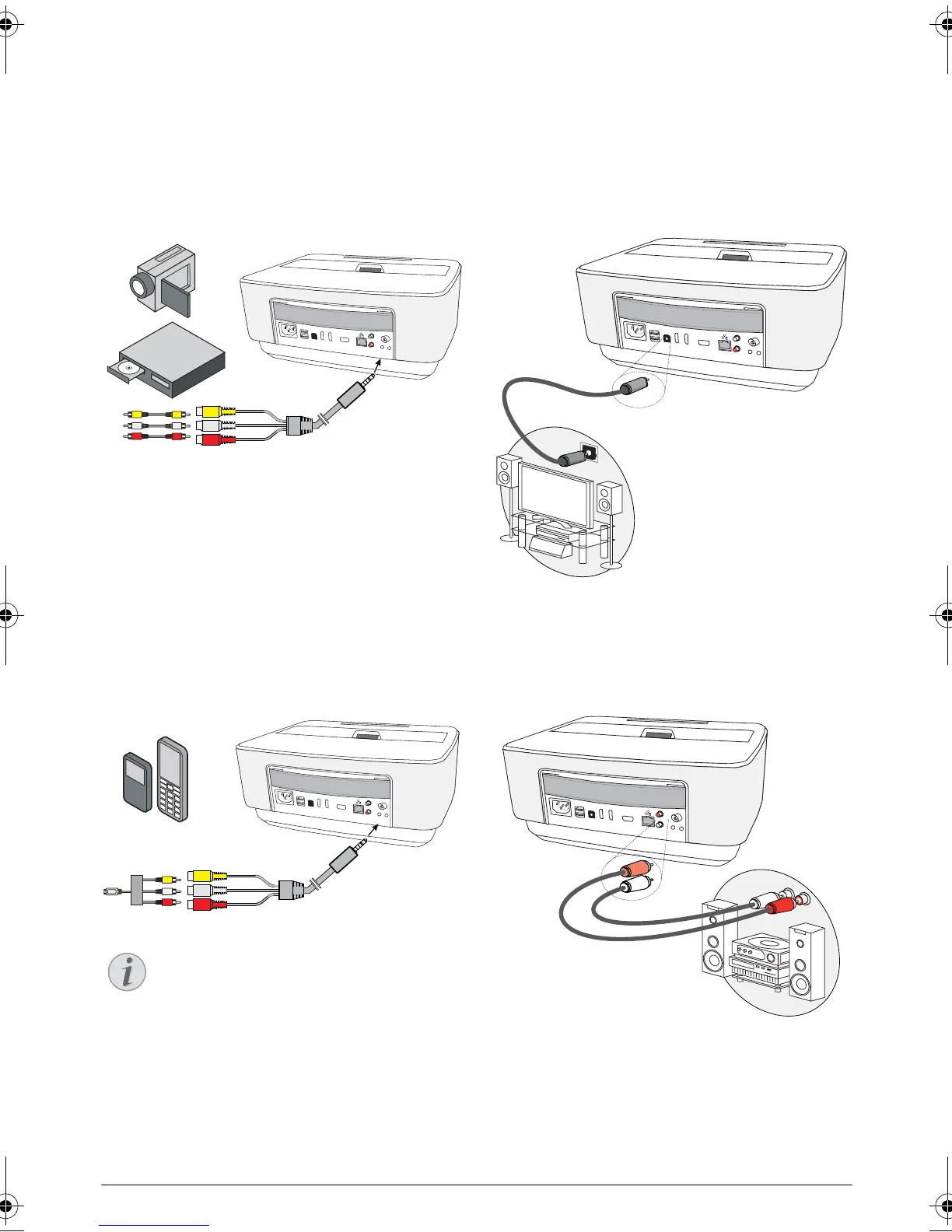
Use the projector's audio/video adapter cable (A/V
cable) (not included) to connect camcorders, DVD
players or digital cameras. The jacks for these devices
are yellow (video), red (audio right) and white (audio
left).
1 Connect the A/V adapter to the socket of the
projector.
2 Connect the video device's audio/video sockets to
the A/V cable using a conventional composite video
(RCA) cable.
3 From the main menu, select AV-in.
Connecting to mobile multimedia devices
Some video devices (e.g.: pocket multimedia players, ...)
require specific connection cables. There are either
supplied with the device or acquired from the manufac
-
turer of the multimedia device. Please note that only the
original cables from the device manufacturer may func
-
tion.
Connecting to a home
cinema amplifier
Use a S/PDIF optical cable (cable not provided) to con-
nect the DIGITAL AUDIO output on the projector to
the input of your home cinema amplifier.
For example, to show digital channels in DTS or
DOLBY DIGITAL quality sound.
Connecting to a Hi-Fi unit
It is possible to use an analog audio connection, just
connect the right and left audio outputs of the Projector
to the auxiliary input of your Hi-Fi system (cable not
provided).
Switching to the Multimedia Device Sig-
nal Output
See the multimedia device instruction manual
to find out how to switch the signal output to
this jack.
PHILIPS
VGA
1
2
S/PDIF
OPTICAL
AUDIO
OUT
TRIG
OUT
AV
IN
L
R
AV
IN
PHILIPS
VGA
1
2
S/PDIF
OPTICAL
AUDIO
OUT
TRIG
OUT
AV
IN
L
R
AV
IN
PHILIPS
VGA
1
2
S/PDIF
OPTICAL
AUDIO
OUT
TRIG
OUT
AV
IN
L
R
S/PDIF
OPTICAL
PHILIPS
VGA
1
2
S/PDIF
OPTICAL
AUDIO
OUT
TRIG
OUT
AV
IN
L
R
AUDIO
OUT
LU UST.book Page 14 Jeudi, 26. décembre 2013 9:48 09















 To Next Page