6 Philips · HDP15x0 & HDP15x0TV
2Overview
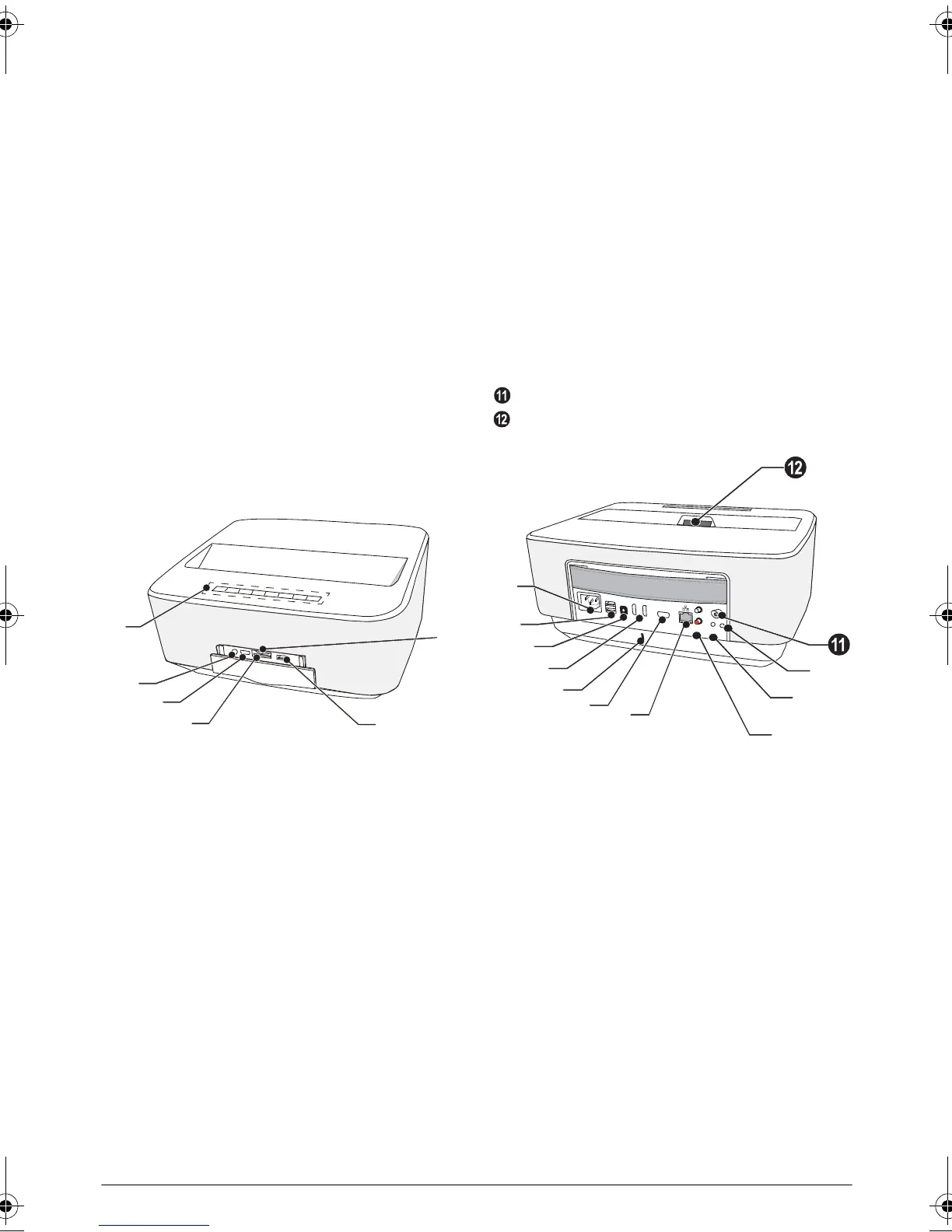
Front View
1 Control panel for navigation and operation
u – To display the home menu
¿ – One menu step back, one directory level back
/ cancelling a function
//À/Á – Navigation keys / navigate the
menu / modify settings
– Confirms selection
B– Long press: Power on /off the projector
Short press: ECO mode on / off
2 Ï – Audio output – headphone connection or con-
nection for external speakers
3 3– HDMI port for a playback device
4 – Memory card slot
5 ý – USB port for a USB storage medium or to con-
nect accessories (mouse or keyboard).
6 Focus wheel for image sharpness
Rear View
1 – Power supply outlet
2 ý – 2 USB ports for a USB storage medium
3 – Digital audio connector
4 – HDMI 1 and 2 ports for a playback device
5 Kensington Security System Connector
6 VGA – Personal Computer input
7 – LAN network connector
8 – Analog audio connectors
9 / – A/V port for a playback device
– Remote screen connection
– Aerial socket for TV connection
– Lens
PHILIPS
VGA
1
2
S/PDIF
OPTICAL
AUDIO
OUT
TRIG
OUT
AV
IN
L
R
a
b
c
d
e
j
i
g
f
h
LU UST.book Page 6 Jeudi, 26. décembre 2013 9:48 09















 To Next Page