Home
Philips
Humidifier
User manual
Page 30 (Replace Water Softener)
Philips User manual - Replace Water Softener
188 pages
Manual
Save Page as PDF
To Next Page
To Next Page
To Previous Page
To Previous Page
Loading...
30
EN
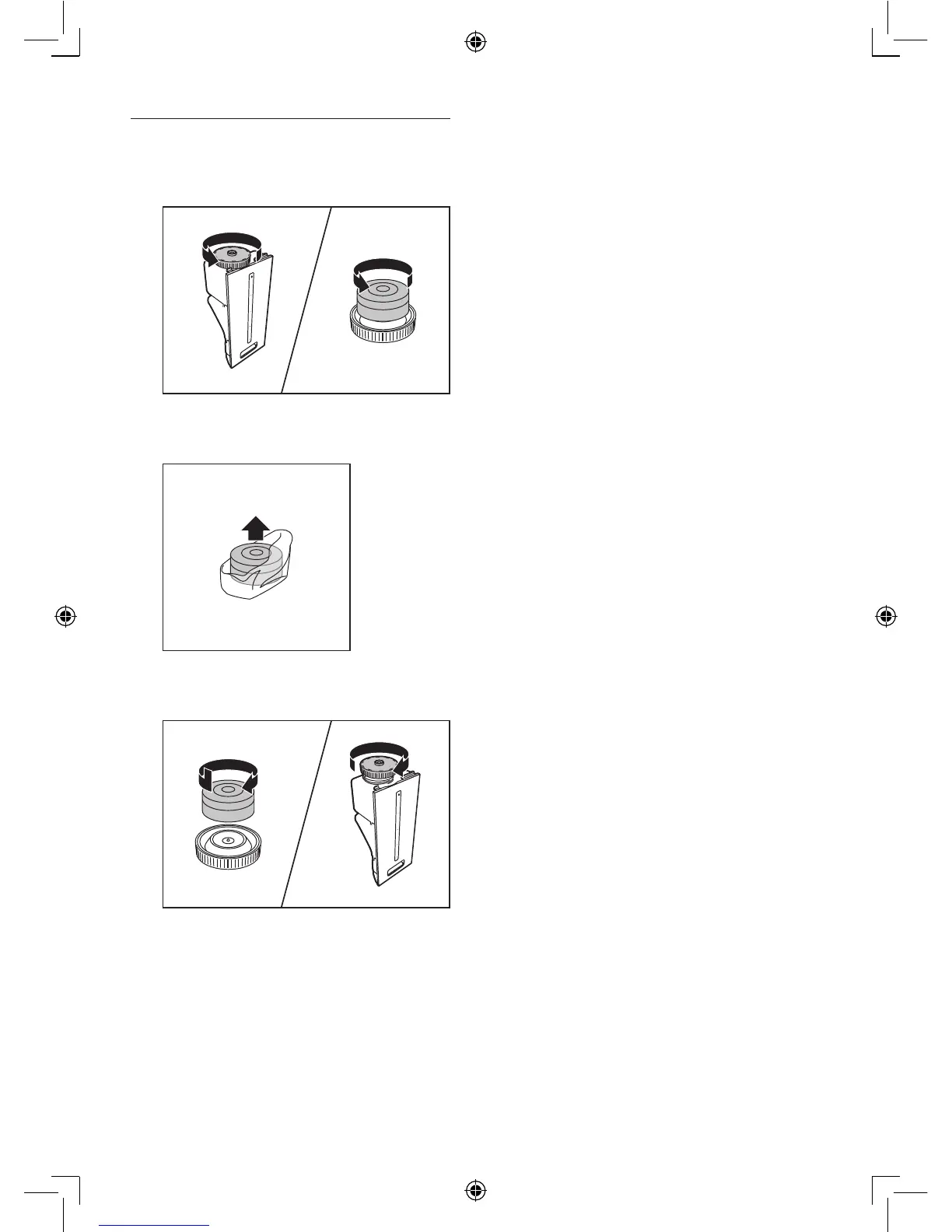
Replace the water softener
1
Unscrew the cap of the water bucket and
remov
e the water softener
.
2
Remov
e the packaging material from the
water softener
.
3
Put the new water softener back and
screw the cap back on the water bucket.
29
31
Table of Contents
Main Page
English
3
Default Chapter
3
Table of Contents
3
1 Important
4
Safety
4
2 Your Combi Air Purifier and Humidifier
7
What's in the Box
7
3 Getting Started
8
Install Filters
8
Prepare for Humidification
9
4 Using the Appliance
11
Understand the Air Quality Light
11
Understand the Humidity Light Indicator
11
Understand the Auto Mode
11
Understand the Healthy Air Protect Alert
11
Understand the Healthy Air Protect Lock
11
Switch on and off the Appliance
12
Set the Sensitivity of the Air Quality Sensor
13
Change the Fan Speed
14
Auto
14
Manual
14
Silent Mode
14
Boost Power Mode
14
Set the Timer
15
Set the Humidity Level
15
Water Level
16
5 Cleaning Your Appliance
17
Clean the Body of the Appliance
17
Clean the Air Quality Sensor and Humidity Sensor
17
Clean the Water Bucket
18
Clean the Humidification Filter Tray
19
6 Cleaning the Pre-Filter and Humidification Filter
20
Clean the Pre-Filter
20
Clean the Humidification Filter
22
Rinse the Humidification Filter
22
Descale the Humidification Filter
23
Cleaning Schedule
24
Replacing the Filters
25
Replace the Multi-Care Filter
25
Replace the Activated Carbon Filter and the HEPA Filter
27
Replace the Humidification Filter and Water Softener
29
Replace the Humidification Filter
29
Replace the Water Softener
30
Reset the Filter Lifetime Counter
31
Troubleshooting
32
10 Guarantee and Service
35
Order Parts or Accessories
35
11 Notices
36
Electomagnetic Fields (EMF)
36
Compliance with EMF
36
Recycling
36
Deutsch
37
Wichtige Hinweise
38
Sicherheit
38
Ihr Kombigerät für die Luftreinigung und -Befeuchtung
42
Was ist IM Lieferumfang
42
Erste Schritte
43
Einsetzen der Filter
43
Vorbereitungen zur Luftbefeuchtung
44
Verwenden des Geräts
46
Informationen zur Luftqualitätsanzeige
46
Informationen zur Luftfeuchtigkeitsanzeige
46
Informationen zum Automatischen Modus
46
Informationen zur Alarmfunktion Bezüglich der Erhaltung Gesunder Luft
46
Informationen zur Verriegelungsfunktion Bezüglich der Erhaltung Gesunder Luft
47
Ein- und Ausschalten des Geräts
47
Einstellen der Empfindlichkeit des Luftqualitätssensors
48
Ändern der Lüftergeschwindigkeit
49
Auto
49
Manuell
50
Ruhemodus
50
Höchstleistungsmodus
50
Einstellen des Timers
50
Einstellen der Luftfeuchtigkeit
51
Wasserstand
52
Reinigen des Geräts
53
Reinigen des Gehäuses
53
Reinigen des Luftqualitätssensors und des Luftfeuchtigkeitssensors
53
Reinigen des Wasserbehälters
54
Reinigen des Filtereinsatzes des Luftbefeuchters
55
Reinigen des Vorfilters und des Luftbefeuchterfilters
57
Reinigen des Vorfilters
57
Reinigen des Luftbefeuchterfilters
59
Abspülen des Luftbefeuchterfilters
59
Entkalken des Luftbefeuchterfilters
60
Reinigungszeitplan
62
Auswechseln der Filter
63
Auswechseln des Multi-Care Filters
63
Auswechseln des Aktivkohlefilters und des HEPA-Filters
65
Auswechseln von Luftbefeuchterfilter und Wasserenthärter
67
Auswechseln des Luftbefeuchterfilters
67
Auswechseln des Wasserenthärters
68
Zurücksetzen des Zählers für die Filterstandzeit
69
Fehlerbehebung
70
Garantie und Kundendienst
73
Bestellen von Ersatz- oder Zubehörteilen
73
11 Hinweise
74
Elektromagnetische Felder (EMF)
74
Elektromagnetische Verträglichkeit
74
Recycling
74
Français
75
1 Important
76
Sécurité
76
2 Votre Purificateur Et Humidificateur D'air
80
Contenu de L'emballage
80
3 Guide de Démarrage
81
Installation des Filtres
81
Préparation de L'humidification
82
4 Utilisation de L'appareil
84
Signification du Voyant de Qualité de L'air
84
Signification du Voyant D'humidité
84
Fonctionnement du Mode Automatique
84
Signification de L'alerte de Protection de L'air Sain
84
Fonctionnement du Verrouillage de Protection de L'air Sain
85
Mise Sous Tension Et Hors Tension de L'appareil
85
Réglage de la Sensibilité du Capteur de Qualité de L'air
86
Modification de la Vitesse du Ventilateur
87
Automatique
87
Manuel
88
Mode Silencieux
88
Mode de Puissance Supplémentaire
88
Réglage du Programmateur
88
Réglage du Taux D'humidité
89
Niveau D'eau
90
5 Nettoyage de L'appareil
91
Nettoyage du Corps de L'appareil
91
Nettoyage du Capteur de Qualité de L'air Et du Capteur D'humidité de L'air
91
Nettoyage du Seau D'eau
92
Nettoyage du Plateau du Filtre D'humidification
93
6 Nettoyage du Préfiltre Et du Filtre D'humidification
94
Nettoyage du Préfiltre
94
Nettoyage du Filtre D'humidification
96
Rinçage du Filtre D'humidification
96
Détartrage du Filtre D'humidification
97
Calendrier de Nettoyage
98
7 Remplacement des Filtres
100
Remplacement du Filtre Multisoin
100
Remplacement du Filtre À Charbon Actif Et du Filtre HEPA
102
Remplacement du Filtre D'humidification Et de L'adoucisseur D'eau
103
Remplacement du Filtre D'humidification
103
Remplacement de L'adoucisseur D'eau
104
8 Réinitialisation du Compteur de la Durée de Vie des Filtres
105
9 Dépannage
106
10 Garantie Et Service
109
Commande de Pièces Ou D'accessoires
109
11 Mentions Légales
110
Champs Électromagnétiques (EMF)
110
Conformité Aux Normes Sur Les Champs Électriques, Magnétiques Et Électromagnétiques
110
Recyclage
110
Қазақша
111
Маңызды Ақпарат
112
Қауіпсіздік
112
Ауа Тазартқыш Және Ылғалдандырғыш
115
Қораптың Құрамы
115
Іске Қосу
116
Сүзгілерді Орнату
116
Ылғалдандыру Үшін Дайындау
117
Құрылғыны Пайдалану
119
Ауа Сапасы Шамының Мағынасы
119
Ылғалдылық Шамы Индикаторының Мағынасы
119
Автоматты Режимнің Мағынасы
119
Таза Ауаны Сақтау Сигналының Мағынасы
119
Таза Ауаны Сақтау Құлпының Мағынасы
120
Құрылғыны Қосу Және Өшіру
120
Ауа Сапасы Сенсорының Сезімталдығын Орнату
121
Желдеткіш Жылдамдығын Өзгерту
122
Автоматты
122
Қолмен
123
Дыбыссыз Режим
123
Қуатты Арттыру Режимі
123
Таймерді Орнату
124
Ылғалдылық Деңгейін Орнату
124
Су Деңгейі
125
Құрылғыны Тазалау
126
Құрылғының Корпусын Тазалау
126
Ауа Сапасы Сенсоры Мен Ылғалдылық Сенсорын Тазалау
126
Су Ыдысын Тазалау
127
Ылғалдандыру Сүзгісінің Науасын Тазалау
128
Алдын Ала Тазалау Сүзгісі Мен
130
Ылғалдандыру Сүзгісін Тазалау
130
Алдын Ала Тазалау Сүзгісін Тазалау
130
Ылғалдандыру Сүзгісін Тазалау
132
Ылғалдандыру Сүзгісін Шаю
132
Ылғалдандыру Сүзгісінің Қағын Түсіру
133
Тазалау Кестесі
134
Сүзгілерді Ауыстыру
135
Көп Күтімді Сүзгін Ауыстыру
135
Активтендірілген Көмір Сүзгі Мен HPEA Сүзгісін Ауыстыру
137
Ылғалдандыру Сүзгі Мен Су Жұмсартқышын Ауыстыру
139
Ылғалдандыру Сүзгісін Ауыстыру
139
Су Жұмсартқышын Ауыстыру
140
Сүзгінің Қызмет Ету Мерзімін Санағышты Қалпына Келтіру
141
Ақауларды Жою
142
Кепілдік Және Қызмет Көрсету
145
Бөлшектерге Және Қосалқы Құралдарға Тапсырыс Беру
145
11 Ескерту
146
Электромагниттік Өрістер (EMF)
146
Электромагниттік Өріспен (ЭМӨ) Сәйкестік
146
Өңдеу
146
Русский
147
1 Внимание
148
Безопасность
148
2 Ваш Климатический Комплекс "2 В 1
152
Что Входит В Комплект Поставки
152
3 Начало Работы
153
Установка Фильтров
153
Подготовка К Увлажнению Воздуха
154
4 Использование Прибора
156
Значение Сигналов Индикатора Качества Воздуха
156
Значение Сигналов Индикатора Влажности
156
Значение Автоматического Режима
156
Значение Сигналов Оповещения Системы Контроля Качества Воздуха
156
Значение Сигналов Блокировки Системы Контроля Качества Воздуха
157
Включение И Выключение Прибора
157
Настройка Чувствительности
158
Датчика Качества Воздуха
158
Изменение Скорости Работы Вентилятора
159
Автоматические Режимы
159
Ручной
160
Беззвучный Режим
160
Режим Повышенной Мощности
160
Установка Таймера
160
Настройка Уровня Влажности
161
Уровень Воды
162
5 Очистка Прибора
163
Очистка Корпуса Прибора
163
Очистка Датчика Качества Воздуха И Датчика Влажности
163
Очистка Резервуара Для Воды
164
Очистка Поддона Увлажняющего Фильтра
165
6 Очистка Фильтра Предварительной
167
Предварительной Очистки И
167
Очистки
167
Вставьте Многофункциональный Фильтр В Фильтр Предварительной Очистки
168
Установите Фильтр Предварительной
168
Очистка Увлажняющего Фильтра
169
Промывание Увлажняющего Фильтра
169
Примечание
169
Удаление Минеральных Отложений С Увлажняющего Фильтра
170
График Очистки
172
7 Замена Фильтров
173
Замена Многофункциональный Фильтра
173
Замена Угольного Фильтра И Фильтра HEPA
175
Чтобы Установить Переднюю Панель
175
Сначала Закрепите Ее В Верхней Части
175
Прибора (1). Затем Аккуратно Прижмите
175
Панель К Корпусу Прибора
175
Замена Увлажняющего Фильтра И Умягчителя Воды
177
Замена Увлажняющего Фильтра
177
Извлеките Из Прибора Поддон Увлажняющего Фильтра
177
Замена Умягчителя Воды
178
8 Сброс Показаний Счетчика
179
Срока Службы Фильтра
179
9 Устранение Неисправностей
180
10 Гарантия И Обслуживание
183
Заказ Запчастей И Аксессуаров
183
11 Примечания
184
Электромагнитные Поля (ЭМП)
184
Соответствие Стандартам ЭМП
184
Related product manuals
Philips HU4813
102 pages
Philips HU4811
50 pages
Philips HU4803
88 pages
Philips FY1410/30
226 pages
Philips HU4813/10
286 pages
Philips HU4803/01
88 pages
Philips System One
3 pages
Philips respironics
20 pages
Philips DreamStation Go
56 pages
Philips RESPIRONICS System One
31 pages
Philips RESPIRONICS DreamStation
8 pages
DreamStation BiPAP autoSV
72 pages














 To Next Page